AULA F75 Mocha Brown Review: The Hassle-Free Mechanical Keyboard
Shopping for a mechanical keyboard can quickly feel overwhelming when faced with specialized hobbyist terminology like switch lubing, soldering irons, and acoustic dampening mods. Many standard computer keyboards feel stiff, hollow, and…
By Tara Sanderson 9 min read




Our verdict
Star rating left by 2,549 Amazon buyers — not a score from testing of our own
The AULA F75 is a remarkably beginner-friendly 75 percent keyboard that eliminates the intimidating learning curve of custom mechanical keyboards while retaining premium features like hot-swappable switches, factory lubrication, and versatile wireless pairing.
- Pre-lubricated linear switches provide smooth, fluid keystrokes right out of the box with no extra tuning required.
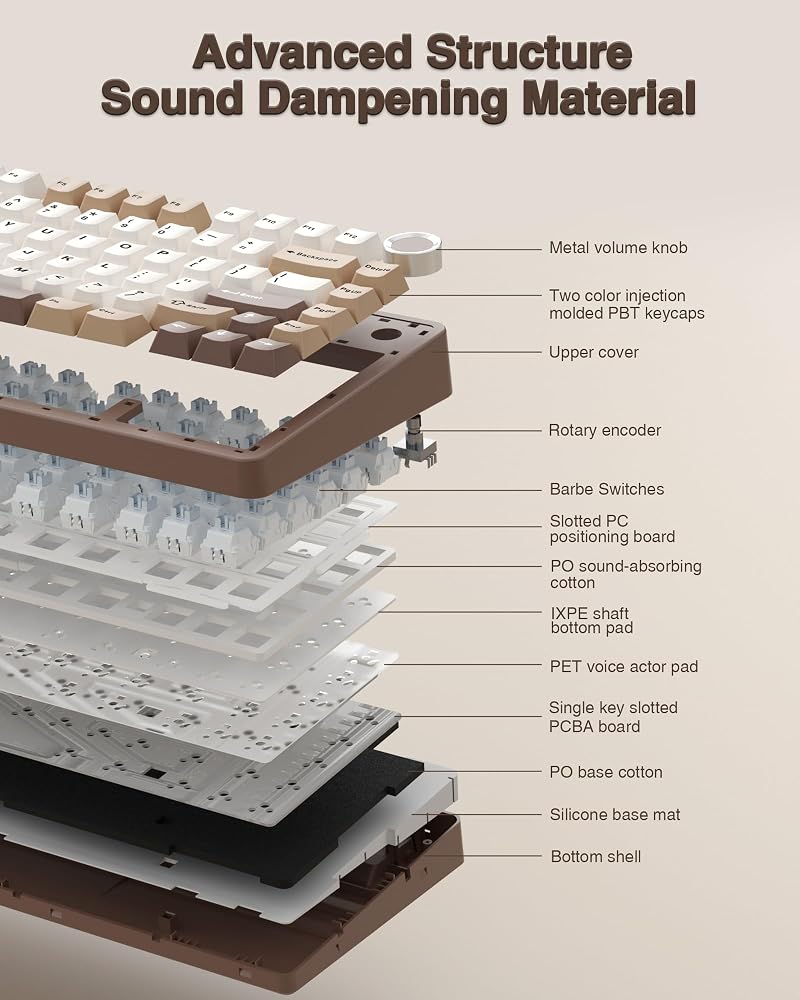
- Five layers of internal sound dampening create a quiet, satisfying, and deep typing sound suitable for shared spaces.
- Versatile tri-mode connectivity allows seamless switching between up to five computers, tablets, or phones.
- A dedicated multi-function control knob gives you quick physical control over volume and dynamic RGB lighting modes.
Where to buy
at Amazon
Price taken from the listing on 18 Sep 2026 and it can change at any time. We may earn a commission if you buy through this link.
Pros
- Pre-lubricated linear switches for smooth typing
- Five-layer acoustic foam reduces hollow plastic noise
- Versatile tri-mode wireless and multi-device pairing
- Universal hot-swappable sockets for 3-pin and 5-pin switches
- Multi-function control knob for lighting and volume
Cons
- Lacks dedicated number pad for intensive data entry
- Exact battery capacity not specified by manufacturer
- Plastic enclosure rather than aluminum frame
As Amazon Associates, we earn from qualifying purchases. This means we may receive a small commission at no extra cost to you if you click through and make a purchase.
Shopping for a mechanical keyboard can quickly feel overwhelming when faced with specialized hobbyist terminology like switch lubing, soldering irons, and acoustic dampening mods. Many standard computer keyboards feel stiff, hollow, and fatiguing to type on during long study or work sessions, yet diving into custom keyboard building takes considerable time and technical know-how. The AULA F75 solves this problem by delivering an enthusiast-grade mechanical experience straight out of the box, combining pre-lubricated internal parts, multi-device wireless convenience, and a distinctive retro-modern White and Brown colorway.
In this AULA F75 Mocha Brown review, we examine how well this compact 75 percent keyboard serves first-time mechanical keyboard buyers, everyday office workers, and gamers who want great acoustics without any tedious assembly. With smooth pre-lubed switches, deep internal padding, and flexible wireless pairing, it stands out as an easy, stress-free entry point into the mechanical keyboard hobby.
AULA F75 Features Explained
Pre-Lubed Linear Switches and Smooth Keystrokes
For anyone exploring mechanical keyboards for the first time, switch terminology can sound confusing. The AULA F75 linear switches are mechanical mechanisms beneath each keycap that register every press in a continuous, straight motion without a tactile bump or audible click. This linear design makes the keyboard feel remarkably fast, lightweight, and gentle on your fingers during marathon typing sessions or fast-paced gaming rounds. Because the switches arrive pre-lubricated from the factory, the internal stems glide effortlessly against the switch housings without the scratchy friction or rattling sounds commonly found on ordinary entry-level boards.
Choosing the right switch makes a massive difference when using the AULA F75 for typing daily correspondence, essays, or code. The pre-lubed stabilizers—the balancing bars under larger keys such as the spacebar, enter key, and backspace—ensure even travel without wobbling or high-pitched ticking. While full-size setups like the aula f108 pro v2 offer a sprawling layout with a traditional number pad, the refined switch action here ensures that every keystroke on this compact frame feels consistently cushioned, soft, and balanced.
Five-Layer Silencing Structure and Sound Profile
Mechanical keyboard enthusiasts often talk about acoustic signatures using terms like creamy or thocky, which describe deep, solid, and pleasantly quiet keystroke sounds rather than harsh, echoey plastic clatter. The AULA F75 sound profile achieves this desirable tone through an advanced internal structure consisting of five separate sound-absorbing layers and an extended integrated silicone pad. These internal cushions soak up empty air pockets inside the plastic case, stopping unwanted vibrations before they turn into noisy echoes across your desk.
Additionally, the printed circuit board features single-key slotting, which means individual cutouts surround the key switches to grant extra flexibility with every press. This structural elasticity softens bottom-out impact, providing an elastic, pillow-like typing feel that protects your joints over long workdays. While ultra-quiet options like the aula f99 pro silent are engineered specifically to eliminate virtually all acoustic presence, this board balances cushioned acoustic dampening with a mellow, pleasant response that makes writing feel genuinely enjoyable.
Flexible Tri-Mode Connectivity and Multi-Device Pairing
Cable clutter can quickly overwhelm a clean desk, especially if you regularly juggle a desktop computer, a work laptop, and portable mobile devices. The AULA F75 wireless setup addresses this issue by offering three distinct connection methods: a lag-free 2.4GHz wireless USB receiver, low-energy Bluetooth 5.0, and a traditional USB-C wired connection. Users can connect up to five separate devices simultaneously, cycling between a primary computer and mobile devices with a quick side-button toggle or straightforward keyboard shortcuts.
This broad versatility makes the keyboard equally comfortable in an office, home study, or living room gaming corner. Because it runs on rechargeable battery power, you can unplug the USB-C cable whenever you want a clean, cord-free work area. While the listing does not specify the exact milliamp-hour rating for the AULA F75 battery life, the presence of smart power handling and battery operation ensures that casual users, students, and professionals can move freely between workstations without staying tethered to an outlet.
Hot-Swappable Switch Sockets for Effortless Customization
Traditionally, modifying a mechanical keyboard required purchasing an electric soldering iron, melting metal contacts, and risking permanent damage to delicate electronic circuits. The AULA F75 hot swappable design removes that technical barrier entirely by utilizing universal hot-swap sockets. These sockets allow anyone to unplug an individual switch and pop in a replacement in seconds, opening the door to customization without requiring specialized electrical knowledge or complicated tools.
In this AULA F75 beginner guide context, compatibility is wonderfully simple: the board supports standard 3-pin and 5-pin mechanical switches. If you ever want to experiment with different switch weights, clicky options, or tactile alternatives down the road, you can simply pull the switches out using the included combination keycap and switch puller. AULA even supplies two extra spare switches in the packaging, giving first-time owners an immediate, risk-free opportunity to practice removing and inserting switches safely.
Multi-Function Knob and Dynamic RGB Backlighting
Positioned at the upper-right corner of the keyboard frame, the integrated multi-function rotary control knob adds convenient physical controls right at your fingertips. The knob features two practical operating states: office mode and gaming mode. In office mode, rotating the roller provides intuitive volume adjustment so you can quickly manage background music, videos, or online meeting audio. In gaming mode, spinning the knob adjusts LED brightness, while clicking it cycles through various dynamic lighting animations without forcing you to memorize complex key shortcuts.
Visually, the keyboard incorporates 16.8 million color RGB backlighting with 16 distinct built-in lighting effects, casting vibrant color patterns across the keycaps. For entertainment lovers, the board also supports 10 dynamic music rhythm lighting effects when utilizing compatible software drivers, making the lights dance along with your favorite audio tracks. Whether you prefer a subtle white glow during evening typing or an energetic rainbow wave during weekend gaming sessions, the lighting customizes effortlessly to your room setup.
Specs
Reviewing the fundamental AULA F75 specs helps verify compatibility, physical dimensions, and hardware features before deciding if this board fits your workspace.
| Layout Size | 75% Compact (81 Keys, QWERTY Layout) |
|---|---|
| Connectivity Modes | 2.4GHz Wireless, Bluetooth 5.0, USB-C Wired |
| Switch Type | Pre-Lubricated Linear Mechanical Switches |
| Switch Compatibility | Hot-Swappable (3-Pin and 5-Pin Sockets) |
| Internal Sound Dampening | Five-Layer Filling Silencer with Extended Silicone Pad |
| Lighting | 16.8 Million RGB Backlit (16 Effects and 10 Music Rhythm Modes) |
| Physical Controls | Multi-Function Rotary Control Knob (Volume and Lighting) |
| Power Source | Rechargeable Battery Powered (Listing does not specify mAh) |
| Device Compatibility | PC, Laptop, Smartphone, Tablet (AAUB P30), Gaming Console |
| Package Contents | AULA F75, USB Cable, 2 Extra Switches, Keycap/Switch Puller, Manual |
As published by the manufacturer on the Amazon listing.
Buy it if
Best Use Cases
- Writing essays, personal journals, and daily office reports where soft linear switches prevent finger strain over long sessions.
- Managing compact multi-device desk arrangements by pairing seamlessly between a work laptop, desktop PC, and smartphone.
- Playing casual or competitive video games where fast linear switch actuation and responsive 2.4GHz wireless provide swift input.
- Introducing curious gift recipients or beginners to custom mechanical keyboards without requiring assembly tools or soldering skills.
Think twice if
Before You Buy
Before adding this keyboard to your cart, consider your daily workflow and workspace layout. The 81-key 75 percent form factor is designed specifically to reclaim desk real estate by eliminating the traditional tenkey number pad while preserving essential navigation arrows and top function keys. If your daily tasks rely heavily on rapid numeric data entry or spreadsheet accounting, an alternate layout featuring a dedicated number pad such as the aula f99 pink might prove more practical for your routine. In terms of platform compatibility, the keyboard pairs smoothly with laptops, desktop computers, mobile phones, tablets like the AAUB P30 model, and gaming consoles.
It is also essential to note what the manufacturer listing does not specify. While the keyboard is confirmed to operate on rechargeable battery power across Bluetooth and 2.4GHz wireless modes, the listing does not specify the exact milliamp-hour (mAh) battery capacity or the expected continuous operating hours between charges. Furthermore, while the listing highlights programmable keys and music rhythm lighting effects via optional software drivers, direct download links or operating system software utility compatibility details are not explicitly detailed in the product description.
Bottom Line
When determining whether the AULA F75 is worth it, the answer comes down to convenience, comfort, and sensory satisfaction. For first-time mechanical keyboard buyers and gift shoppers, standard off-the-shelf keyboards often disappoint with stiff keys, clattery acoustics, and rigid wired configurations. The AULA F75 bridges the gap between mass-market peripherals and custom hobbyist gear, delivering velvety pre-lubricated switches, five layers of silencing foam, and versatile tri-mode connectivity in an inviting, contemporary White and Brown package.
By providing universal hot-swappable switch sockets and bundling essential tools right inside the box, this keyboard gives newcomers plenty of room to grow without demanding any technical maintenance on day one. Whether you are treating a friend to their very first mechanical keyboard or upgrading your own everyday desk setup, this board provides an effortless, high-value typing experience that feels great right from the first keystroke.
FAQ
Can beginners easily swap switches on the AULA F75?
Yes, the keyboard features universal hot-swappable sockets that support both 3-pin and 5-pin mechanical switches. Beginners can simply use the included combination keycap and switch puller tool to lift out existing switches and press new ones into place without soldering or risk of electrical shorting.
How does the tri-mode wireless setup work on this keyboard?
The keyboard connects using three different methods: low-latency 2.4GHz wireless via a compact USB receiver, Bluetooth 5.0 for pairing up to multiple mobile devices, or a standard USB-C wired connection. Users can switch active connections easily using dedicated shortcut keys or the physical toggle switch.
What does the multi-function control knob do?
The knob operates in two distinct modes. In office mode, turning the knob acts as a volume roller to raise or lower audio levels. In gaming mode, rotating the knob adjusts the brightness of the RGB backlighting, and pressing down on the knob toggles between different lighting effects.
What accessories are included in the package?
Inside the box, you receive the AULA F75 keyboard, a detachable USB cable for charging and wired use, a dual-purpose keycap and switch puller tool, two replacement linear switches, and an instruction manual explaining setup shortcuts.
Is the AULA F75 compatible with mobile phones and tablets?
Yes, the keyboard supports connections to smartphones, tablets (including models such as the AAUB P30), desktop PCs, laptops, and gaming consoles via its Bluetooth 5.0, 2.4GHz wireless, and wired USB-C connectivity options.
What buyers say
Quoted from reviews published on the Amazon listing. We have not edited the wording.
LOVE my first mechanical keyboard
This is the first mechanical keyboard that i got and i absolutely love it. It definitely makes the typing experience more relaxing - the keys have the perfect creamy think to it. If you type really fast it sounds like pebbles in the creek ^.^I did some research before getting a keyboard since i wanted something of a…
Amazing
I don't even have words to be honest besides this is an amazing keyboard. For $64 it's insanely nice quality like better than my $200 keyboard from a different brand. It's very smooth to the touch and when typing and it can connect from bluetooth or the USB connector. And holds charge for a very long time. And…
Smooth and Satisfying Mechanical Keyboard
This keyboard has a great feel right out of the box. The pre-lubed switches provide a smooth, satisfying keypress, and the sound is pleasant without being excessively loud.The 75% layout is a great balance between compact size and functionality. It keeps the important navigation and arrow keys while taking up considerably less desk space than a full-size keyboard.…
Where to buy
at Amazon
Price taken from the listing on 18 Sep 2026 and it can change at any time. We may earn a commission if you buy through this link.
More Accessories & Peripherals
See the section



Get our picks by email
New reviews and the prices we spotted, once a week.