Beelink Mini S13 Pro Review: Is This Tiny PC Right for Your Home?
Setting up a traditional desktop computer often means dealing with oversized metal towers, tangled webs of thick cords, and excessive fan noise that disrupts a calm living area. Many families, remote workers,…
By Jasmine Norris 10 min read




Our verdict
Star rating left by 145 Amazon buyers — not a score from testing of our own
The Beelink Mini S13 mini PC is a compact, user-friendly desktop that handles web browsing, remote work tasks, and high-definition video playback with whisper-quiet operation and an exceptionally small footprint. It removes the complexity of home computing by providing practical pre-installed software, responsive memory, and flexible expansion slots inside an understated matte black enclosure.
- Powered by an efficient Intel N150 processor running four cores up to 3.6GHz for responsive everyday multitasking.
- Generous 16GB DDR4 RAM paired with a 500GB solid-state drive ensures rapid startup times and seamless application loading.
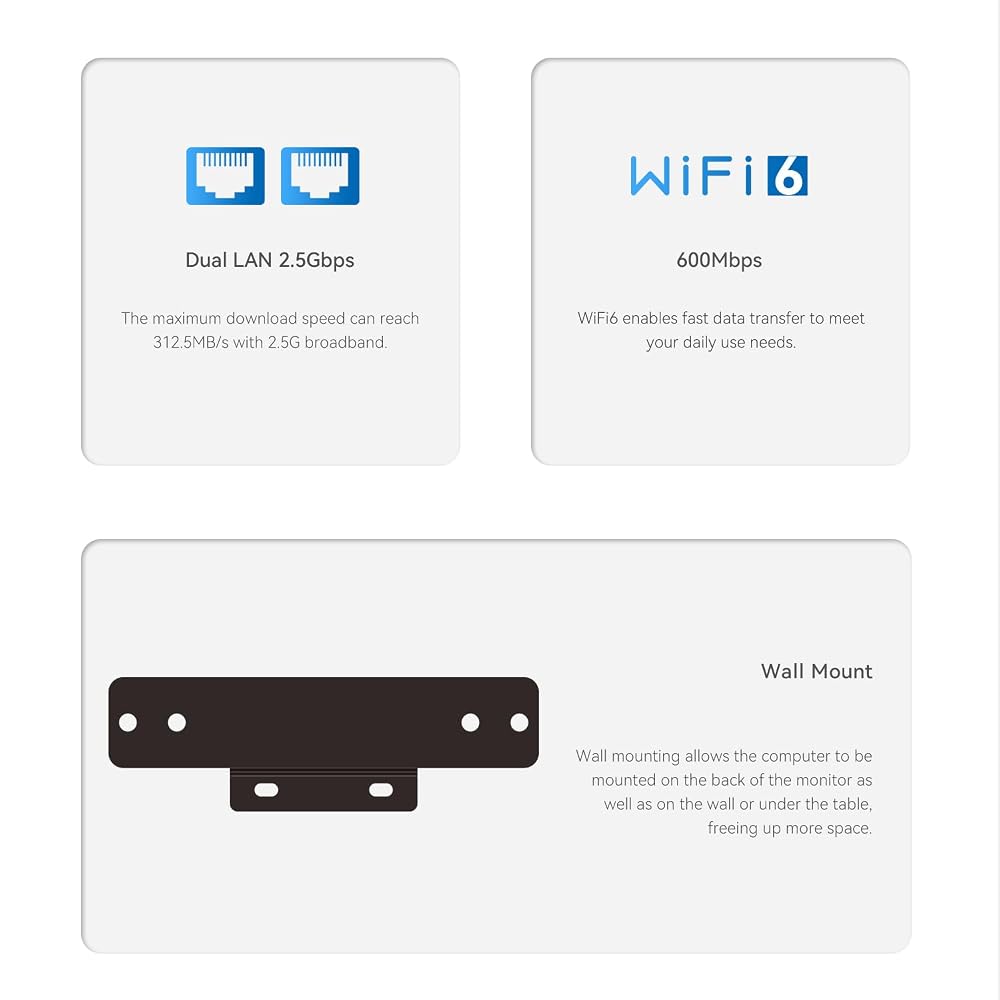
- Equipped with dual 2.5G Ethernet ports and modern WiFi 6 connectivity for rock-solid home networking.
- Supports ultra-high-definition 4K video playback across HDMI outputs for clear movies and media streaming.
Where to buy
at Amazon
Price taken from the listing on 18 Sep 2026 and it can change at any time. We may earn a commission if you buy through this link.
Pros
- Intel N150 quad-core processor up to 3.6GHz
- Generous 16GB DDR4 memory included standard
- Secondary M.2 PCIe NVMe slot for storage expansion
- Dual 2.5G Ethernet ports for fast wired networking
- Integrated Intel UHD graphics handles smooth 4K video
- Modern WiFi 6 and Bluetooth 5.2 wireless connectivity
Cons
- Primary drive uses SATA3 speed rather than NVMe
- Secondary expansion slot capped at PCIe 3.0 x1
- Requires separate purchase of monitor keyboard and mouse
As Amazon Associates, we earn from qualifying purchases. This means we may receive a small commission at no extra cost to you if you click through and make a purchase.
Setting up a traditional desktop computer often means dealing with oversized metal towers, tangled webs of thick cords, and excessive fan noise that disrupts a calm living area. Many families, remote workers, and casual computer users simply want an uncluttered workspace where they can check email, manage household spreadsheets, and watch streaming video without dedicating half a desk to bulky hardware. The Beelink Mini S13 solves this everyday challenge by shrinking the essential components of a reliable home computer into a palm-sized chassis weighing only 0.73 kg. Built for newcomers who want straightforward computing out of the box, this compact desktop computer for beginners replaces cumbersome towers with a neat, energy-efficient device that easily fits beside a television or tucks beneath a standard computer monitor.
For shoppers seeking a dependable machine for daily tasks, this system delivers an accessible balance of simplicity, essential computing power, and modern connectivity. Powered by an efficient processor and bundled with generous memory, it handles regular online browsing, teleconferencing, and media playback with minimal fuss. While it is not designed for demanding studio production or high-end 3D gaming, it excels at providing smooth, consistent performance for everyday home needs. If your goal is to set up a functional home workstation or an unobtrusive media center without dealing with technical headaches, this tiny machine offers an approachable and capable computing foundation.
Beelink Mini S13 Features Explained
Intel N150 Quad-Core Processor Performance
At the center of this compact desktop is the Beelink Mini S13 Intel N150 processor. For anyone unfamiliar with processor terminology, cores act like individual workers inside the computer, handling instructions simultaneously. This chip features four cores and four threads, running at speeds up to 3.6GHz. This design allows the system to process everyday home office programs, multiple browser tabs, and background utility tasks without stalling or locking up. Because the architecture focuses heavily on modern electrical efficiency, the processor generates very little heat during ordinary operation, allowing the internal air-cooling fan to spin quietly in the background.
Compared to older low-power chips or basic entry-level alternatives like the Beelink Mini S12 Pro N100, the N150 brings refined frequency tuning that keeps daily interactions feeling snappy. Whether you are navigating dense web portals, compiling family photo albums, or organizing monthly expenses, the processor executes instructions cleanly. It provides the exact tier of speed that casual home users require, avoiding the unnecessary heat and power draw of bulky multi-fan gaming towers.
System Memory and Storage Expansion Potential
A computer requires fast memory to keep open applications responsive, and this configuration includes 16GB of DDR4 RAM straight from the factory. In practical terms, having 16GB allows you to leave productivity documents open, keep streaming music running in the background, and jump between dozens of browser tabs without experiencing lag or application crashes. Storage is handled by an internal 500GB M.2 SATA3 2280 solid-state drive, which delivers near-instant system boot times and swift file opening compared to old-fashioned spinning mechanical hard drives.
For users who want room to grow, planning a Beelink S13 Pro storage upgrade is remarkably straightforward. The motherboard incorporates a secondary, independent M.2 PCIe 3.0 x1 NVMe slot inside the chassis. This secondary slot allows you to insert an additional high-speed solid-state drive whenever your collection of personal photos, videos, or offline work files outgrows the primary 500GB partition. Having an internal expansion slot means you do not have to rely on dangling external hard drives or loose USB cables to gain extra disk space down the road.
Intel UHD Graphics and 4K Media Playback
Visual output is driven by integrated Intel UHD Graphics featuring 24 execution units operating at frequencies up to 1000MHz. Instead of using a separate, power-hungry graphics card, the graphical processing is integrated directly into the central processor. This integrated setup provides ample rendering power to deliver crisp visuals on desktop monitors, living room projectors, and high-definition smart screens. It effortlessly decodes modern digital media formats, transforming the small unit into an exceptional companion for your entertainment center.
When it comes to Beelink S13 Pro 4K streaming, the hardware decodes ultra-high-definition video content smoothly without dropped frames or visual stuttering. Through the HDMI video output interface, you can output pristine 4K video directly to your display, producing sharp text for office spreadsheets and vibrant colors for streaming movies. If your primary goal is watching video lectures, attending video conferences, or catching up on your favorite television series, the integrated graphics engine provides dependable visual clarity.
Modern Wireless and Dual 2.5G Wired Networking
Reliable network performance is critical for any modern desktop, and this machine stands out by offering dual 2.5G Ethernet ports on its rear panel. While many budget computers still rely on older 1G network jacks, dual 2.5G LAN jacks allow this small unit to transfer files at significantly faster wired data rates when connected to a compatible router or home network switch. It also allows advanced users to set up dedicated network routing, local network-attached storage links, or separate network isolation setups right from home.
For spaces where running an Ethernet cable across the room is inconvenient, the built-in WiFi 6 AX101 wireless card maintains a strong, low-latency connection to your home wireless router. WiFi 6 handles crowded household networks far better than previous wireless standards, reducing signal congestion when multiple family members stream videos or play games at the same time. The wireless module also integrates Bluetooth 5.2, allowing you to connect wireless mice, wireless keyboards, Bluetooth headphones, and portable speakers without cluttering your desk with individual USB receiver dongles.
Air Cooling System and Pre-Installed Operating System
To keep the compact internal components working at peak efficiency, the system utilizes a dedicated internal air-cooling fan and thermal heatsink assembly. This cooling method draws fresh air into the minimalist black enclosure, exhausts warm air away from the motherboard, and prevents thermal throttling during extended computing sessions. Despite active airflow, the fan profile remains quiet, making the machine suitable for quiet study bedrooms, home libraries, and noise-sensitive home offices.
Software setup is equally stress-free because the desktop comes pre-installed with Windows 11 Home, complete with built-in Windows Defender and Windows Security protections. This means you do not have to purchase an operating system separately or spend hours configuring core security patches before using the machine. While users seeking elite high-end performance for complex computing tasks might look toward powerhouses like the Beelink SER8 8845HS, this starter system provides a fully functioning, protected desktop environment the moment you press the power button.
Specs
The following table outlines the verified hardware specifications for the system to help you evaluate how its internal components match your daily computing requirements.
| Processor | Intel N150 (4 Cores, 4 Threads, Up to 3.6GHz) |
|---|---|
| System Memory | 16GB DDR4 RAM |
| Primary Internal Storage | 500GB M.2 SATA3 2280 Solid-State Drive |
| Storage Expansion | Secondary M.2 PCIe 3.0 x1 NVMe Slot (1 Total Expansion Slot) |
| Graphics Hardware | Integrated Intel UHD Graphics (24 EUs, 1000MHz) |
| Wireless Connectivity | WiFi 6 (AX101) with Bluetooth 5.2 |
| Wired Network Interface | Dual 2.5G Ethernet Ports |
| Video Output Interface | HDMI Ports (Supports 4K Playback) |
| Cooling Method | Internal Air Cooling System |
| Chassis Color & Weight | Minimalist Black Finish, 0.73 kg Total Weight |
| Operating System & Security | Windows 11 Home, Windows Defender, Windows Security |
As published by the manufacturer on the Amazon listing.
Buy it if
Best Use Cases
- Setting up a clean Beelink S13 Pro for home office workstation to create spreadsheets, write documents, and manage client communications.
- Using the machine as a dedicated living room streaming hub to deliver smooth 4K movies and video lectures to a television.
- Providing a safe, quiet study computer for students who need to attend online classes, conduct web research, and complete homework assignments.
- Acting as a lightweight home server or local network appliance utilizing the dual 2.5G Ethernet ports for secure file routing.
- Serving as a compact desktop computer for beginners or older family members who want a simple, pre-configured PC that takes up virtually zero space.
Think twice if
Before You Buy
Before ordering this miniature computer, it is essential to understand what peripheral equipment you will need to operate it comfortably. Because this product is a standalone desktop unit rather than an all-in-one computer or portable laptop, the box does not include a display monitor, typing keyboard, or computer mouse. You will need to supply your own HDMI-compatible monitor or television, along with a standard USB or Bluetooth keyboard and mouse to perform the initial Beelink Mini S13 setup. If you are comparing your options against traditional portable machines, reviewing resources like the business laptops clearance HP EliteBook guide can help you decide whether a fixed desktop setup or a self-contained portable laptop better fits your daily lifestyle.
Shoppers should also pay close attention to the technical notes on the product listing regarding optical media. While the manufacturer listing mentions a BD-R optical storage device classification under its technical attributes, the physical machine is an ultra-compact mini PC chassis that does not contain a physical optical disc drive or CD/DVD tray. If you have an extensive physical disc collection that you plan to play, you will need to connect an external USB disc drive. Furthermore, the listing does not specify bundled accessories such as monitor mounting brackets or specialty adapters, so plan to connect standard HDMI cables and standard USB peripherals during installation.
Bottom Line
When deciding is Beelink S13 Pro worth it for your household, consider how you intend to use your computer every day. If your digital life revolves around checking email, viewing family photos, participating in video calls, and streaming high-definition media, this compact machine delivers smooth, dependable performance without cluttering your living space. The inclusion of 16GB of DDR4 memory, a responsive 500GB solid-state drive, and high-speed networking options makes it far more capable than standard entry-level hardware from just a few years ago.
For first-time buyers and gift-givers seeking an easy-to-use desktop, the unit eliminates the complexity often associated with personal computers. It arrives pre-configured with Windows 11 Home, boots up in seconds, and operates with minimal power draw and barely audible cooling fans. While users needing intensive workstation rendering or demanding gaming capabilities will require specialized high-wattage desktop hardware, this compact desktop computer for beginners delivers exceptional utility and practical simplicity for everyday home and office use.
FAQ
Does the Beelink Mini S13 come with an operating system already installed?
Yes, the computer arrives with Windows 11 Home pre-installed on its internal 500GB solid-state drive. It includes standard built-in protections such as Windows Defender and Windows Security, allowing you to complete standard setup prompts and start browsing safely without having to purchase software separately.
Can this mini desktop handle 4K video streaming smoothly?
Yes, the integrated Intel UHD Graphics chip features 24 execution units running up to 1000MHz, which provides hardware-level decoding for modern 4K video streams. You can connect the unit to a 4K television or monitor via HDMI to enjoy crisp, stutter-free high-definition video playback.
How do you add more storage capacity to the system?
The system features an internal secondary M.2 PCIe 3.0 x1 NVMe slot inside the chassis. To expand storage, you can open the bottom panel of the unit and install an additional compatible M.2 NVMe solid-state drive without needing to remove the primary 500GB SATA boot drive.
What accessories are required to use this computer?
Because the unit is an ultra-compact standalone computer, you will need an external monitor or television with an HDMI port, an HDMI video cable, a USB or wireless keyboard, and a computer mouse. You can also connect external speakers or headphones using standard audio ports or Bluetooth 5.2.
Is this mini computer loud when running basic office programs?
No, the desktop is engineered with an efficient air-cooling fan that regulates internal temperatures while maintaining very quiet sound levels. During normal office work, web browsing, and video streaming, the fan operates quietly in the background without creating distracting noise.
What buyers say
Quoted from reviews published on the Amazon listing. We have not edited the wording.
Nice low power Jellyfin server
Why did you pick this product vs others?:Works as I wanted, and comes with a Windows license. I had some small issue on setup and decided to do a fresh reinstall of Windows. That was painless and it works well. Measured power consumption is 4W at idle. Most of the time hovering in the 4-8W range. The machine…
Almost exactly one year since I bought this computer and it suddenly stops working.
We bought this computer a year ago. We received it actually less than a year ago, and it has stopped working. It still turns on, but it gets to the load menu where it shows the Beelink name and it won't go any farther. It shows you can hit Del to get to setup or F7 to get…
Awesome mini home server
This has been an awesome proxmox box for self hosting. I am able to run a web server, home assistant, immich and a couple of other services without putting off to much heat.
Where to buy
at Amazon
Price taken from the listing on 18 Sep 2026 and it can change at any time. We may earn a commission if you buy through this link.
More Computers & Laptops
See the section


Get our picks by email
New reviews and the prices we spotted, once a week.