Dell Inspiron 15 3530 Review: Is This Everyday Touchscreen Laptop Right for You?
Shopping for a dependable family computer or home office workstation can feel daunting when spec sheets are packed with complicated tech jargon. Many households, students, and remote workers do not need an…
By Jasmine Norris 9 min read


Our verdict
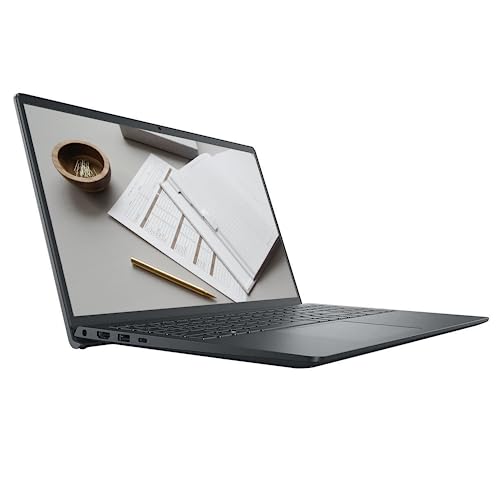
The Dell Inspiron 15 3530 is a reliable, user-friendly laptop built for smooth multitasking, student projects, and home office productivity. By pairing a 10-core Intel Core i7 processor with 16GB of system memory and a rapid 1TB solid-state drive, it delivers snappy performance across routine computing tasks without noticeable slowdowns.
- Fast 13th Generation Intel Core i7-1355U processor easily handles multitasking and productivity workloads.
- Generous 1TB PCIe NVMe solid-state drive provides near-instant boot times and abundant storage for files.
- Intuitive 15.6-inch Full HD touchscreen display simplifies navigation and everyday browsing.
- Sharp 1080p FHD webcam and modern Wi-Fi 6 connectivity ensure dependable virtual meetings and classes.
Where to buy
at Amazon Prime
Price taken from the listing on 18 Sep 2026 and it can change at any time. We may earn a commission if you buy through this link.
Pros
- Fast 13th Gen Intel Core i7 processor
- Spacious 1TB high-speed solid-state drive
- Responsive 15.6-inch Full HD touchscreen display
- Sharp integrated 1080p Full HD webcam
- Modern Wi-Fi 6 and Bluetooth connectivity
Cons
- Integrated graphics unsuited for demanding 3D gaming
- HDMI 1.4 port limits high-refresh external video
- No built-in optical CD or DVD drive
As Amazon Associates, we earn from qualifying purchases. This means we may receive a small commission at no extra cost to you if you click through and make a purchase.
Shopping for a dependable family computer or home office workstation can feel daunting when spec sheets are packed with complicated tech jargon. Many households, students, and remote workers do not need an exotic high-performance rig; they simply want a responsive machine that boots instantly, handles dozens of browser tabs, displays video calls clearly, and provides plenty of space for family photos and work files. The Dell Inspiron 15 tackles these daily computing demands by pairing an efficient 13th Generation Intel Core i7 processor, ample system memory, and a spacious solid-state storage drive within a practical 15.6-inch clamshell design.
This dell inspiron 15 beginner guide breaks down how the laptop handles real-world routines without overwhelming you with complex technical terminology. With its responsive Full HD touchscreen and preinstalled Windows 11 Pro operating system, this laptop inspiron 15 model serves as an accessible daily computer that avoids tricky setups while offering plenty of speed for web browsing, streaming, and remote collaboration.
Dell Inspiron 15 3530 Features Explained
13th Generation Intel Core i7 Processor Performance
At the center of this machine is the 13th Generation Intel Core i7-1355U processor. In simple terms, a processor acts as the computer’s central brain, carrying out instructions whenever you open a program, edit a document, or browse the web. This chip features 10 processing cores and 12 threads alongside 12MB of Intel Smart Cache. Having multiple cores lets the system divide tasks efficiently, meaning background processes like anti-virus scans or file downloads will not cause your active typing or video playback to freeze. With a base frequency of 1.20 GHz and maximum turbo speeds reaching up to 5.0 GHz, the dell inspiron 15 i7 performance ensures that everyday applications open promptly and run fluidly.
For first-time buyers comparing this setup against entry-level computers like the aspire go 15, the Core i7 processor here provides an extra cushion of computing power. This additional processing headroom helps keep the machine fast and usable for years to come, even as software updates and modern websites require more processing resources. The integrated Intel Iris Xe graphics coprocessor handles daily visual rendering smoothly, making it well-suited for streaming high-definition video, viewing photo libraries, and managing multi-window office work without placing heavy strain on the battery.
15.6-Inch Full HD Touchscreen Display
The visual experience is anchored by a 15.6-inch diagonal display that offers Full HD resolution, which measures 1920 by 1080 pixels. A Full HD resolution ensures that text looks sharp and crisp rather than blurry, which significantly reduces eye fatigue during long reading sessions, remote work shifts, or online research. Dell incorporates narrow display borders and Wide Viewing Angle (WVA) technology to maintain consistent color and contrast even when you look at the screen slightly from the side. The panel also features an anti-glare finish and LED backlighting to help minimize reflections from overhead lighting or nearby windows.
In this dell inspiron 15 touchscreen review evaluation, touch responsiveness proves to be an especially convenient feature for casual home use. Although this laptop uses a traditional clamshell notebook hinge rather than a 360-degree folding design, having a touch-sensitive glass surface allows you to tap buttons, scroll through news articles, and pinch to zoom into family pictures just like you would on a smartphone or tablet. For first-time laptop owners and younger students, direct touch interaction provides a comfortable and familiar navigation alternative to the standard touchpad.
System Memory and Generous Solid-State Storage
System memory, commonly known as RAM, serves as the temporary workspace where your active applications and browser tabs reside. This configuration comes equipped with 16GB of high-bandwidth RAM, which is double the memory found in many entry-level computers. Having 16GB ensures you can keep dozens of browser tabs open while running word processors, spreadsheet software, and streaming music in the background without experiencing system hesitation or frustrating software crashes.
Equally important for long-term satisfaction is the internal dell inspiron 15 storage capacity, provided by a 1TB PCIe NVMe M.2 Solid State Drive (SSD). Unlike traditional mechanical hard drives that use spinning magnetic disks, an SSD stores information on fast flash chips, allowing the laptop to boot into Windows in seconds and open large files almost instantly. A full 1TB drive provides massive capacity for personal archiving, easily accommodating tens of thousands of digital photos, home video clips, school projects, and essential software without the constant need for external drives or paid cloud storage subscriptions.
Versatile Physical Ports and Modern Wireless Connectivity
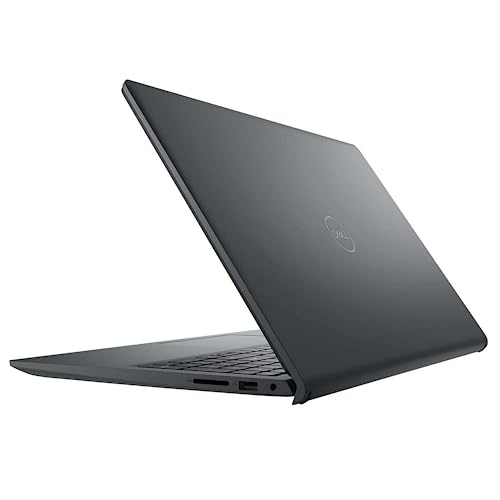
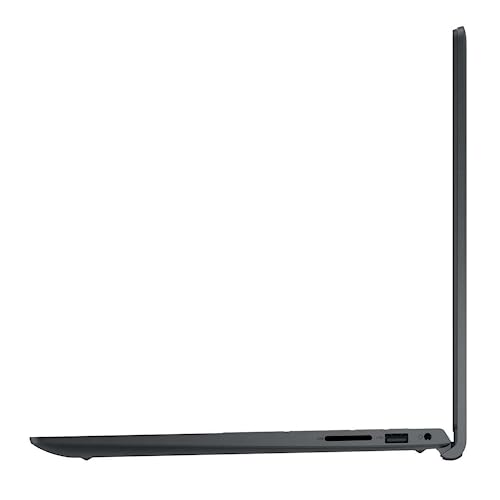
Connecting your external accessories is straightforward thanks to a practical array of physical connections. The Dell Inspiron 15 features one USB 3.2 Gen 1 Type-C port for modern peripherals, one USB-A 3.2 Gen 1 port for fast flash drives, a standard USB-A 2.0 port for a mouse receiver, and a dedicated HDMI 1.4 port for connecting an external monitor or television. Users who take photos with digital cameras will also appreciate the built-in multi-format SD media card reader, which makes transferring vacation pictures quick and simple without requiring extra dongles.
Wireless communication is handled by modern Wi-Fi 6 (2×2/160) Gig+ and Bluetooth connectivity. Wi-Fi 6 provides faster throughput and greater stability on busy home networks where multiple phones, streaming TVs, and smart speakers compete for bandwidth. For shoppers deciding between this mid-sized model and a larger screen such as the dell inspiron 16 laptop, this 15.6-inch model provides an optimal middle ground, offering a comprehensive port selection while remaining easy to move from room to room.
Windows 11 Pro and Built-in 1080p Webcam
An appealing advantage of this model is the inclusion of Windows 11 Pro rather than the standard Home edition. Windows 11 Pro retains all the familiar consumer tools while adding business-grade features such as BitLocker device encryption, Group Policy management, Dynamic Provisioning, Assigned Access, and Active Directory or Azure AD support. These extra tools make the computer an excellent choice for small business owners, remote corporate employees, or students who need to connect securely to managed school networks.
Virtual meetings and remote classes are supported by an integrated widescreen Full HD 1080p webcam and built-in stereo speakers. While many affordable laptops still use grainy 720p cameras that struggle in indoor lighting, a 1080p camera captures clear, sharp video during Zoom, Microsoft Teams, and family video calls. Combined with a dedicated headphone and microphone audio combo jack, the laptop is fully equipped for clear online communication right out of the box.
Specs
| Processor | 13th Gen Intel Core i7-1355U (10 cores, 12 threads, up to 5.0 GHz) |
|---|---|
| Operating System | Windows 11 Pro |
| Memory | 16GB high-bandwidth RAM (supports up to 64GB DDR4) |
| Storage | 1TB PCIe NVMe M.2 Solid State Drive |
| Display | 15.6-inch FHD (1920 x 1080) Anti-glare Touchscreen WVA |
| Graphics | Intel Iris Xe Graphics (Integrated) |
| Webcam | Integrated Widescreen FHD 1080p Webcam |
| Wireless | Wi-Fi 6 (2×2/160) Gig+ and Bluetooth Combo |
| Ports | 1x USB-C 3.2 Gen 1, 1x USB-A 3.2 Gen 1, 1x USB-A 2.0, 1x HDMI 1.4, SD card slot, audio jack |
| Dimensions and Weight | 14.11" L x 9.25" W x 0.75" Th; 3.64 pounds |
As published by the manufacturer on the Amazon listing.
Buy it if
Best Use Cases
- Managing home office work, drafting spreadsheets, preparing presentations, and attending clear video conferences.
- Assisting students with research papers, online classroom portals, digital textbook reading, and coursework organization.
- Handling household tasks like budgeting, online banking, photo storage, and streaming media for the entire family.
- Supporting small business operators who need Windows 11 Pro network security, rapid Wi-Fi 6 speeds, and fast boot times.
Think twice if
Before You Buy
Before purchasing this laptop, it is helpful to understand its graphical capabilities. The machine uses integrated Intel Iris Xe graphics rather than a dedicated discrete graphics processor. While integrated graphics handle Full HD streaming, photo editing, and dell inspiron 15 everyday tasks effortlessly, they are not designed for demanding 3D gaming or professional video rendering. Shoppers who prioritize high frame rates in modern video games should consider a specialized machine such as the dell g15 gaming laptop instead.
When reviewing the dell inspiron 15 specs, take note of display connectivity and bundled accessories. The HDMI 1.4 port connects easily to standard external monitors and televisions at Full HD resolution, though it does not support ultra-high-bandwidth 4K gaming refresh rates. The package includes an AC adapter to recharge the internal 3-cell 41 WHr battery, but the listing does not specify an internal optical drive for reading CDs or DVDs. Additionally, the listing does not specify included accessories such as a carrying sleeve, stylus, or external mouse, so gift-givers should plan to purchase those separately if needed.
Bottom Line
Deciding whether the dell inspiron 15 is worth it comes down to matching your everyday needs with what this computer provides. For users seeking a responsive, well-built laptop that avoids frustrating lag, the Dell Inspiron 15 3530 hits an ideal balance. Its combination of a 13th Generation Intel Core i7 processor, 16GB of system memory, and a 1TB solid-state drive ensures quick loading times and effortless multitasking for routine work and family computing.
While heavy gamers and visual effects artists will require dedicated graphical hardware, this machine excels at daily web productivity, virtual learning, and home management. With Windows 11 Pro preloaded and an intuitive 15.6-inch touchscreen ready out of the box, it represents a capable and future-ready choice for first-time buyers and busy households alike.
FAQ
Can the Dell Inspiron 15 handle multitasking with many open tabs?
Yes, the Dell Inspiron 15 manages multitasking smoothly thanks to its 10-core 13th Generation Intel Core i7 processor and 16GB of high-bandwidth memory. This hardware pairing lets you keep numerous browser tabs, office applications, and media streams running simultaneously without sluggish performance.
Does the Dell Inspiron 15 have a touchscreen display?
Yes, this configuration includes a 15.6-inch Full HD (1920 x 1080) anti-glare touchscreen. The touch functionality allows you to tap icons, scroll through long documents, and zoom into pictures directly on the screen in addition to using the keyboard and trackpad.
Is the Dell Inspiron 15 a good choice for home use?
The dell inspiron 15 for home use is very practical because its 1TB solid-state drive provides generous space for family photo albums, financial spreadsheets, and home records. Its clean Windows 11 interface makes it simple for family members of any technical skill level to navigate.
Is the Dell Inspiron 15 suitable for students?
The dell inspiron 15 for students is well-suited for academic work, weighing around 3.64 pounds for easy transport between rooms or study areas. The integrated 1080p webcam and fast Wi-Fi 6 connectivity also ensure clear communication during online classes and group projects.
Can the internal memory and storage be upgraded later?
The listing specifications note that the system architecture can support up to 64GB of DDR4 memory and up to a 2TB solid-state drive plus an optional 2TB hard drive, providing room for hardware upgrades if your future storage and computing needs expand.
What operating system comes preinstalled on the Dell Inspiron 15?
This laptop comes preloaded with Windows 11 Pro. In addition to all standard Windows 11 features, the Pro edition includes business-level tools like BitLocker encryption, Group Policy management, assigned access, and Active Directory or Azure AD integration.
Where to buy
at Amazon Prime
Price taken from the listing on 18 Sep 2026 and it can change at any time. We may earn a commission if you buy through this link.
More Computers & Laptops
See the section



Get our picks by email
New reviews and the prices we spotted, once a week.