Dell OptiPlex 7020 as a Gaming PC: A First-Time Buyer Guide
Finding a suitable computer for a first-time user or younger family member often turns into a confusing balancing act between size, reliability, and entertainment potential. Many shoppers searching for a starter system…
By Jasmine Norris 9 min read




Our verdict
Scores are out of 10, based on listed specifications and buyer feedback — not from testing of our own
The Dell OptiPlex 7020 Micro is an exceptionally compact personal computer that shines at everyday office productivity, homework tasks, multimedia streaming, and dell optiplex 7020 for casual gaming. While its fast solid-state storage and multi-core processing keep everyday operations snappy, its integrated graphics hardware strictly limits play to lighter, less demanding video games.
- Tiny desktop chassis saves valuable workspace in smaller rooms or family study areas.
- Responsive multi-core processor and generous memory handle heavy multitasking smoothly.
- Reliable performance across popular entry-level, indie, and educational game titles.
- Shared graphics memory restricts compatibility with demanding modern 3D games.
Where to buy
at Amazon Prime
Price taken from the listing on 18 Sep 2026 and it can change at any time. We may earn a commission if you buy through this link.
Pros
- Extremely compact micro form factor design
- Fast 14-core Intel Core i5 processor
- Generous 16GB memory for smooth multitasking
- Rapid 512GB PCIe solid-state storage drive
- Multiple display outputs with HDMI and DisplayPort
Cons
- Integrated graphics unsuitable for demanding modern games
- Compact chassis prevents dedicated graphics card upgrades
- Conflicting listing details regarding processor generation
As Amazon Associates, we earn from qualifying purchases. This means we may receive a small commission at no extra cost to you if you click through and make a purchase.
Finding a suitable computer for a first-time user or younger family member often turns into a confusing balancing act between size, reliability, and entertainment potential. Many shoppers searching for a starter system do not want a massive, noisy tower dominating a bedroom desk or shared living room table. Instead, they look toward ultra-compact business machines like the Dell OptiPlex 7020 Micro, hoping that its modern processor and dependable reputation will let it serve double duty as both a homework station and a casual gaming machine.
Our verdict is that this unit functions wonderfully as a responsive dell optiplex 7020 beginner desktop for daily web browsing, school productivity, and light entertainment, but it is not built to be a heavy-duty dell optiplex 7020 gaming pc. For gift-givers wondering is dell optiplex 7020 worth it for gaming, the answer comes down to software expectations. It handles basic sandbox games and classic titles with ease, but it lacks the dedicated graphical hardware required to run visually intensive, modern blockbuster releases.
Dell OptiPlex 7020 Micro Features Explained
Ultra-Compact Chassis and Desk Footprint
The dell optiplex 7020 micro form factor is designed specifically to eliminate desk clutter without sacrificing standard desktop utility. Measuring approximately 7 inches wide, 7.2 inches high, and only 1.4 inches deep, this dell optiplex 7020 mini pc occupies a fraction of the space required by a traditional computer tower. It can sit flat beneath a monitor stand, stand vertically on a small bookshelf, or tuck neatly into a home entertainment setup without drawing unwanted attention.
Despite its miniature stature, the internal air cooling system keeps the processor operating safely during sustained use. First-time buyers and parents will appreciate that the cooling fan stays relatively quiet during standard operations, avoiding the distracting background drone produced by larger gaming systems. Its clean black exterior and solid 7.5-pound build ensure that it remains stable on the desk even when multiple cords and accessories are attached to its rear panel.
Modern Multi-Core Processing Power
Under the hood, this desktop relies on a capable dell optiplex 7020 intel core i5 central processor. The product details highlight an Intel Core i5 14th Gen i5-14500 processor featuring 14 distinct computing cores running at a base clock speed of 1.70 GHz alongside an 18 MB cache. Having this many cores allows the operating system to distribute different tasks simultaneously, ensuring that background updates, web downloads, and media playback do not cause the active window to freeze or stutter.
Paired with the 14-core processor is 16GB of DDR4 memory running at 2933MHz. When evaluating a dell optiplex 7020 family computer, 16GB of RAM is an ideal baseline that provides plenty of breathing room for daily life. Students can research school topics across dozens of open browser tabs while running document editors and video calling software simultaneously, experiencing smooth responsiveness across Windows 11 Pro without encountering the sluggish performance typical of budget consumer machines.
Integrated Visuals and Everyday Gaming Performance
Examining the dell optiplex 7020 graphics capabilities is critical for anyone hoping to purchase this machine for gaming. This desktop does not contain an independent, dedicated graphics card with isolated video memory. Instead, it relies on integrated Intel HD Graphics 770, an onboard visual processor built directly into the main CPU that dynamically borrows a portion of the system’s 16GB of system RAM to render images on your screen.
Because integrated graphics share memory and processing bandwidth with the operating system, they are best suited for lighter visual workloads. In practice, this means smooth performance during dell optiplex 7020 roblox minecraft sessions, retro console emulation, 2D puzzle games, and older strategy titles. However, attempting to run visually intensive modern shooting games or open-world adventures will result in low frame rates and choppy animation. Shoppers who specifically need dedicated graphical processing often explore modified older options like the dell optiplex gaming pc gtx 750ti, which incorporates discrete video hardware to assist with older three-dimensional titles.
Fast Solid-State Storage Drive
Long wait times when starting a computer or launching heavy software are eliminated thanks to the internal 512GB PCIe solid-state drive (SSD). Utilizing a high-speed PCIE x 4 interface, this storage drive transfers data far faster than traditional mechanical hard drives. As a result, the computer boots into Windows in seconds and opens everyday programs almost instantaneously, keeping family members productive without frustrating delays.
A storage capacity of 512GB provides plenty of space for family photo collections, school assignments, essential business programs, and several casual gaming installations. While large modern games can easily exceed 80GB each, casual and educational software typically occupies only a few gigabytes per title. This generous storage ensures you will not have to constantly delete older files just to make room for routine system updates and new school projects.
Extensive Monitor and Peripheral Connectivity
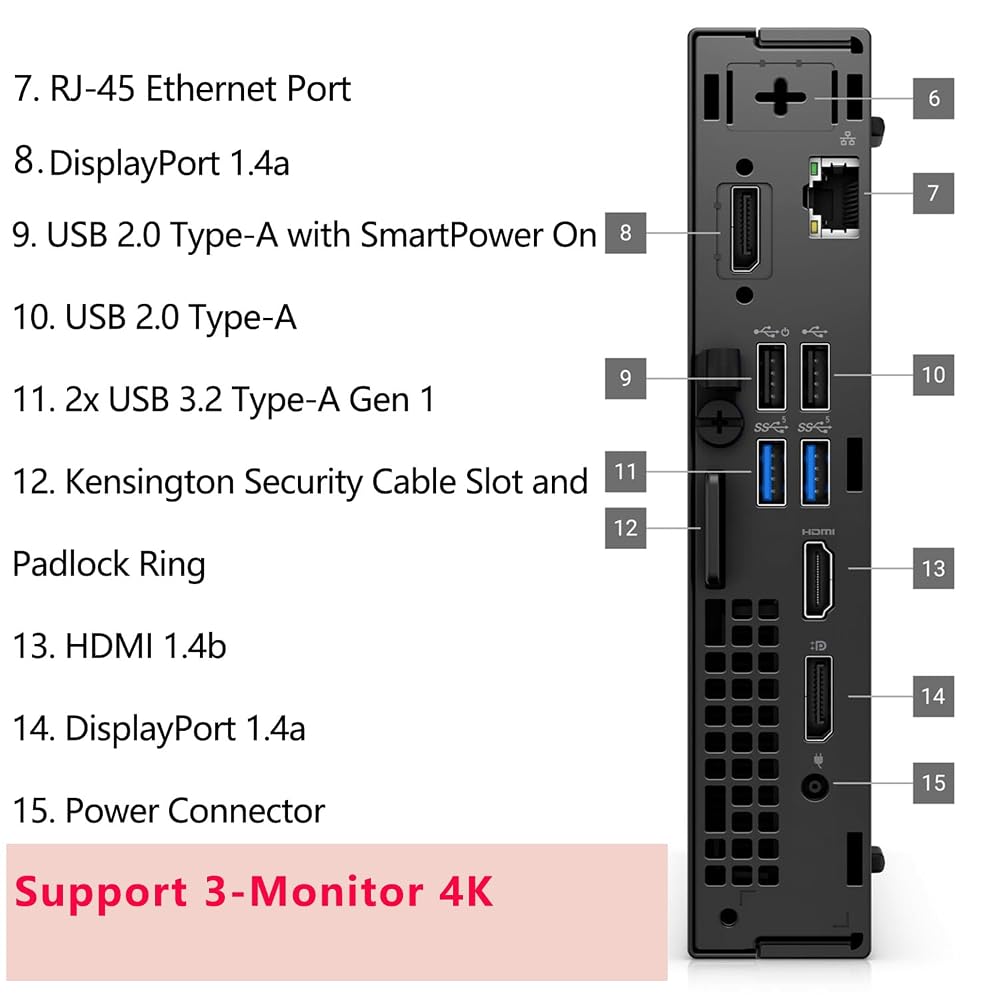
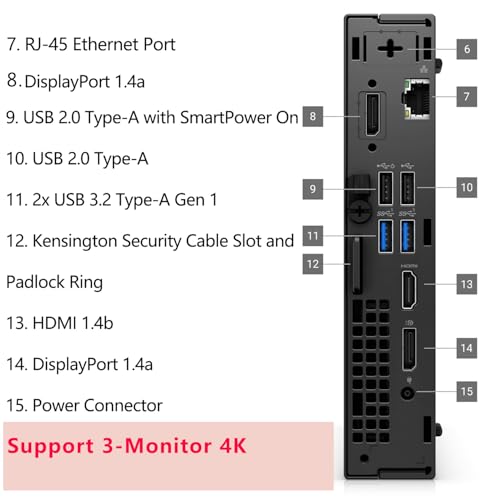
Connecting this desktop to displays and everyday accessories is straightforward thanks to a versatile assortment of connection ports. For video output, the unit features built-in DisplayPort 1.4a and HDMI 1.4b connections, along with an additional display output. This setup allows users to attach multiple monitors simultaneously, making it simple to connect a productivity screen like the dell 27 plus 4k monitor – s2725qs for homework while keeping a second screen open for reference materials or video streams.
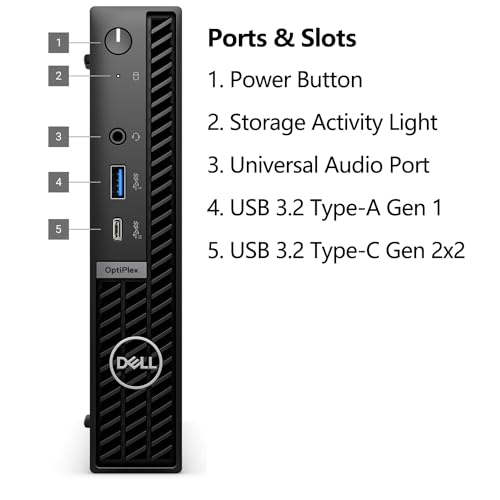
The computer also provides substantial peripheral support, including two USB 3.2 Gen 2 ports, several USB 3.2 Gen 1 ports, and a modern USB Type-C 3.2 Gen 1 port. These connections make it easy to plug in a keyboard, mouse, game controller, external backup drive, and webcam all at the same time. The listing also highlights built-in Wi-Fi, Bluetooth, Gigabit Ethernet for wired network stability, an integrated microphone input, and three total expansion slots for future flexibility.
Specs
| Processor | Intel Core i5 14th Gen i5-14500 (14 Cores, 1.70 GHz, 18 MB Cache) |
|---|---|
| Graphics Processing | Intel HD Graphics 770 (Integrated) |
| System Memory | 16GB DDR4 SDRAM (2933MHz) |
| Storage Drive | 512GB M.2 PCIe NVMe SSD (PCIE x 4) |
| Operating System | Windows 11 Pro |
| Form Factor | Micro Form Factor Mini PC |
| Video Outputs | DisplayPort 1.4a, HDMI 1.4b |
| Physical Dimensions | 7 inches x 7.2 inches x 1.4 inches |
| Unit Weight | 7.5 lbs |
| Networking | Gigabit Ethernet, 802.11a/b/g/n Wi-Fi, Bluetooth |
As published by the manufacturer on the Amazon listing.
Buy it if
Best Use Cases
- Playing lightweight sandbox titles, web-based educational games, and classic PC games at standard resolutions.
- Completing daily school assignments, writing research papers, and participating in remote classroom video calls.
- Acting as a space-saving family computer in compact home offices, kitchens, or student bedrooms.
- Streaming high-definition video content and movies to multiple monitors or a family television screen.
- Running everyday office productivity suites and heavy web browser multitasking with rapid response times.
Think twice if
Before You Buy
Before purchasing this desktop as a gift or first PC, buyers should carefully consider its physical boundaries and graphical ceiling. Because this machine utilizes a compact micro chassis, it cannot accommodate a full-sized dedicated desktop graphics card. If your recipient intends to play demanding modern competitive games or graphics-heavy action titles, a dedicated gaming tower such as the dell alienware aurora act1250 gaming pc is designed specifically to handle those demanding graphical requirements. Additionally, shoppers should note minor discrepancies in the listing details: the product title mentions an Intel Hexa-Core i5-12500T with DDR5 memory, whereas the detailed feature bullets and product description specify an Intel Core i5 14th Gen i5-14500 with DDR4 memory. While both processor versions deliver excellent performance for daily tasks, you should confirm the exact hardware configuration with the seller before ordering if a specific generation is important to your plans.
It is equally important to review what peripherals you will need on arrival day. The listing includes the core micro computer unit, internal air cooling, Windows 11 Pro, and built-in networking capabilities, but the listing does not specify whether an external monitor, keyboard, mouse, or video connection cables are included in the package. First-time buyers should budget time to acquire an external computer screen, input devices, and appropriate HDMI or DisplayPort cords separately so that the recipient can set up and enjoy the computer immediately upon unboxing.
Bottom Line
The Dell OptiPlex 7020 Micro is a well-built, reliable desktop computer that excels at everyday family computing, homework, remote learning, and casual entertainment. Its 14-core Intel processor, 16GB of system memory, and swift 512GB solid-state drive provide a smooth, frustration-free experience for daily computing needs while occupying almost no desk space.
While it is not equipped to function as a high-end gaming machine for cutting-edge titles, it comfortably handles popular casual favorites like Minecraft and Roblox. For gift-givers seeking a dependable, space-saving desktop that will last through years of school assignments and light entertainment, this micro PC is a practical and capable choice.
FAQ
Can the Dell OptiPlex 7020 run popular casual games like Roblox and Minecraft?
Yes, the integrated Intel HD Graphics 770 processor provides adequate visual performance to play lightweight sandbox games like Roblox and Minecraft at standard high-definition settings. While visually demanding community shaders and heavy texture modifications should be avoided, standard vanilla gameplay runs reliably for casual players.
What are the primary Dell OptiPlex 7020 gaming PC specs?
The primary dell optiplex 7020 gaming pc specs provided in the product details include an Intel Core i5 14th Gen i5-14500 processor with 14 cores, 16GB of DDR4 memory, a 512GB PCIe solid-state storage drive, integrated Intel HD Graphics 770, and Windows 11 Pro. These specifications provide rapid general computing speed, though graphical processing is handled by the processor rather than a standalone video card.
Can I install a dedicated gaming graphics card inside this micro desktop?
No, the micro form factor chassis measures only 1.4 inches in depth, which leaves no physical space for a standard desktop graphics card. Power delivery and cooling inside this compact case are specifically designed for the low-power integrated graphics architecture, meaning future graphical upgrades cannot include full-sized video cards.
Does this desktop support dual monitors for homework and entertainment?
Yes, the desktop features both DisplayPort 1.4a and HDMI 1.4b outputs on its back panel. This dual-connection layout makes it simple to connect two independent monitors simultaneously, allowing a student to read research material on one screen while typing assignments or managing study chats on the other.
Is the Dell OptiPlex 7020 worth it for a beginner or family user?
Yes, for families and first-time computer users who need a compact, low-maintenance machine for homework, web browsing, and casual gaming, this desktop is well worth considering. Its fast solid-state drive ensures rapid startup times, while its compact footprint keeps family living areas tidy and uncluttered.
Where to buy
at Amazon Prime
Price taken from the listing on 18 Sep 2026 and it can change at any time. We may earn a commission if you buy through this link.
More Computers & Laptops
See the section


Get our picks by email
New reviews and the prices we spotted, once a week.