Dell S3425DW Monitor: A Beginner Guide to This Ultrawide Screen
Working on a cramped laptop screen often leads to daily frustration, visual fatigue, and endless window toggling. When you spend your day balancing spreadsheets, video calls, web research, and project management apps,…
By Rebecca Paxton 9 min read



Our verdict
Scores are out of 10, based on listed specifications and buyer feedback — not from testing of our own
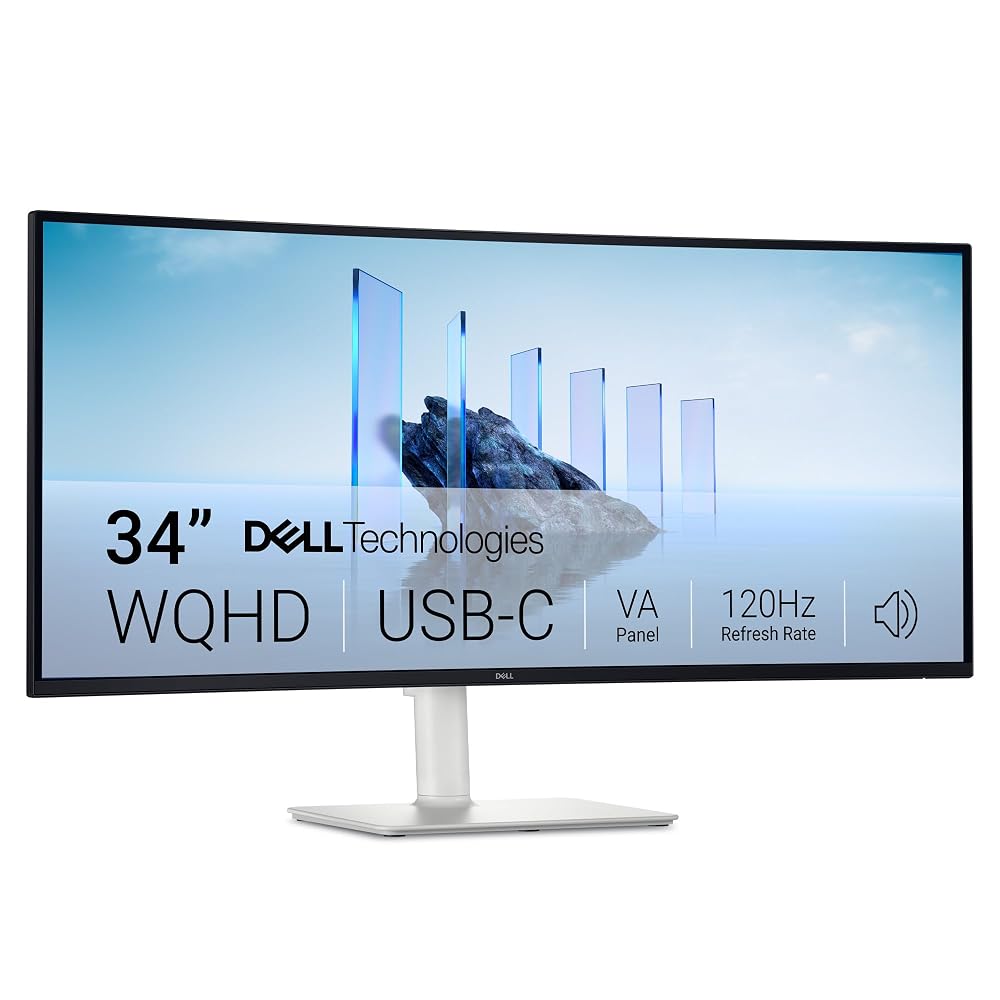
The Dell S3425DW delivers an expansive, user-friendly workspace that replaces multi-monitor clutter with a single cohesive curved panel. It combines dependable office ergonomics, vibrant color presentation, and streamlined connectivity into an accessible package for remote workers and everyday computer users.
- Spacious 34-inch curved screen provides panoramic workspace to view multiple documents simultaneously.
- Convenient USB-C connection delivers display video and up to 65W charging through a single cord.
- Smooth 120Hz refresh rate combined with AMD FreeSync Premium keeps everyday scrolling and gaming fluid.
- Built-in ComfortView Plus hardware technology reduces blue light without distorting screen colors.
Where to buy
at Amazon
Price taken from the listing on 18 Sep 2026 and it can change at any time. We may earn a commission if you buy through this link.
Pros
- Expansive 34-inch curved 21:9 ultrawide panel
- Single USB-C cable delivers video and 65W charging
- Fluid 120Hz refresh rate with FreeSync Premium
- Hardware ComfortView Plus reduces blue light without color shift
- Rich 3000:1 contrast ratio with wide color coverage
Cons
- 65W power delivery insufficient for heavy workstation laptops
- Large 31.8-inch width requires substantial desk space
- Listing does not specify stand ergonomic adjustment range
As Amazon Associates, we earn from qualifying purchases. This means we may receive a small commission at no extra cost to you if you click through and make a purchase.
Working on a cramped laptop screen often leads to daily frustration, visual fatigue, and endless window toggling. When you spend your day balancing spreadsheets, video calls, web research, and project management apps, a single small display quickly becomes a bottleneck. The Dell S3425DW addresses this challenge by providing a spacious 34-inch panoramic canvas designed to streamline your daily workflow. It eliminates the visual clutter of having two separate physical monitors on your desk while expanding your digital workspace so you can keep everything you need in plain view.
For home office professionals, casual gamers, and first-time ultrawide shoppers, this curved monitor serves as an approachable all-in-one upgrade. With a crisp 1440p resolution, smooth motion handling, integrated speakers, and single-cable laptop charging, it consolidates your entire workstation into an intuitive and clean setup. If you want an immersive viewing experience without dealing with complex cable routing or confusing technical configurations, this beginner guide examines how the display performs for everyday productivity.
Dell S3425DW Features Explained
Curved Ultrawide Screen and 1440p Resolution
The standout feature of this display is its 34-inch curved screen with an ultrawide 21:9 aspect ratio. Traditional monitors use a 16:9 widescreen format, which often forces you to stack windows on top of each other or buy a secondary screen. By stretching the horizontal workspace across a native resolution of 3440 x 1440 pixels, the monitor gives you enough visual real estate to place three full-sized documents or browser windows side by side without zooming out. If you are accustomed to a standard 16:9 monitor like the dell s2725ds monitor, transitioning to this panoramic format fundamentally changes how you organize your daily work tasks.
The gentle curve of the panel is engineered to match the natural peripheral arc of human vision. Instead of having to constantly turn your head back and forth to read content on the far edges, the curved design keeps the entire screen equidistant from your eyes. This layout helps reduce physical neck strain during long working sessions. Furthermore, the LED-backlit VA panel features a matte screen finish and wide 178-degree viewing angles, which work together to deflect ambient room glare from nearby desk lamps or sunny home office windows.
Simplified USB-C Setup and Power Delivery
Connecting modern laptops to external monitors can often lead to a confusing web of power bricks, display adapters, and peripheral cords. The Dell S3425DW simplifies this process through its integrated USB-C connectivity. With a single USB-C cable, the monitor receives the video signal from your laptop, transmits audio, and sends up to 65W of power delivery back to the computer. This means you can plug one lightweight cable into your compatible notebook when you sit down, instantly turning your monitor into a central display hub while keeping your laptop battery charged.
This single-cord convenience is especially helpful for people who frequently carry their laptop between the office, kitchen table, and couch. You no longer need to unpack your laptop charger or crawl under your desk to plug in dedicated power bricks. By consolidating video transmission and charging into one port, your desktop remains tidy and minimalist. For users whose computers support USB-C video output, configuring your workstation requires virtually zero technical expertise.
Smooth Refresh Rate and Motion Clarity
Screen performance is largely governed by how quickly a display updates its image, which is measured in hertz. Standard office displays typically operate at 60Hz, updating sixty times per second. The Dell S3425DW doubles this speed with a 120Hz refresh rate. While this specification is often highlighted for video games, the benefits are immediately noticeable during regular office tasks. Moving your mouse cursor, dragging browser windows across the ultrawide panel, and skimming through lengthy documents feels significantly smoother and more responsive to the touch.
For after-hours entertainment, the monitor includes AMD FreeSync Premium and an ultra-low 0.03ms response time. These technologies sync the monitor with your computer graphics output to eliminate screen tearing, stuttering, and motion ghosting. While competitive esports enthusiasts might prefer specialized ultra-fast panels like the dell s2522hg 240hz, this monitor hits a sweet spot that easily satisfies both daily productivity needs and casual gaming sessions.
Everyday Eye Comfort Technology
Staring at digital screens for eight or more hours a day can lead to tired eyes, headaches, and physical fatigue. The Dell S3425DW addresses this with improved ComfortView Plus technology. Unlike standard software blue-light filters that place an aggressive yellow cast over your screen and distort your media, this hardware-level solution continuously reduces harmful blue light emissions to 35% or less while preserving color accuracy.
This balanced approach allows you to read spreadsheets, write emails, edit photos, and watch movies with consistent, true-to-life colors. Because the protection operates directly within the panel hardware, you do not need to toggle menu options or install third-party applications to keep your eyes comfortable throughout long shifts.
Color Coverage and Re-Engineered Audio
Underneath the hood, the monitor utilizes a VA panel capable of delivering a high 3000:1 contrast ratio. This high static contrast means dark shadows appear deep and rich rather than washed out into gray, which is a common drawback of entry-level displays. Supported by 300 nits of brightness and HDR readiness, the screen provides satisfying depth when streaming widescreen films or viewing high-resolution media. In terms of color fidelity, the panel covers 99% of the sRGB spectrum and 95% of the wider DCI-P3 color space, ensuring rich and vibrant tones across all forms of visual content.
Audio is another area where this model improves upon basic office screens. It features re-engineered built-in speakers engineered with greater output power, deeper frequency response, and a wider decibel range than prior generations. While dedicated audio enthusiasts might occasionally consider an external accessory like a dell ax510 sound bar, the integrated sound system here is more than capable of handling conference calls, online lectures, podcasts, and casual video playback without requiring standalone desktop speakers.
Specs
| Screen Size | 34 inches |
|---|---|
| Display Aspect Ratio | 21:9 ultrawide |
| Native Resolution | 3440 x 1440 (WQHD) |
| Display Panel Technology | LED-backlit VA |
| Refresh Rate | 120Hz |
| Response Time | 0.03ms |
| Contrast Ratio | 3000:1 |
| Brightness | 300 nits |
| Color Gamut Coverage | 99% sRGB, 95% DCI-P3 |
| Power Delivery | Up to 65W via USB-C |
| Dimensions with Stand (D x W x H) | 8.73" x 31.78" x 16.2" |
| Item Weight | 20.7 pounds |
As published by the manufacturer on the Amazon listing.
Buy it if
Best Use Cases
- Remote professionals who want to view multiple spreadsheets, chat windows, and browser tabs side by side on one seamless screen.
- Laptop users looking for an organized desk setup that uses a single USB-C cable for both video output and device charging.
- Casual gamers who want an immersive ultrawide gaming experience powered by a 120Hz refresh rate and AMD FreeSync Premium.
- Film lovers seeking a native 21:9 aspect ratio that displays cinematic movies without distracting top and bottom black bars.
Think twice if
Before You Buy
Before bringing this monitor home, it is essential to measure your available desk space. The Dell S3425DW measures nearly 32 inches wide and weighs 20.7 pounds, meaning it demands a stable, spacious desk surface. You should also verify that your computer hardware supports an ultrawide WQHD resolution at 120Hz. While modern laptops with USB-C ports typically support display output, older or basic machines may only output lower resolutions. Furthermore, while the 65W USB-C power delivery is plenty for thin-and-light productivity laptops, high-performance mobile workstations or power-hungry gaming laptops may still need their original proprietary charging brick plugged in during intensive workloads.
It is also worth noting what the product listing does not specify. The listing does not detail the exact count of additional video ports, such as HDMI or DisplayPort connections, nor does it list the specific downstream USB hub ports available on the chassis. Additionally, the specifications do not outline the exact ergonomic adjustments of the stand, such as maximum height elevation, tilt angles, or swivel range. If you have a highly specialized workstation setup, verify whether your existing desk depth accommodates the 8.73-inch stand footprint before finalizing your purchase.
Bottom Line
If you are wondering whether this ultrawide display is worth adding to your setup, the answer comes down to simplicity and screen real estate. The monitor bridges the gap between basic desktop displays and complex dual-screen arrays, offering a broad 34-inch canvas that transforms how you manage multitasking. With its vibrant 3000:1 contrast ratio, generous color gamut, and gentle curve, reading data and watching entertainment feels natural and comfortable throughout the day.
While top-tier commercial displays like the dell ultrasharp u3425we cater to specialized enterprise environments with advanced networking needs, this model provides home office workers and casual users with the most critical everyday features. The combination of single-cable USB-C docking, a responsive 120Hz refresh rate, built-in sound, and certified eye comfort makes it an outstanding centerpiece for any modern desk.
FAQ
Can the Dell S3425DW charge my laptop while connected?
Yes, the monitor provides up to 65W of power delivery through its USB-C connection. As long as your laptop supports charging over USB-C and requires 65W or less, it will charge continuously while sending video and audio signals over that single cable.
What makes an ultrawide curved monitor better than two separate monitors?
An ultrawide curved monitor provides a continuous digital workspace without plastic bezels breaking up the center of your view. It requires only one power outlet, uses a single display connection, and curves slightly inward to keep the corners within easy eye reach, reducing desk clutter and physical neck turning.
Does the ComfortView Plus feature make colors look yellow?
No, ComfortView Plus is a built-in hardware solution designed to reduce harmful blue light emissions to 35% or less without sacrificing color accuracy. Unlike basic software night modes that cast a heavy yellow or amber tint over your screen, this technology preserves natural color balance.
Is the Dell S3425DW suitable for gaming?
Yes, the monitor is well-suited for everyday and casual gaming thanks to its 120Hz refresh rate, 0.03ms response time, and AMD FreeSync Premium support. These features minimize motion blur and prevent screen tearing, providing an expansive, smooth experience in panoramic game worlds.
Do I need to buy external speakers for this monitor?
For standard daily tasks such as video conferences, online videos, and casual music listening, you do not need external speakers. The monitor includes re-engineered built-in audio with deeper frequency response and increased volume compared to previous generations, though dedicated audio lovers can still attach external speakers if they prefer higher acoustic fidelity.
Where to buy
at Amazon
Price taken from the listing on 18 Sep 2026 and it can change at any time. We may earn a commission if you buy through this link.
More Monitors
See the section


Get our picks by email
New reviews and the prices we spotted, once a week.