Intel Core i7-14700 Review: A Beginner-Friendly CPU Guide
Building or upgrading a desktop personal computer can easily overwhelm beginners, first-time builders, and family gift-givers. The endless barrage of technical terms, socket names, and cooling requirements makes it hard to identify…
By Reid Wallace 8 min read


Our verdict
Scores are out of 10, based on listed specifications and buyer feedback — not from testing of our own
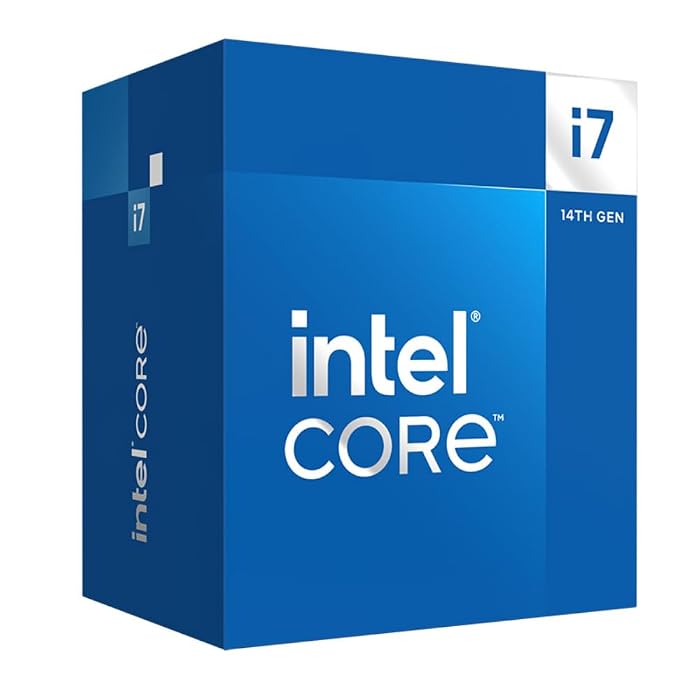
In this intel core i7-14700 beginner guide, we find that this component is one of the most practical high-tier processors for newcomers and everyday desktop builders. It packs massive computing capability into a standard format, pairing twenty cores with reliable baseline hardware so that first-time users do not need to solve complicated cooling or graphics challenges right away.
- Equipped with 20 cores and 28 threads to distribute complex computing tasks and everyday applications without slowing down
- Features the Intel Laminar RM1 thermal solution right in the packaging, saving you the expense and confusion of selecting a separate cooler
- Supplies integrated Intel UHD Graphics 770 so you can turn the system on and display video immediately without a discrete graphics card
- Offers broad flexibility by supporting both newer DDR5 and budget-friendly DDR4 system memory standards on compatible motherboards
Where to buy
at Amazon Prime
Price taken from the listing on 18 Sep 2026 and it can change at any time. We may earn a commission if you buy through this link.
Pros
- 20 cores and 28 threads for multitasking
- Integrated Intel UHD Graphics 770 included
- Bundled Intel Laminar RM1 cooler in box
- Supports both DDR4 and DDR5 memory
- Boost clock speeds reach up to 5.4 GHz
Cons
- May require BIOS update on 600-series motherboards
- Bundled cooler not ideal for heavy sustained rendering
- Higher power draw under demanding workloads
As Amazon Associates, we earn from qualifying purchases. This means we may receive a small commission at no extra cost to you if you click through and make a purchase.
Building or upgrading a desktop personal computer can easily overwhelm beginners, first-time builders, and family gift-givers. The endless barrage of technical terms, socket names, and cooling requirements makes it hard to identify what a system actually needs. At the heart of every computer sits the central processing unit, which coordinates every calculation, program launch, and visual update across the machine. The Intel Core i7-14700 aims to cut through that complexity by providing a robust, high-performance computing foundation that includes vital components right in the retail box.
Our verdict is that this processor serves as an exceptional, reassuring option for users who want premium computing power without the anxiety of buying separate specialized parts. By packing ample processing cores alongside built-in graphics and an included thermal cooler, it simplifies the assembly process significantly compared to older counterparts like the intel core i7 13700. Whether you are assembling a home workstation, setting up an entertainment center, or preparing a modern gaming rig, this desktop processor delivers balanced, dependable performance from day one.
Intel Core i7-14700 Features Explained
Performance Hybrid Architecture
Understanding processor cores can be tricky for first-time builders, but Intel simplifies this by dividing the workload between two distinct core types. The Intel Core i7-14700 features a performance hybrid architecture with twenty total cores, divided into eight Performance-cores and twelve Efficient-cores, supporting twenty-eight concurrent threads. Performance-cores focus entirely on your active, demanding tasks such as running a modern video game or editing high-definition media files. Meanwhile, the Efficient-cores take over background operating system duties, cloud synchronizations, antivirus scans, and music streaming.
This division of labor has a massive impact on daily intel core i7-14700 performance. Instead of your desktop stuttering when multiple browser windows or background utility apps run at once, the processor prioritizes and routes each task to the ideal core type. For gift-givers and casual users, this means the computer remains responsive, quick to boot, and free of annoying lag even when running dozens of family programs simultaneously.
Integrated Intel UHD Graphics 770
A major obstacle for many first-time builders is the complexity and added cost of choosing a dedicated graphics card. The Intel Core i7-14700 removes that barrier by including integrated Intel UHD Graphics 770 directly on the chip silicon. This built-in graphical processor connects directly through your motherboard video ports to drive desktop monitors, handle 4K media playback, and run everyday school or office applications without requiring any external video hardware.
This built-in feature provides tremendous peace of mind. If you are waiting to purchase a separate graphics card or need to diagnose display issues down the road, having integrated graphics ensures your computer can always boot up and show a picture. In contrast, models such as the intel core i7-14700f lack integrated graphics entirely, leaving beginners with a black screen unless a standalone graphics card is already plugged in.
Intel Laminar RM1 Cooler Included in the Box
Another area where beginners often feel stressed is heat management, as many high-end processors ship without any cooling fan whatsoever. Having the intel core i7-14700 cooler included inside the retail packaging removes this hurdle immediately. Intel bundles its Laminar RM1 thermal solution with this processor, giving builders an approved heatsink and fan combination that is ready to mount directly onto the motherboard.
The included cooler is engineered to handle standard computing workflows and general gaming without requiring you to measure case clearances or buy third-party mounting brackets. While specialized heavy tasks like hours of continuous professional video rendering might benefit from larger liquid coolers, the factory RM1 cooler ensures that anyone opening the box can build, assemble, and run their computer immediately without purchasing extra hardware.
Flexible Memory Support for DDR4 and DDR5
System memory represents another big decision when planning a new computer build. When considering intel core i7-14700 ddr4 vs ddr5 choices, this desktop chip makes life easy by offering built-in compatibility with both standards. This architectural flexibility lets builders decide whether they want to use widely available DDR4 RAM or step up to newer DDR5 RAM depending on their overall component goals.
If you are upgrading an older computer or want to keep initial build expenses down, you can choose a motherboard equipped with DDR4 slots and reuse existing RAM sticks. On the other hand, if you are designing a fresh machine meant to take full advantage of newer memory speeds, you can select a DDR5 motherboard without needing to change your CPU choice. The processor adapts smoothly to whichever memory standard your motherboard slots accommodate.
High Clock Frequencies and Modern PCIe Connectivity
Beyond core counts, raw clock speed determines how fast individual instructions execute inside a computer. The Intel Core i7-14700 delivers clock speeds reaching up to 5.4 GHz through Intel Turbo Boost Max Technology 3.0 alongside a generous 33MB cache buffer. In plain language, this massive cache acts like an ultra-fast temporary storage shelf on the chip, keeping frequently needed game files and system instructions instantly accessible to minimize loading pauses.
The chip also features support for modern PCIe 5.0 and PCIe 4.0 lanes, allowing modern solid-state storage drives and future expansion accessories to transfer data at high rates. While overclocking enthusiasts who enjoy manual electrical tuning often look toward the intel i7 k lineup, this standard processor delivers blazing burst speeds automatically without forcing you to learn complicated BIOS settings or overclocking menus.
Specs
| Processor Model | Intel Core i7-14700 (14th Gen) |
|---|---|
| Total Cores | 20 cores (8 Performance-cores + 12 Efficient-cores) |
| Concurrent Threads | 28 threads |
| Maximum Clock Speed | Up to 5.4 GHz with Turbo Boost Max 3.0 |
| Total Cache | 33 MB Cache (with 2.5 MB secondary cache listed) |
| Processor Socket | LGA 1700 |
| Integrated Graphics | Intel UHD Graphics 770 |
| Included Thermal Solution | Intel Laminar RM1 Cooler |
| Base Power / Wattage | 65W Processor Base Power (125W listed) |
| Platform Compatibility | Windows 11 |
As published by the manufacturer on the Amazon listing.
Buy it if
Best Use Cases
- Building a reliable family computer that smoothly handles web browsing, educational software, and office applications all afternoon.
- Creating an intel core i7-14700 for gaming setup capable of driving high frame rates in modern multiplayer and single-player titles.
- Powering a creative workstation for photo retouching, graphic design, and basic video editing without experiencing system stutter.
- Upgrading an existing desktop from a previous-generation chip like an intel core i7-13700f to gain higher peak clock speeds and integrated display backup.
- Setting up a dependable home media station for streaming 4K entertainment content without needing an external graphics card.
Think twice if
Before You Buy
Before purchasing this processor, paying close attention to intel i7-14700 motherboard compatibility is essential. The processor installs specifically into the i7-14700 lga 1700 socket, meaning it requires a compatible motherboard based on either Intel 700-series or Intel 600-series chipsets. If you choose an Intel 600-series motherboard, you must verify whether it requires a BIOS firmware update before it can recognize this 14th-generation CPU. Many first-time builders get caught off guard by an unbootable screen simply because an older motherboard lacks the necessary software update out of the box.
You should also understand what comes in the retail package and what requires separate sourcing. While this retail package includes the processor and the Intel Laminar RM1 cooler, it does not include tools, motherboard mounting screws, or additional case fans. Furthermore, the listing does not specify software update timelines beyond noting platform support for Windows 11. Be sure to check your computer chassis dimensions and power supply wattage to ensure your overall system can comfortably accommodate all chosen components.
Bottom Line
When deciding is intel core i7-14700 worth it for a new build or upgrade, the answer for most everyday desktop users and beginners is a clear yes. The intel core i7 14700 desktop processor strikes an attractive balance between top-tier computational horsepower and real-world assembly convenience. By providing twenty responsive cores alongside integrated Intel UHD Graphics 770 and a factory-matched thermal solution, it removes the typical friction points that intimidate newcomers.
Whether you are purchasing components for a gift or setting out on your very first DIY build, this processor provides the reliability, software support, and multitasking headroom needed to keep a desktop running fast and fluid for years. It delivers exceptional everyday usability without requiring immediate investments in complex water cooling setups or pricey separate graphic adapters.
FAQ
Does the Intel Core i7-14700 include a cooler in the box?
Yes, the retail package comes with the Intel Laminar RM1 thermal solution, giving you a functional cooling fan and heatsink right away without having to research and buy an aftermarket cooler.
Do I need to buy a separate graphics card with this processor?
No, the Intel Core i7-14700 features integrated Intel UHD Graphics 770, allowing you to connect display cables directly to your motherboard outputs for video playback, desktop work, and casual computing.
What socket and motherboards support the Intel Core i7-14700?
This CPU uses the LGA 1700 socket and works with Intel 700-series and 600-series chipset motherboards, though 600-series boards may require a BIOS update before the system can boot.
Can I use DDR4 memory with the Intel Core i7-14700?
Yes, the processor supports both DDR4 and DDR5 memory standards, but your choice depends on the specific motherboard you buy, as motherboards support either DDR4 or DDR5 RAM slots exclusively.
Is the Intel Core i7-14700 good for gaming?
Yes, with clock speeds up to 5.4 GHz, 20 cores, and 28 threads, it delivers fast performance in modern video games, especially when paired with a capable dedicated graphics card.
Where to buy
at Amazon Prime
Price taken from the listing on 18 Sep 2026 and it can change at any time. We may earn a commission if you buy through this link.
More PC Components & Storage
See the section



Get our picks by email
New reviews and the prices we spotted, once a week.