Logitech Brio 101 Review: A Friendly Guide for Beginners
Many standard desktop monitors and laptop displays feature integrated webcams that suffer from muddy image resolution, poor lighting management, and zero built-in physical privacy. For everyday computer users, remote staff, and newcomers…
By Tara Sanderson 7 min read


Our verdict
Star rating left by Amazon buyers — not a score from testing of our own
The Logitech Brio 101 serves as a dependable, fuss-free upgrade for everyday computer video calls, combining essential high-definition visuals with straightforward hardware features.
- Crisp Full HD 1080p resolution provides clear video for virtual workspace collaboration.
- RightLight brightness balancing increases illumination by up to 50 percent to counteract harsh room shadows.
- An integrated sliding privacy cover delivers instant peace of mind whenever calls end.
- Direct USB-A plug-and-play connectivity ensures instant operation across modern computer setups.
Where to buy
at Amazon Prime
Price taken from the listing on 18 Sep 2026 and it can change at any time. We may earn a commission if you buy through this link.
Pros
- Full HD 1080p image clarity
- RightLight boosts brightness up to 50 percent
- Built-in mechanical privacy slide shutter
- Instant plug-and-play USB-A connectivity
- Compatible with Nintendo Switch 2 GameChat mode
Cons
- Fixed focus without motorized lens adjustment
- Mono microphone recording format
- USB-A connection requires adapter for USB-C
As Amazon Associates, we earn from qualifying purchases. This means we may receive a small commission at no extra cost to you if you click through and make a purchase.
Many standard desktop monitors and laptop displays feature integrated webcams that suffer from muddy image resolution, poor lighting management, and zero built-in physical privacy. For everyday computer users, remote staff, and newcomers seeking a hassle-free video upgrade, finding a straightforward camera that works immediately out of the box is essential. The Logitech Brio 101 solves these standard desk hurdles by pairing clean 1080p video clarity with automated lighting adjustments and an integrated physical privacy cover.
Our evaluation shows that this camera provides a seamless, beginner-friendly experience without demanding deep technical know-how or complex driver adjustments. By focusing on essential video calling functions, reliable brightness balancing, and native operating system compatibility, it delivers dependable quality for standard daily calls, though advanced content creators may miss premium extras like autofocus or multi-microphone arrays.
Logitech Brio 101 Features Explained
Full HD Video Clarity and Automated Lighting Balance
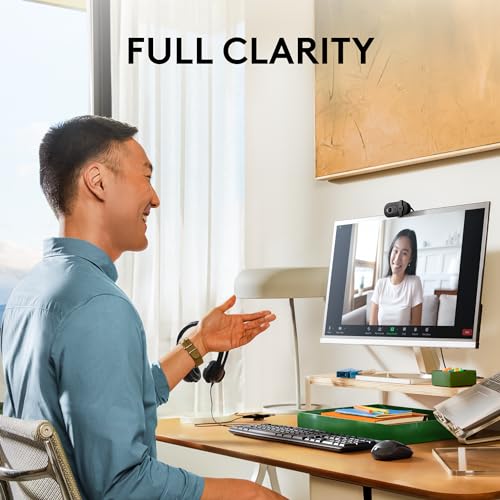
The primary reason to replace an integrated computer camera is visual clarity. The Logitech Brio 101 operates at Full HD 1080p resolution, producing sharp, clean pictures that help you present a professional appearance during video conferences. The internal imaging hardware utilizes a fluid crystal sensor system paired with a maximum aperture of f/2.0, allowing adequate light intake even in standard indoor office environments where ceiling lights produce uneven glare.
Dealing with poor room lighting is a frequent struggle for remote workers sitting near windows or dim lamps. Logitech integrates RightLight technology into the device, which automatically boosts brightness by up to 50 percent compared to older generation Logitech webcams. This automated exposure management actively softens heavy facial shadows, preventing you from looking washed out or obscured. Users moving between bright daylight and darker evening hours can rely on the camera to balance scene lighting automatically without manual slider adjustments.
Integrated Physical Privacy Shutter
Digital privacy is an understandable priority for anyone working or studying from home. Software toggles can occasionally glitch, leaving users uncertain about whether their video stream is genuinely disconnected. The Logitech Brio 101 privacy shutter eliminates this ambiguity by placing a mechanical cover directly over the camera lens.
Operating the shutter requires a simple physical slide across the front bezel. When closed, the lens is completely blocked by physical material, preventing accidental video transmission. This tactile mechanism provides reassurance between meetings, making the unit especially well suited for shared family workspaces, student bedrooms, and busy home offices.
Audio Transmission and Built-In Microphone
Clear communication requires intelligible voice pickup alongside steady video. The Logitech Brio 101 microphone quality is engineered around a built-in mono audio capture format that conveys speech clearly across standard web conferencing software. This onboard audio allows first-time users to conduct daily voice calls without immediately needing an external desk microphone.
While the single internal microphone manages basic speech transmission well in quiet environments, users working in high-noise households or noisy open offices might prefer combining their camera with a dedicated audio tool such as the Logitech H391 wired headset for PC/laptop, stereo headphones with noise canceling microphone, USB-C. Having a functional microphone built directly into the webcam housing remains an invaluable backup that reduces cable clutter on smaller desks.
Plug and Play Setup and Logi Options+ Software
Installing new computer hardware can be intimidating for beginners, but the Logitech Brio 101 setup is entirely driver-free. The device utilizes a traditional built-in USB-A cable that connects straight into a vacant computer port. Once connected, your operating system detects the hardware within seconds, making Logitech Brio 101 plug and play functionality exceptionally smooth on Windows 7 and newer, macOS 10.10 and newer, and Chrome OS systems.
For those who wish to customize their framing, the camera supports the Logi Options+ application. Through this utility, users can adjust digital zoom levels, fine-tune framing, and tweak basic camera properties to fit their specific seating arrangement. If you prefer avoiding extra utility software altogether, the webcam functions straight out of the box with standard defaults on platforms like Microsoft Teams, Zoom, and Google Meet.
Form Factor, Recycled Build, and Field of View
The webcam features a compact, rectangular form factor measuring 1.26 inches deep, 2.87 inches wide, and 2.62 inches tall. This unobtrusive footprint balances securely on top of thin laptop lids and thicker desktop computer monitors alike. Logitech also focuses on sustainability here, manufacturing the device housing with a minimum of 77 percent post-consumer recycled plastic according to product feature listings, though certain descriptive sections also reference a minimum 34 percent recycled content threshold.
The optical system features a fixed-focus design with a 60-degree viewing angle. A 60-degree field of view is intentionally narrower than wide-angle conference room cameras, which works to the individual user’s advantage. It frames your head and shoulders naturally while excluding messy background room details, laundry piles, or walking family members from the camera frame.
Specs
| Display Resolution Maximum | Full HD (1080p) |
|---|---|
| Connectivity Technology | USB-A |
| Sensor Type | Fluid crystal |
| Viewing Angle | 60 degrees |
| Focus Type | Fixed Focus |
| Lens and Zoom | Zoom lens type with Digital Zoom support |
| Maximum Aperture | f/2.0 |
| Supported Audio Format | Mono (integrated microphone) |
| Operating System Support | Windows 7 and up, macOS 10.10 and up, Chrome OS |
| Special Feature | Low Light auto-correction (RightLight) |
| Dimensions (D x W x H) | 1.26 x 2.87 x 2.62 inches |
| Water Resistance | Not Water Resistant |
As published by the manufacturer on the Amazon listing.
Buy it if
Best Use Cases
- Conducting daily virtual workplace appointments on Microsoft Teams, Zoom, or Google Meet without complex configuration.
- Attending remote classroom lectures, tutoring sessions, and student group discussions from home.
- Communicating with friends using Nintendo Switch 2’s new GameChat mode compatibility.
- Providing a reliable video capture upgrade for desktop towers like an iBUYPOWER Element gaming PC desktop computer Intel Core i7 that lacks a built-in screen camera.
- Upgrading older office laptop webcams to secure better facial exposure in uneven lighting environments.
Think twice if
Before You Buy
Before purchasing, examine your computer’s available connection ports. The unit is equipped with an integrated USB-A connection cable. While standard desktop towers and older laptops feature these ports natively, modern ultra-thin laptops frequently feature only USB-C sockets. If your device exclusively uses USB-C ports, you will need to supply an external adapter or hub, as the listing does not specify an included converter in the package. Additionally, note that retail packaging titles occasionally reference multi-pack configurations such as a pack of 4, while the specifications and hardware descriptions outline single-unit capabilities.
You should also evaluate your physical workspace setup and distance from the lens. Because the camera features a fixed-focus optical design rather than continuous mechanical autofocus, it is engineered to keep subjects sharp at standard desk distances. If you regularly hold documents or fine objects right against the lens to show colleagues, the camera will not refocus automatically on close-up targets. Buyers looking for ultra-wide field views, robotic motion tracking, or high-tier digital production can explore advanced alternatives such as the Logitech Brio 4K, whereas standard users will appreciate the simplicity of this fixed system.
Bottom Line
When asking if the Logitech Brio 101 is worth it, the answer depends entirely on your daily computing needs. For users seeking an uncomplicated, highly reliable webcam that dramatically outpaces basic built-in laptop cameras, this model delivers tremendous utility. It successfully avoids the intimidating menus, complicated driver suites, and finicky focus hunting that can frustrate beginners, focusing instead on instant usability and clean 1080p visuals.
With its automated RightLight low-light correction, simple slide-over privacy barrier, and broad cross-platform support spanning Windows, Mac, Chrome OS, and game chat systems, the device meets all the core demands of daily video communication. It stands as an excellent introductory investment for remote workers, students, and family members who want dependable video without unnecessary complications.
FAQ
Is Logitech Brio 101 worth it for beginners?
Yes, the webcam is designed specifically with beginner convenience in mind. Because it utilizes genuine plug-and-play USB connectivity, users do not need to install complex drivers or understand technical video formats. Simply plugging the device into an active USB-A port enables immediate video and audio functionality across all popular meeting tools.
Does the Logitech Brio 101 perform well in low light rooms?
The webcam handles low-light spaces effectively thanks to built-in RightLight technology. This auto-light balance system boosts brightness by up to 50 percent compared to older Logitech webcam models, softening deep shadows and balancing exposure so that facial features remain identifiable even in poorly lit rooms.
Can the Logitech Brio 101 be used for live game streaming?
Yes, the camera functions smoothly as an entry-level streaming camera. It outputs video in Full HD 1080p and features native compatibility with popular streaming suites on desktop computers, as well as support for Nintendo Switch 2’s new GameChat mode for interacting with friends during gameplay sessions.
What is the benefit of the 60-degree field of view?
A 60-degree field of view provides personal framing focused squarely on the user. Unlike ultra-wide lenses that show entire rooms, a 60-degree angle keeps your head and shoulders centered while naturally cutting out background distractions, clutter, and movement behind your desk.
Does the webcam include an autofocus mechanism?
The camera features a fixed-focus lens system rather than motorized autofocus. This design ensures that you stay clearly in focus at normal desk seating positions without the camera constantly shifting, pulsing, or hunting for focus while you move your hands during meetings.
Where to buy
at Amazon Prime
Price taken from the listing on 18 Sep 2026 and it can change at any time. We may earn a commission if you buy through this link.
More Accessories & Peripherals
See the section


Get our picks by email
New reviews and the prices we spotted, once a week.