MSI G272QPF E2 27-Inch Monitor: A Simple Guide for New Buyers
Shopping for a desktop screen can be frustrating when product listings overflow with confusing acronyms, technical measurements, and aggressive marketing jargon. First-time buyers setting up a desk space and gift-givers shopping for…
By Rebecca Paxton 8 min read


Our verdict
Star rating left by 53 Amazon buyers — not a score from testing of our own
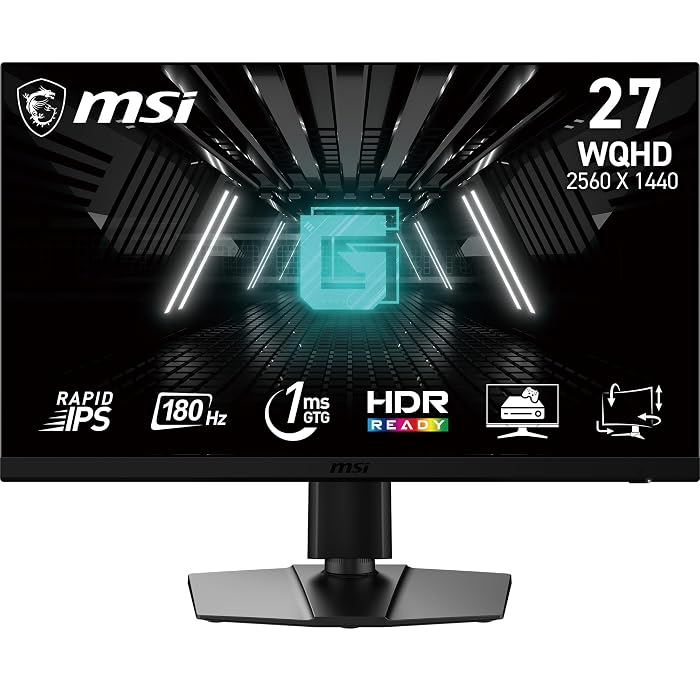
For shoppers asking if the MSI G272QPF E2 fits their daily needs, this 27-inch display stands out as a balanced, beginner-friendly upgrade. It hits the desktop sweet spot by combining crisp 1440p resolution with ultra-smooth 180Hz motion, supported by a versatile stand that easily adjusts for personal viewing comfort.
- Sharp 2560 x 1440 QHD resolution across an expansive 27-inch panel
- Fluid 180Hz refresh rate combined with a fast 1ms response time
- Versatile stand with dedicated height and tilt adjustments
- Built-in speakers and AMD Adaptive Sync to reduce clutter and screen tearing
Where to buy
at Amazon
Price taken from the listing on 18 Sep 2026 and it can change at any time. We may earn a commission if you buy through this link.
Pros
- Sharp 2560 x 1440 QHD resolution
- Fluid 180Hz refresh rate
- Fast 1ms response time
- Ergonomic height and tilt adjustments
- Built-in speakers for clutter-free audio
Cons
- Listing does not specify included video cables
- Conflicting listing notes on glossy versus matte finish
- Standard 300 cd/m2 brightness level
As Amazon Associates, we earn from qualifying purchases. This means we may receive a small commission at no extra cost to you if you click through and make a purchase.
Shopping for a desktop screen can be frustrating when product listings overflow with confusing acronyms, technical measurements, and aggressive marketing jargon. First-time buyers setting up a desk space and gift-givers shopping for loved ones often struggle to balance visual clarity, fluid motion, and comfortable physical ergonomics. The central challenge is securing sharp picture quality and smooth gameplay without requiring an advanced technical background to set it up. The MSI G272QPF E2 meets this need directly by combining a 27-inch 1440p display, fast refresh speeds, and an adjustable ergonomic stand into an accessible package.
Our verdict in this msi g272qpf e2 review is that this monitor represents an ideal entry point into high-resolution PC computing. By pairing a 2560 x 1440 pixel grid with a fluid 180Hz refresh rate, it delivers an immediate visual upgrade over traditional office screens while remaining straightforward to plug in and use.
MSI G272QPF E2 Features Explained
Crisp 1440p Visuals and 27-Inch Screen Space
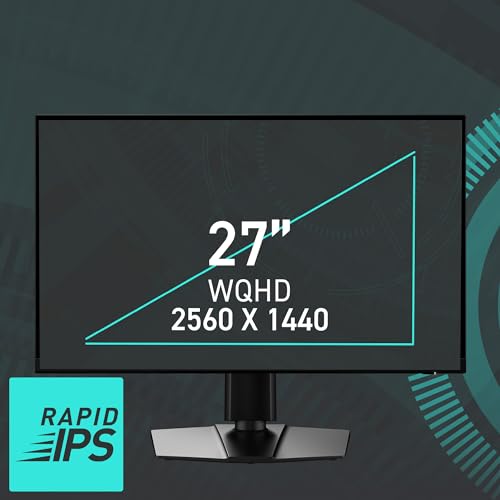
Screen resolution determines how clear and detailed images appear on your desk. A standard office monitor generally uses 1080p, which spreads around two million pixels across the screen. In contrast, the msi 27 inch 1440p monitor design of the MSI G272QPF E2 features a 2560 x 1440 resolution, commonly known as QHD or 2K. With nearly 3.7 million pixels packed into the 27-inch display, text looks noticeably sharper, game textures reveal finer details, and individual pixels remain invisible from normal sitting distances.
The 27-inch display with a 1.78:1 aspect ratio provides ample screen real estate to place two browser windows side by side without feeling cramped. While productivity-focused displays like the msi pro mp273q e14 also provide clean workspaces, this model balances functional multitasking with gaming responsiveness. Its flat screen profile ensures that horizontal lines and geometry look natural without the visual distortion that sometimes surprises new users on curved monitors.
Rapid IPS Panel Technology and Fluid 180Hz Motion
The panel technology inside a monitor dictates color quality and viewing comfort. The MSI G272QPF E2 uses a Rapid IPS liquid crystal panel, which is an upgraded version of traditional In-Plane Switching technology. Standard IPS displays are celebrated for accurate colors and wide 178-degree horizontal and vertical viewing angles, preventing colors from washing out when viewed from an angle. The msi rapid ips monitor construction speeds up liquid crystal state transitions, giving gamers rich colors alongside rapid visual response.
Refresh rate measures how many times per second the display draws a new frame. While standard home office screens update at 60Hz, the msi g272qpf e2 180hz capability updates up to 180 times each second. This extra speed makes mouse movements feel instant and eliminates jerky motion in games. Whether scrolling through fast web pages or following high-speed sports, the visual stream remains remarkably fluid, significantly reducing visual fatigue during prolonged sessions.
Responsive 1ms Gaming Speed and AMD Adaptive Sync
Pixel response time measures how fast individual pixels transition between colors. The msi g272qpf e2 response time is rated at 1 millisecond, preventing fast-moving objects from leaving blurry trails or visual ghosting across the screen. This rapid response is crucial for msi g272qpf e2 for gaming scenarios, where maintaining clear visual outlines during fast camera movements keeps action readable and sharp.
To eliminate visual artifacts, the display incorporates AMD Adaptive Sync. When running games, graphics cards output varying framerates that can fall out of sync with a monitor running at a static refresh speed, creating horizontal splits known as screen tearing. AMD Adaptive Sync synchronizes the monitor refresh rate directly with incoming frames from your graphics hardware in real time. This smooth synchronization works seamlessly whether connected to a desktop tower or a mobile gaming machine like the msi katana 15 b13vek-277us.
Flexible Stand Adjustments and Physical Build
Ergonomics play a vital role in daily computer comfort, particularly during long study or gaming sessions. Instead of a fixed plastic stand that requires stacking books underneath, the msi g272qpf e2 stand adjustments include a height-adjustable arm alongside tilt functionality. Users can easily raise or lower the display to match their natural eye level and tilt the frame backward or forward to eliminate room glare, promoting better posture.
The exterior chassis features super narrow bezels along the top and sides, maximizing the viewing area and providing a sleek, modern look on any desk. For users who prefer mounting their display on a dynamic desk arm or wall bracket, the cabinet includes standard VESA mounting points. While ultra-premium displays like the msi mag 272qp qd-oled x50 cater to niche enthusiasts, this model focuses on practical, sturdy everyday design with a manageable 9.2-inch stand depth.
Everyday Connectivity and Integrated Audio
Setting up the monitor involves minimal cable hassle. The rear connectivity panel includes two HDMI ports alongside a DisplayPort connection, allowing users to hook up a desktop computer and a game console simultaneously. The listing specifications also identify two component outputs. Having multiple video inputs makes toggling between daytime study or work duties and evening entertainment as simple as tapping the monitor control buttons.
For users working with compact desks, the monitor includes built-in speakers that play audio directly through the HDMI or DisplayPort connection without requiring external soundbars. MSI also integrates Eye Care technology to reduce blue light output and eliminate screen flickering. These features help keep eyes comfortable during extended work sessions, making the monitor a versatile centerpiece for mixed-use home offices.
Specs
The following msi g272qpf e2 27 specs detail the core technical measurements and hardware attributes provided by the manufacturer.
| Screen Size | 27 inches |
|---|---|
| Resolution | 2560 x 1440 (QHD) |
| Panel Technology | Rapid IPS LCD |
| Refresh Rate | 180Hz |
| Response Time | 1 millisecond |
| Aspect Ratio | 1.78:1 |
| Contrast Ratio | 1200:1 |
| Brightness | 300 cd/m2 |
| Viewing Angle | 178 degrees |
| Video Inputs | 2 x HDMI, DisplayPort |
| Physical Adjustments | Height adjustable arm, Tilt, VESA compatible |
| Dimensions (D x W x H) | 9.2"D x 24.14"W x 15.95"H |
As published by the manufacturer on the Amazon listing.
Buy it if
Best Use Cases
- First-time PC gamers seeking smooth 180Hz motion and sharp 1440p clarity without complex installation steps.
- Hybrid remote workers who need comfortable height adjustment and extra desktop space for side-by-side documents.
- College students living in compact rooms who benefit from integrated speakers and multiple inputs for a PC and console.
- Gift-buyers looking for a well-rounded 27-inch screen that upgrades a loved one from an aging 1080p display.
Think twice if
Before You Buy
Before ordering the MSI G272QPF E2, make sure your computer graphics hardware is capable of driving a 2560 x 1440 resolution at high frame rates. Rendering games at 1440p requires more graphical power than standard 1080p, and reaching the full 180Hz refresh rate typically requires using the DisplayPort connection or a modern high-bandwidth HDMI connection. If you plan to connect an older laptop with basic integrated graphics, it may only support lower refresh rates or standard 1080p output, so checking your computer video output specifications in advance is essential.
Buyers should also evaluate desk dimensions and listing specifications carefully. With a width of 24.14 inches and a stand depth of 9.2 inches, you will need adequate desktop surface area. Note that the listing details contain a slight contradiction regarding screen finish, referencing a glossy screen finish in one field while listing matte finish under picture enhancement technology. Furthermore, the listing does not specify which video cables come in the box, nor does it state the wattage of the integrated speakers, which provide basic utility sound rather than deep acoustic immersion.
Bottom Line
Finding the right desktop monitor does not need to be a stressful exercise in deciphering obscure technical terms. When deciding whether is msi g272qpf e2 worth it, the screen stands out as an outstanding value for first-time buyers and gift-givers alike. It successfully bridges the gap between basic office screens and complicated enthusiast hardware by combining a sharp 27-inch 1440p canvas, smooth 180Hz motion, and a comfortable ergonomic stand in a dependable package.
Whether you are outfitting a student bedroom, upgrading a work-from-home desk, or building your first gaming station, this display covers the essentials with confidence. Its Rapid IPS panel provides rich, consistent colors from wide angles, while AMD Adaptive Sync and 1ms response speeds keep games running tear-free and crisp, making the MSI G272QPF E2 an easy recommendation for any modern desktop setup.
FAQ
Is the MSI G272QPF E2 good for everyday office work as well as gaming?
Yes, this monitor works exceptionally well for daily productivity and office tasks. The 2560 x 1440 QHD resolution displays sharp text and provides enough screen space to view two full documents side by side comfortably. Additionally, the height-adjustable stand and built-in Eye Care features help reduce neck strain and eye fatigue during long workdays.
Can I adjust the height and tilt on this monitor?
Yes, the included stand features both a height-adjustable arm and tilt capability. You can raise or lower the screen to align with your eye level and tilt the display forward or backward to minimize reflections from room lighting. The monitor also supports standard VESA mounting if you choose to use an aftermarket arm.
Does the MSI G272QPF E2 have built-in speakers?
Yes, the listing states that this monitor includes integrated speakers. They receive sound directly through your connected HDMI or DisplayPort cables, which helps save desk space. However, the listing does not specify speaker wattage, meaning they are best suited for basic computer sounds and casual listening rather than cinematic gaming audio.
What video ports are available on the MSI G272QPF E2?
The monitor provides two HDMI ports alongside a DisplayPort input, as well as two component outputs noted in the product data. This port selection allows you to connect multiple devices, such as a desktop PC and a gaming console, and switch between them without swapping cables.
How does 1440p resolution compare to 1080p on a 27-inch screen?
On a 27-inch screen, 1440p resolution offers roughly seventy-eight percent more pixels than a standard 1080p display. This higher pixel density produces noticeably sharper text, clearer fine details in games and photos, and a larger workspace for multitasking without any visible pixel graining.
Where to buy
at Amazon
Price taken from the listing on 18 Sep 2026 and it can change at any time. We may earn a commission if you buy through this link.
More Monitors
See the section


Get our picks by email
New reviews and the prices we spotted, once a week.