MSI MAG Z790 Tomahawk Breakdown: What First-Time Builders Need to Know
Building a custom desktop computer can be an exciting milestone, but choosing the right motherboard is often the most intimidating step for beginners and gift-givers. The motherboard serves as the central nervous…
By Reid Wallace 8 min read




Our verdict
Scores are out of 10, based on listed specifications and buyer feedback — not from testing of our own
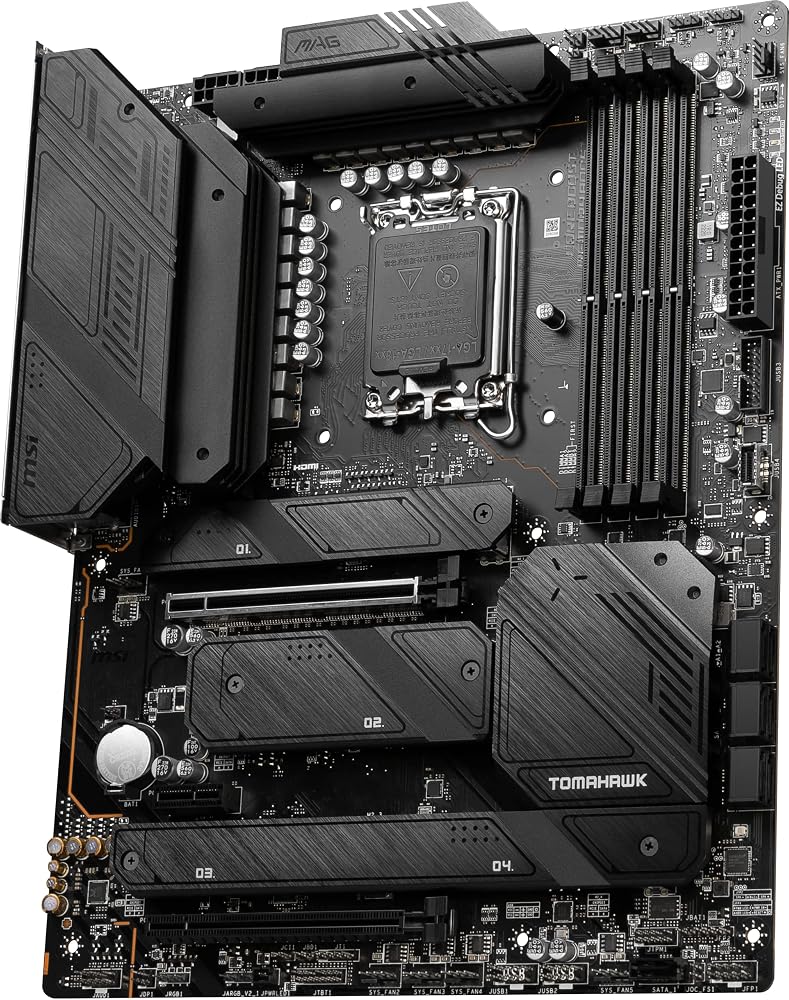
The MSI MAG Z790 Tomahawk WiFi is a rugged, beginner-friendly ATX motherboard that blends high-speed data architecture with dependable hardware cooling for modern Intel PC builds.
- Supports Intel 12th, 13th, and 14th Gen desktop processors via the LGA 1700 socket.
- Equipped with four high-speed DDR5 memory slots supporting up to 128 GB of RAM.
- Features integrated wireless connectivity through Wi-Fi 6E and Bluetooth 5.3 alongside 2.5Gbps wired LAN.
- Provides dedicated thermal protection using an Extended Heatsink Design and M.2 Shield Frozr cooling plates.
Where to buy
at Amazon
Price taken from the listing on 18 Sep 2026 and it can change at any time. We may earn a commission if you buy through this link.
Pros
- PCIe 5.0 graphics slot
- Supports up to 128 GB DDR5 RAM
- Built-in Wi-Fi 6E and Bluetooth 5.3
- Robust 16 plus 1 plus 1 power delivery
- Integrated M.2 Shield Frozr cooling
Cons
- ATX size incompatible with compact cases
- Does not support older DDR4 RAM
- Included accessory bundle not fully specified
As Amazon Associates, we earn from qualifying purchases. This means we may receive a small commission at no extra cost to you if you click through and make a purchase.
Building a custom desktop computer can be an exciting milestone, but choosing the right motherboard is often the most intimidating step for beginners and gift-givers. The motherboard serves as the central nervous system of the entire machine, physically housing the processor, connecting system memory, and routing electrical signals between every single component. When parts do not match, the entire computer simply fails to run. The MSI MAG Z790 Tomahawk WiFi solves this compatibility challenge by providing a sturdy, well-engineered ATX platform designed to support modern Intel computing hardware with minimal setup confusion.
Our research into this motherboard indicates that it hits a sweet spot for builders who want long-term reliability and modern connectivity without unnecessary complexity. Equipped with the Intel Z790 chipset, high-speed DDR5 memory slots, advanced power delivery, and built-in wireless networking, it provides a stable backbone for both high-end gaming and demanding productivity. If you want a dependable foundation that simplifies the assembly process while keeping modern performance options wide open, this motherboard offers an exceptionally balanced solution.
MSI MAG Z790 Tomahawk WiFi Features Explained
Processor Support and Socket LGA 1700
The central processing unit, or CPU, acts as the primary brain of any computer, and the motherboard must feature the exact physical socket designed to connect that specific chip. The MSI MAG Z790 Tomahawk WiFi features the Intel LGA 1700 socket, engineered specifically to host 12th and 13th Gen Intel Core, Pentium Gold, and Celeron processors, while also offering support for modern 14th Gen Intel Core desktop processors. This wide compatibility makes assembling an msi mag z790 tomahawk beginner build much less intimidating, as builders have the freedom to choose from an extensive range of compatible processors depending on their personal budget and performance goals.
Selecting an msi mag z790 tomahawk intel 14th gen configuration ensures that the system benefits from Intel’s hybrid architecture, which combines high-performance cores with high-efficiency cores for smooth multitasking. While some shoppers might compare different manufacturer platforms like the msi mag x870 tomahawk, this Intel-based Z790 board focuses on straightforward hardware installation and robust BIOS stability. First-time builders can drop in an LGA 1700 processor with confidence, knowing the motherboard provides full hardware communication across every compute thread.
DDR5 Memory Compatibility and Speed
Random access memory, or RAM, serves as the short-term working memory of your computer, holding open applications, browser tabs, and active game data for instantaneous access. Checking msi mag z790 tomahawk ddr5 compatibility is an essential step because DDR5 represents the modern memory standard, delivering substantially higher data bandwidth and efficiency than older DDR4 generations. This motherboard features four dual-channel DDR5 slots capable of supporting up to 128 GB of total memory, with support for overclocked memory frequencies reaching up to 7200 plus(OC) MHz.
MSI integrates its proprietary Memory Boost technology into the physical circuit traces of the board, isolating memory transmission lines to protect sensitive data signals from electromagnetic interference. This clean electronic routing helps maintain rock-solid system stability whether you are running demanding simulation games or editing large multimedia files. For gift-givers, choosing a motherboard with four DDR5 memory slots is a major advantage because the user can start with a pair of memory modules today and still have two open slots available for future memory expansion.
Robust Power Delivery and Voltage Regulation
Modern desktop processors require smooth, consistent electrical current to run safely, especially when handling intense computing tasks like modern 3D gaming or video encoding. The msi mag z790 tomahawk power delivery architecture utilizes an enhanced 16 plus 1 plus 1 Duet Rail Power System backed by dual 8-pin CPU power connectors. In practical terms, these power phases act like a heavy-duty electrical filtration network, transforming incoming electrical currents from your power supply into steady, finely tuned voltages that prevent sudden hardware brownouts.
Paired with MSI’s Core Boost technology, this power delivery system ensures that high-core-count processors receive clean electrical current without voltage dips that could cause abrupt computer crashes. While premium enthusiast options such as the msi mpg z790 carbon wifi cater to extreme manual overclockers, the Tomahawk provides more than enough clean power stability for standard desktop computing, streaming, and intense gaming workloads.
Thermal Design and M.2 Shield Frozr Cooling
Whenever high-performance computer parts operate under load, they naturally produce thermal energy, and unmanaged heat causes components to slow themselves down to prevent damage. The msi mag z790 tomahawk thermal design counteracts heat buildup through an Extended Heatsink Design that covers the primary voltage regulator modules around the CPU socket. These thick metal heatsinks passively absorb thermal energy and transfer it into the natural airflow inside your computer case, ensuring key motherboard components maintain safe operating temperatures.
High-speed solid-state storage drives also generate noticeable heat during sustained file transfers, which can lead to thermal throttling and sluggish drive performance. MSI addresses this issue by integrating M.2 Shield Frozr thermal plates directly onto the motherboard’s storage slots. These integrated metal covers clamp down over your M.2 solid-state drives with pre-applied thermal pads, dissipating drive heat efficiently and keeping your storage drives running at their maximum rated speeds during massive game installs or sustained file copying.
High-Speed Ports and Network Connectivity
Having a versatile selection of physical ports and network adapters is essential for connecting monitors, accessories, audio gear, and the internet, and the msi mag z790 tomahawk ports explained here provide everything a modern desktop needs. The rear interface offers 15 total connection points, including an ultra-fast USB 3.2 Gen 2×2 Type-C port, multiple USB 3.2 Gen 2 ports, and 10 USB 2.0 connections for keyboards, mice, and peripherals. It also includes HDMI and DisplayPort outputs for integrated processor graphics, an optical S/PDIF digital audio output, and seven SATA ports for traditional storage drives.
Wireless networking is equally streamlined, making the initial msi mag z790 tomahawk wifi setup straightforward for builders who do not have an Ethernet jack located near their desk. The board comes with integrated Wi-Fi 6E and Bluetooth 5.3 hardware, allowing immediate connection to high-speed wireless networks and wireless game controllers without buying separate adapter cards. For those with direct wired access, an onboard 2.5Gbps LAN port provides low-latency wired networking, while a primary PCIe 5.0 expansion slot ensures full readiness for modern graphics cards.
Specs
| Processor Socket | LGA 1700 |
|---|---|
| Chipset Type | Intel Z790 |
| Compatible Processors | 12th, 13th, and 14th Gen Intel Core, Pentium Gold, Celeron |
| Memory Technology | DDR5 (Up to 7200+ OC MHz) |
| Memory Slots & Maximum RAM | 4 Slots, Up to 128 GB Maximum Size |
| Graphics Card Interface | PCI Express 5.0 |
| Storage Expansion | Lightning Gen 4 x4 M.2, 7 SATA Ports (Serial ATA/600) |
| Wireless & Wired Networking | Wi-Fi 6E, Bluetooth 5.3, 2.5Gbps LAN |
| Audio & Video Ports | HDMI, DisplayPort, Optical S/PDIF Audio |
| Form Factor & Platform | ATX Form Factor, Windows 11 Compatible |
As published by the manufacturer on the Amazon listing.
Buy it if
Best Use Cases
- Building a dedicated desktop computer with an msi mag z790 tomahawk for gaming setup that pairs modern graphics cards with fast DDR5 system memory.
- Assembling a dependable home workstation running Windows 11 with multi-monitor outputs and ample high-speed USB storage connections.
- Constructing a future-ready PC build for a student or family member who needs wireless Wi-Fi 6E connectivity without running network cables through the house.
- Configuring a multi-drive desktop storage system utilizing seven SATA connections alongside high-speed Lightning Gen 4 M.2 solid-state drives.
Think twice if
Before You Buy
Before ordering the MSI MAG Z790 Tomahawk WiFi, you must verify that your computer case is designed to accept standard ATX motherboards. ATX boards measure approximately 12 inches by 9.6 inches and will not fit inside smaller micro-ATX or mini-ITX computer enclosures. Furthermore, builders comparing this board to previous platforms like the msi mag b550 should note that this Z790 board exclusively accepts Intel LGA 1700 processors and DDR5 memory modules, meaning older DDR4 memory sticks and AMD processors cannot be transferred into this system.
The product listing confirms the presence of robust hardware features like Wi-Fi 6E, Bluetooth 5.3, and heavy-duty M.2 Shield Frozr heatsinks, but the listing does not specify the exact number of SATA data cables or mounting hardware accessories included inside the retail box. When planning your system power supply, ensure that your chosen unit includes dual 8-pin CPU power leads to properly feed the motherboard’s 16 plus 1 plus 1 power delivery architecture, guaranteeing optimal stability from your very first boot.
Bottom Line
When asking whether the is msi mag z790 tomahawk worth it question holds true for your upcoming build, the motherboard’s balanced specifications provide a clear and positive answer. It eliminates common beginner frustrations by offering comprehensive processor support, exceptional onboard cooling, and rock-solid power delivery on an industry-standard ATX layout. By removing guesswork around memory and processor compatibility, it allows first-time builders and gift-givers to focus on assembling a reliable, high-performance desktop without unnecessary complications.
With high-speed connectivity spanning PCIe 5.0 graphics readiness, modern DDR5 memory support, and integrated Wi-Fi 6E, the MSI MAG Z790 Tomahawk WiFi delivers the essential tools needed for a modern PC build. It provides the durability and expandability required to keep your desktop computer running smoothly for years of gaming and productivity ahead.
FAQ
Does the MSI MAG Z790 Tomahawk WiFi support DDR4 RAM?
No, this motherboard is designed exclusively for DDR5 memory technology across its four RAM slots and is physically incompatible with older DDR4 memory sticks.
Can I use an Intel 14th Gen processor with this motherboard?
Yes, the motherboard features the Intel LGA 1700 socket and Intel Z790 chipset, which support 12th, 13th, and 14th Gen Intel Core desktop processors.
How many storage drives can I connect to this board?
The board provides extensive storage connectivity, including high-speed Lightning Gen 4 x4 M.2 slots for NVMe solid-state drives and seven standard SATA ports for traditional hard drives and SSDs.
Do I need to buy a separate Wi-Fi adapter for wireless internet?
No, the motherboard features integrated Wi-Fi 6E and Bluetooth 5.3 hardware, allowing you to connect to wireless networks and Bluetooth peripherals right out of the box.
What operating system is recommended for this motherboard?
The product specifications list Windows 11 as the supported operating system platform, ensuring full compatibility with Intel’s modern processor architecture.
Where to buy
at Amazon
Price taken from the listing on 18 Sep 2026 and it can change at any time. We may earn a commission if you buy through this link.
More PC Components & Storage
See the section


Get our picks by email
New reviews and the prices we spotted, once a week.