MSI Venture 16 AI Business Laptop: A Simple Everyday Buyer’s Guide
Shopping for a modern home office computer can quickly turn frustrating when confronted with confusing technical jargon, complex hardware specifications, and artificial intelligence buzzwords. Everyday shoppers, remote professionals, and family gift-givers often…
By Jasmine Norris 9 min read


Our verdict
Scores are out of 10, based on listed specifications and buyer feedback — not from testing of our own
The MSI Venture 16 AI is a comfortable, modern desktop replacement built to streamline routine office software, web browsing, and multimedia streaming. It eliminates everyday computer slowdowns by pairing a high-end processor with generous system memory, making it an appealing option for non-technical buyers seeking future-ready capabilities in an approachable package.
- Spacious 16-inch WUXGA touchscreen with a tall 16:10 aspect ratio and anti-glare finish.
- Speedy 16-core Intel Core Ultra 9 processor with integrated AI processing capabilities.
- Generous 32GB DDR5 memory and 1TB solid-state drive for effortless multitasking.
- Practical productivity extras including a dedicated Copilot key, numeric keypad, and 180-degree lay-flat hinge.
Where to buy
at Amazon Prime
Price taken from the listing on 18 Sep 2026 and it can change at any time. We may earn a commission if you buy through this link.
Pros
- Responsive 16-inch WUXGA touchscreen with anti-glare finish
- Fast 16-core Intel Core Ultra 9 processor
- Spacious 32GB DDR5 RAM for smooth multitasking
- Fast 1TB SSD for quick boot times
- Convenient 180-degree lay-flat hinge with Flip-n-Share
Cons
- Box opened and resealed for configuration upgrades
- Integrated graphics not designed for high-end gaming
- Standard 720p webcam resolution
As Amazon Associates, we earn from qualifying purchases. This means we may receive a small commission at no extra cost to you if you click through and make a purchase.
Shopping for a modern home office computer can quickly turn frustrating when confronted with confusing technical jargon, complex hardware specifications, and artificial intelligence buzzwords. Everyday shoppers, remote professionals, and family gift-givers often just want a dependable machine that offers plenty of screen real estate and fast performance without unnecessary setup headaches. The MSI Venture 16 AI solves this dilemma by combining an intuitive 16-inch touchscreen display with an advanced Intel Core Ultra 9 processor, giving users a spacious digital canvas for managing daily spreadsheets, web browsing, family photos, and video calls without feeling complicated.
In our comprehensive msi venture 16 ai review, this full-sized portable computer proves to be an exceptionally capable everyday workhorse for those who prioritize smooth multitasking and direct touchscreen control over specialized 3D gaming graphics. While buyers should understand that the configuration comes in an opened and resealed package to facilitate its memory upgrade, the inclusion of a massive 32GB memory capacity and a quick solid-state drive ensures that this machine remains responsive, fluid, and reliable for years of routine household or business tasks.
MSI Venture 16 AI Features Explained
Intel Core Ultra 9 Processing and Neural Architecture
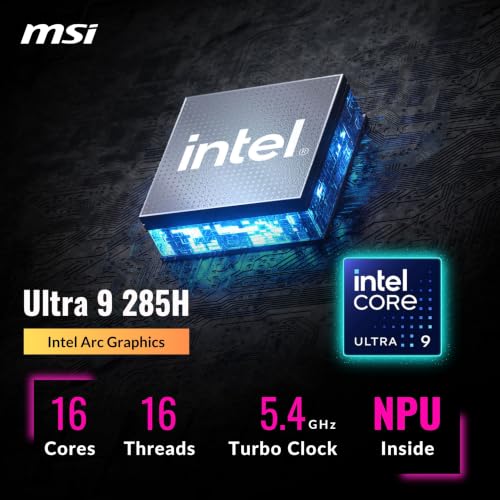
At the center of this machine is the msi venture 16 ai intel core ultra 9 285H processor, a cutting-edge engine built with 16 distinct computing cores, 16 threads, and peak clock speeds reaching up to 5.4 GHz. For anyone unfamiliar with processor terminology, computing cores act like individual workers in an office; having 16 cores means your computer can assign background security scans, file downloads, and running applications to separate workers at the exact same time without stalling your primary work. In addition to raw processing power, the chip incorporates an integrated neural processing unit capable of up to 13 trillion operations per second, specifically designed to handle intelligent software features without draining system efficiency.
Visual tasks are managed by integrated Intel Arc Graphics, which shares system memory to render crisp images, web pages, and video streams. Because graphics rendering is integrated directly into the central processor rather than handled by a power-hungry separate graphics card, the laptop maintains cooler and quieter operation during long business days. If you are comparing this design against high-powered gaming rigs like the msi katana 15 b13vek-277us, keep in mind that the Venture series is tailored specifically for office productivity, media enjoyment, and creative office workflows rather than competitive 3D gaming.
16-Inch WUXGA Touchscreen and Lay-Flat Hinge
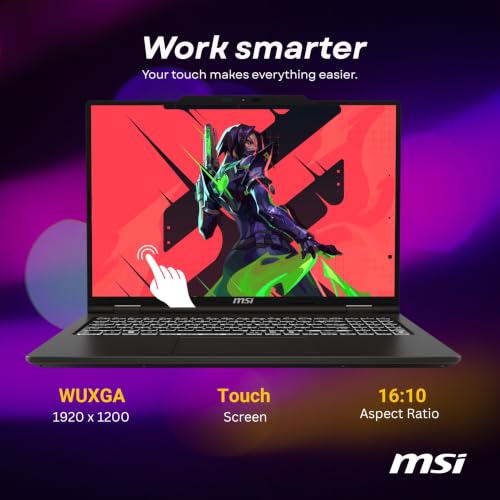
The visual focal point of this model is its generous 16-inch WUXGA display featuring a resolution of 1920 by 1200 pixels. This screen adopts a modern 16:10 aspect ratio, which provides extra vertical screen space compared to standard widescreen televisions and older 16:9 laptops. That extra vertical height means you can view more rows of an accounting ledger, read more paragraphs of an article, or view stacked application windows without constantly rolling a mouse wheel. An anti-glare coating helps disperse reflections from overhead office lights and sunny windows, protecting your eyes during lengthy computing sessions.
Operating as a full-featured msi venture 16 ai touchscreen laptop, this computer allows you to tap buttons, zoom in on images, and scroll down web pages directly with your fingers just like you would on a mobile phone or tablet. MSI also includes a flexible 180-degree lay-flat hinge paired with a Flip-n-Share utility. With a single click, you can invert the orientation of the screen while laying the laptop completely flat on a table, making it effortless to share presentations, vacation itineraries, or digital documents with clients or family members seated across from you.
Substantial Memory and Solid-State Storage
To keep daily operations running smoothly without hesitation, this computer is equipped with 32GB of high-speed DDR5 RAM. Computer memory functions as a temporary electronic workspace where the machine holds all currently active browser tabs, software programs, and open files. Having 32GB of modern DDR5 memory means you can keep dozens of browser windows open, listen to high-resolution music, and edit large documents simultaneously without running into low-memory warnings or annoying software crashes. Because this unit receives a professional msi venture 16 ai memory upgrade before arrival, buyers benefit from heavy-duty multitasking capacity straight out of the packaging.
Permanent file storage is handled by a 1TB solid-state drive that operates up to fifteen times faster than traditional spinning mechanical hard drives. Solid-state technology stores data on electronic flash memory, enabling Windows to boot in seconds, software applications to launch almost instantly, and large image folders to open without waiting. The absence of moving internal parts also means the drive operates in complete silence while offering greater physical resilience against the small bumps and vibrations common on home desks.
Typing Comfort, Numeric Keypad, and DTS Audio
Comfortable input hardware is vital for anyone who spends hours typing correspondence or balancing household finances. The Venture 16 features a full-sized keyboard illuminated with white backlighting, allowing you to clearly see keycaps in dimly lit rooms or late-night work environments. The deck incorporates a dedicated numeric keypad on the right side, which is an invaluable feature for bookkeeping, spreadsheet entry, and math calculations that avoids the tedium of using the horizontal number row. Despite offering a 16-inch screen and full keyboard, the chassis weighs 4.2 pounds with an overall thickness of 0.87 inches, keeping it easy to move between home rooms.
Audio playback is powered by built-in stereo sound tuned with DTS audio technology, designed to provide clear vocal clarity for video conferences, instructional seminars, and streaming television shows. A front-facing 720p HD webcam captures your image for business meetings or calls with distant relatives. While high-end digital creation workstations such as the msi vector 16 hx ai rtx 5080 focus on complex rendering tasks, the audio-visual hardware on the Venture is tuned specifically for clean everyday communication and personal entertainment.
Modern Wireless Networking and Windows Copilot Tools
Reliable connectivity is essential in busy homes, and this laptop includes Wi-Fi 6E along with Bluetooth 5.3 wireless capabilities. Wi-Fi 6E gives the computer access to modern wireless channels, which helps avoid interference from other smartphones, streaming boxes, and smart appliances competing for bandwidth on your home router. In addition, an integrated memory card slot allows photographers and hobbyists to transfer pictures directly from digital cameras without needing separate USB conversion adapters.
The laptop comes pre-installed with Windows 11 Home and incorporates intuitive msi venture 16 ai copilot features accessible with a single press of the dedicated Copilot key on the keyboard. This dedicated button opens an intelligent assistant that helps summarize long web articles, draft business emails, outline project ideas, or adjust operating system settings. The combination of Windows 11 accessibility tools and automated Copilot utilities makes navigating this modern computer straightforward, even for first-time owners or gift recipients who feel intimidated by new technology.
Specs
| Processor | Intel Core Ultra 9 285H (16 Cores, 16 Threads, Up to 5.4 GHz, 24 MB Cache) |
|---|---|
| Graphics | Integrated Intel Arc Graphics (Shared Video Memory) |
| System Memory | 32GB DDR5 RAM |
| Storage Drive | 1TB Solid State Drive (SSD) |
| Screen Display | 16-inch WUXGA (1920 x 1200) Touchscreen, 16:10 Ratio, Anti-Glare |
| Operating System | Windows 11 Home |
| Wireless Networking | Wi-Fi 6E and Bluetooth 5.3 |
| Camera and Sound | 720p HD Front Webcam, DTS Audio Technology |
| Physical Dimensions | 15.56" L x 9.66" W x 0.87" Thickness; 4.2 Pounds |
| Hardware Additions | Dedicated Copilot Key, Backlit Keyboard, Numeric Keypad, Memory Card Slot, 180° Lay-Flat Hinge |
As published by the manufacturer on the Amazon listing.
Buy it if
Best Use Cases
- Managing complex home office budgets and spreadsheets using the integrated numeric keypad and expansive 32GB memory capacity.
- Sharing visual presentations or collaborative project notes across a desk using the 180-degree lay-flat hinge and Flip-n-Share screen feature.
- Enjoying relaxed web browsing and family media streaming with the responsive 16-inch touchscreen display.
- Drafting correspondence, research papers, and school projects with instant assistance from the physical Windows Copilot key.
Think twice if
Before You Buy
Before purchasing the msi venture 16 ai for business tasks or home use, it is important to understand how this specific hardware bundle is packaged. The seller listing explains that this laptop features an upgraded hardware configuration, which means the original factory box is opened and resealed prior to shipment to install the advertised 32GB of DDR5 memory and 1TB solid-state drive. Each upgraded computer undergoes professional inspection and testing to verify system health, but shoppers who require a factory-sealed original retail box should be aware of this process before ordering.
Prospective buyers should also review the practical hardware boundaries of this configuration. The laptop utilizes integrated Intel Arc graphics rather than an independent dedicated graphics card, meaning it is not engineered for heavy modern 3D gaming or intense workstation animation. Additionally, the unit does not include an internal optical drive for playing physical DVD discs, and while Wi-Fi 6E, Bluetooth 5.3, and a memory card slot are clearly provided, the listing does not specify the exact battery life runtime or the specific count of external USB ports.
Bottom Line
Deciding whether the msi venture 16 ai is worth it comes down to what you expect from an everyday computer. By uniting a modern Intel Core Ultra 9 processor with an expansive 16-inch touchscreen and 32GB of responsive memory, this laptop effortlessly overcomes the sluggish loading times, limited screen space, and multitasking freezes that often frustrate home computer users. Its intuitive touch interface and 180-degree lay-flat screen provide welcome flexibility whether you are sitting at an office desk or working from a kitchen island.
For first-time laptop purchasers seeking modern performance and gift-givers wanting to provide a capable machine that will not feel outdated in a couple of years, the Venture 16 strikes an excellent balance. It packages robust computing power, practical everyday comforts like a backlit keyboard with numeric keypad, and friendly Windows Copilot tools into a straightforward machine ready to handle daily workloads.
FAQ
How does the touchscreen function on this laptop
The 16-inch display operates just like a smartphone or tablet screen, allowing you to tap buttons, pinch to zoom on photos, and swipe through web articles using your fingers. You can freely switch between using standard mouse and keyboard inputs and touching the display directly whenever it feels most convenient.
What advantages does the Intel Core Ultra 9 processor provide
The Intel Core Ultra 9 285H provides 16 separate computing cores that distribute software tasks efficiently, preventing system slowdowns when multiple applications are active. It also contains dedicated neural processing architecture capable of up to 13 trillion operations per second to support modern artificial intelligence features smoothly.
Why does the computer arrive in an opened and resealed box
The listing explains that the laptop packaging is opened and resealed by professional technicians to install custom hardware upgrades, specifically expanding the memory to 32GB DDR5 RAM and adding the 1TB solid-state drive. The computer is inspected and tested during this upgrade process to ensure reliable operation.
Can this laptop handle modern video games
This laptop uses integrated Intel Arc graphics rather than a dedicated high-power gaming graphics card. While it can easily handle everyday casual games, streaming media, and web-based entertainment, it is designed primarily for home office productivity, personal management, and business applications rather than demanding high-frame-rate 3D games.
What should I expect when completing the initial computer setup
Following a standard msi venture 16 ai setup guide is very simple: you connect the power adapter, press the power button, and follow the clear on-screen Windows 11 Home prompts. The system walks you through selecting your language, connecting to your Wi-Fi network, and signing into a Microsoft account, after which your apps, backlit keyboard, and Copilot tools are ready for daily use.
Where to buy
at Amazon Prime
Price taken from the listing on 18 Sep 2026 and it can change at any time. We may earn a commission if you buy through this link.
More Computers & Laptops
See the section


Get our picks by email
New reviews and the prices we spotted, once a week.