PXN Speedy Controller Review: The Simple Gamepad for iPhone
Mobile touchscreens work adequately for casual puzzle games, but navigating fast-paced action titles or complex racing tracks with virtual on-screen buttons often leads to cramped hands, blocked screen visibility, and missed inputs.…
By Karen Barnett 9 min read




Our verdict
Scores are out of 10, based on listed specifications and buyer feedback — not from testing of our own
The PXN Speedy delivers a comfortable, console-style experience for iOS players who want straightforward setup and dependable gaming performance without dealing with complex software remapping. It pairs authentic tactile controls with official platform approval, ensuring that popular mobile adventures handle with precision and comfort.
- Official Apple MFi certification guarantees immediate plug-and-play performance with supported App Store games.
- Integrated 550mAh lithium battery delivers up to 20 hours of continuous wireless gameplay on a single charge.
- Telescopic mounting clip securely attaches smartphones ranging from 4 inches to 6 inches directly above the gamepad.
- Dedicated companion app lets users monitor battery levels, inspect button responsiveness, and view supported titles.
Where to buy
at Amazon Prime
Price taken from the listing on 18 Sep 2026 and it can change at any time. We may earn a commission if you buy through this link.
Pros
- Official Apple MFi certified for iOS compatibility
- Up to 20 hours of battery life
- Includes adjustable telescopic phone clip
- Pressure-sensitive face buttons and triggers
- Free companion app for testing and battery status
Cons
- Phone clip limited to 6-inch maximum width
- Listing does not specify charging cable type
- Designed strictly for Apple devices without Android support
As Amazon Associates, we earn from qualifying purchases. This means we may receive a small commission at no extra cost to you if you click through and make a purchase.
Mobile touchscreens work adequately for casual puzzle games, but navigating fast-paced action titles or complex racing tracks with virtual on-screen buttons often leads to cramped hands, blocked screen visibility, and missed inputs. For newcomers stepping into mobile gaming or family members shopping for a reliable holiday present, bridging the gap between tactile console gaming and touch-based smartphones can be confusing. The PXN Speedy solves this friction by bringing a full-sized, traditional gamepad experience directly to iOS devices, giving players dedicated physical thumbsticks, responsive face buttons, and comfortable hand grips.
Our verdict is that this wireless gamepad represents an approachable, stress-free upgrade for iPhone and iPad users who desire a classic console feel without complicated configuration. Because it carries official authorization from Apple, it pairs cleanly and operates seamlessly across supported App Store titles right out of the box, making it an excellent match for beginner players who want plug-and-play simplicity.
PXN Speedy Features Explained
Apple MFi Certification and Direct Game Compatibility
One of the greatest challenges for first-time mobile gamers is ensuring that an external accessory actually communicates with their favorite titles. The PXN Speedy is an official apple mfi certified controller, which means it carries direct hardware authorization from Apple and features an advanced core derived from Apple’s original chip design. In practical terms, this certification eliminates the frustrating third-party screen-mapping apps and manual button assignments that plague generic mobile controllers. When you boot up compatible titles such as Call of Duty, Fortnite, Minecraft, Real Racing 3, Grand Theft Auto Vice City, or Oceanhorn, the game recognizes the hardware instantly, displaying proper button prompts and providing immediate control.
This seamless integration makes the gamepad especially friendly for gift recipients who may not possess deep technical expertise. Unlike traditional home console controllers such as the playstation 5 controller anniversary edition that are engineered primarily around a television ecosystem, this controller is tailored expressly for iOS standards. Operating on iOS 7, iOS 8, or later versions, the device communicates with modern handsets spanning the iPhone 11 series through the iPhone 14 lineup, as well as iPad tablets and Apple TV hardware, delivering reliable performance without perceptible lag or input latency.
Extended Button Layout and Pressure-Sensitive Controls
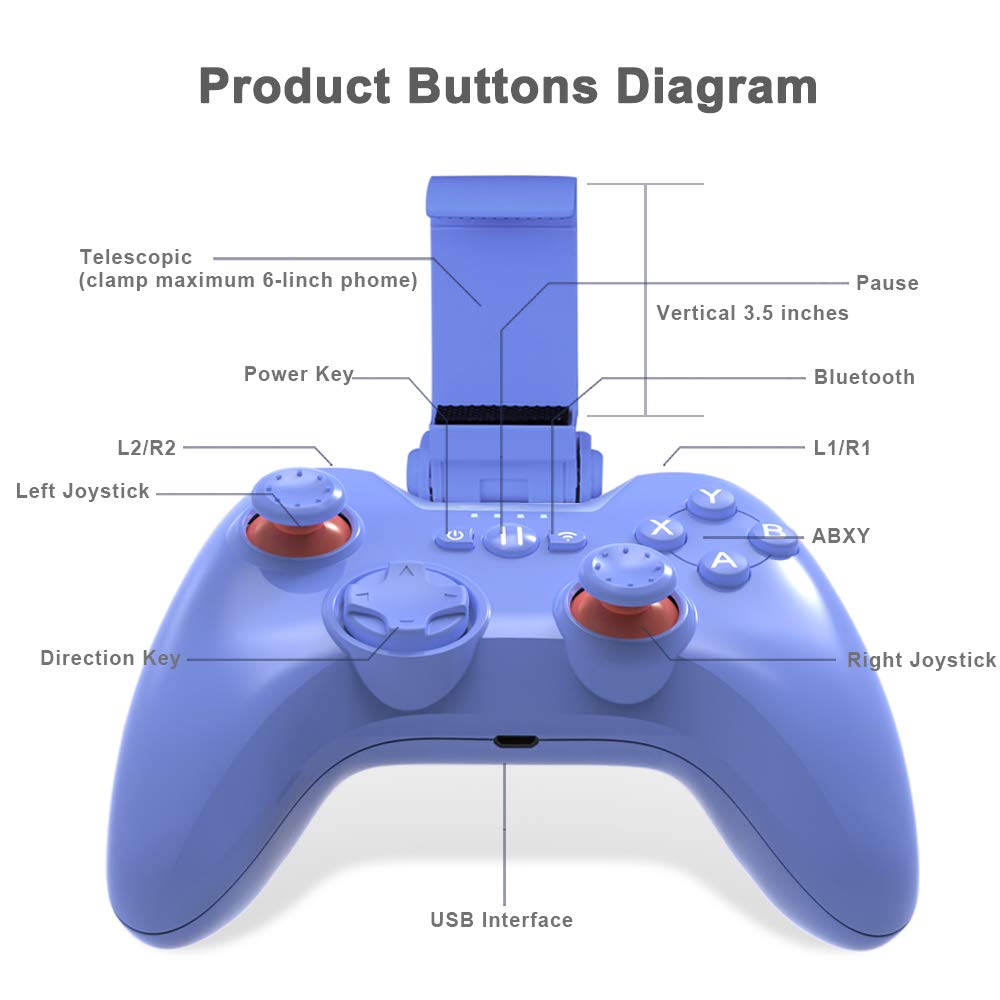
While console players might be familiar with home hardware like the pink dualsense controller ps5, this mobile gamepad adapts those familiar ergonomics for handheld Apple devices. The physical architecture of the pxn 6603 mfi game controller follows Apple’s extended layout standard, supplying a total of 16 buttons for comprehensive game input. Players receive four primary face buttons, a traditional directional pad, two clickable analog thumbsticks, four shoulder controls comprising two left and two right shoulder buttons and triggers, and a central pause button. This layout mirrors modern home consoles, ensuring that anyone accustomed to console gaming feels instantly at home without having to adapt their finger placement.
Beyond the sheer number of inputs, the controller incorporates pressure-sensitive mechanisms across its face buttons, directional pad, analog sticks, and shoulder triggers. In racing simulations like Real Racing 3 or action titles like DEAD TRIGGER 2 and Implosion – Never Lose Hope, pressure sensitivity allows you to feather the throttle, brake progressively, or alter character movements based on how firmly you press a control. Combined with integrated rumble feedback and a specialized textured finish on the grip surface, the gamepad prevents slipping during heated matches while maintaining comfortable hand ergonomics.
Telescopic Phone Mount for Handheld Play
Gaming on a phone often requires propping the screen up against a coffee mug or resting it awkwardly on a desk. The pxn speedy gamepad with phone clip eliminates this hassle by including a matched, loadable telescopic clamp that secures your mobile device directly to the chassis of the controller. This mount creates a unified handheld gaming system reminiscent of dedicated portable consoles, distributing weight comfortably across your palms so you can play on a sofa, in bed, or during daily transit.
The telescopic mechanism adjusts to accommodate smartphones measuring between 4 inches and 6 inches across. Whether you are using a compact handset like the iPhone 12 mini or iPhone 13 mini, or standard-sized models like the iPhone 11, iPhone 12, iPhone 13, or iPhone 14, the spring-loaded clamp keeps the device firmly locked in position. Because the clip is loadable and detachable, players who prefer resting an iPad on a table or playing on an Apple TV can easily unclip the phone bracket and use the controller as a standalone gamepad.
High-Capacity Rechargeable Battery
Portable mobile accessories require dependable power reserves so that sessions are not cut short unexpectedly. The pxn speedy battery life is backed by an internal 550mAh lithium battery engineered for high electrical efficiency. On a full charge, the controller delivers up to 20 hours of continuous wireless playtime, providing ample endurance for long weekend gaming marathons or multi-day travel without needing an immediate recharge.
When power does eventually deplete, recharging the battery back to full capacity takes approximately 2 hours. This rapid turnaround time ensures that downtime remains minimal between gaming sessions. Because the battery is built directly into the gamepad housing, users never have to purchase disposable alkaline cells, keeping maintenance simple and convenient over the lifespan of the device.
PXN Game App Integration
For beginners who appreciate visual confirmation of their hardware settings, the manufacturer offers a dedicated utility called the PXN Game app, downloadable directly from the official Apple App Store. This companion application serves as an interactive dashboard where users can check the real-time Bluetooth connection status between the controller and their iOS device.
Additionally, the app allows players to inspect the exact remaining battery percentage of the handle, test individual button responses on a visual schematic, and browse an organized list of supported games including titles like Pako 2 and NBA 2K20. Having this inspection tool helps eliminate guesswork, offering peace of mind to new users who want to confirm that every trigger and analog stick is functioning properly before jumping into a multiplayer match.
Specs
| Product Model | PXN-6603 (PXN Speedy) |
|---|---|
| Hardware Platform | Smartphone, Television |
| Compatible Operating System | iOS 7, iOS 8 or later |
| Compatible Devices | iPhone, iPad, Apple TV |
| Total Button Quantity | 16 Buttons (Extended MFi Layout) |
| Input Features | Pressure-Sensitive Face Buttons, D-Pad, Sticks, and Triggers |
| Battery Capacity | 550mAh Lithium Battery |
| Battery Life | Up to 20 Hours |
| Recharge Time | Approximately 2 Hours |
| Phone Clip Compatibility | 4-inch to 6-inch smartphones |
| Color Finish | Blue |
As published by the manufacturer on the Amazon listing.
Buy it if
Best Use Cases
- Transforming an iPhone into a handheld console for competitive shooters like Call of Duty and Fortnite without blocking the display.
- Navigating expansive racing simulators like Real Racing 3 where pressure-sensitive analog triggers grant smooth throttle modulation.
- Enjoying relaxed living-room gaming sessions on an Apple TV display without purchasing a separate home console.
- Traveling on long road trips or flights where the 20-hour battery life and secure phone clamp allow portable play anywhere.
- Verifying button inputs and discovering compatible App Store titles effortlessly through the dedicated companion app.
Think twice if
Before You Buy
Before making a purchase, it is important to understand device sizing and platform boundaries. Reviewing the official pxn speedy specs reveals broad compatibility across Apple’s hardware catalog, but the included telescopic clamp is engineered specifically to accommodate mobile phones measuring between 4 inches and 6 inches in display size. While standard models like the iPhone 11, iPhone 12, iPhone 13, and iPhone 14 fit securely, larger devices such as the iPhone 14 Plus or iPhone 14 Pro Max may push the dimensional limits of the bracket, particularly if wrapped in thick shockproof cases. For desktop tablet gaming with an iPad, the controller operates wirelessly as a standalone unit without utilizing the clamp. While dedicated console accessories like the game sir g7 pro focus on wired PC and console gaming, the PXN Speedy is developed strictly around Apple’s wireless mobile environment.
Buyers should also note what the manufacturer listing omits. While the package contains the blue controller and the matched phone clip, the listing does not specify the exact type or length of the charging cable included, nor does it specify whether an AC charging wall adapter comes in the box. Furthermore, the product data does not specify support for Android smartphones, Windows personal computers, or traditional home game consoles, meaning this gamepad is designed exclusively for the Apple iOS family.
Bottom Line
The pxn speedy controller ios combination offers a dependable, beginner-friendly avenue into mobile gaming for anyone tired of slippery on-screen controls. With its official Apple MFi authorization, extended 16-button layout, and pressure-sensitive inputs, the gamepad turns supported App Store titles into rich, tactile experiences that feel close to traditional console play.
Whether you are shopping for a child who loves Minecraft, a teenager competing in Call of Duty on their phone, or yourself seeking comfortable Apple TV navigation, this package delivers impressive endurance with its 20-hour battery life and bundled phone mount. It takes the guesswork out of mobile gaming accessories and provides straightforward, reliable fun right out of the box.
FAQ
How do you connect the controller to an iPhone using the PXN Speedy setup guide?
Setting up the gamepad is straightforward thanks to its native Apple compatibility. Simply power on the controller, open the Bluetooth menu within your iPhone settings, and select the device from the list of available wireless accessories. Once paired, you can launch the free PXN Game companion app from the App Store to test button inputs and verify connection stability before starting your favorite games.
Does the controller offer PXN Speedy Apple TV compatibility?
Yes, the listing confirms hardware compatibility for television setups running iOS or tvOS software, including Apple TV. Because the device adheres to Apple’s MFi standard, it pairs wirelessly to your Apple TV box, allowing you to control supported living-room games and media menus directly from your couch without needing a phone attached.
Is the PXN Speedy worth it for casual mobile players?
When asking is pxn speedy worth it, the answer depends on your gaming habits, but if you regularly play action games, shooters, or driving titles on your iOS device, the physical comfort and precision make it an excellent choice. It eliminates touchscreen finger fatigue, provides up to 20 hours of wireless gaming on a short 2-hour charge, and includes a built-in phone clamp, removing the need to buy extra accessories or struggle with complicated button-mapping software.
Which devices work best with the PXN Speedy for iPhone?
When selecting the pxn speedy for iphone gaming, the controller supports a wide selection of Apple hardware running iOS 7, iOS 8, or later operating systems. Supported phones explicitly noted in the listing include the iPhone 11 series, iPhone 12, 12 mini, 12 Pro, 12 Pro Max, iPhone 13, 13 mini, 13 Pro, 13 Pro Max, as well as the iPhone 14, 14 Plus, 14 Pro, and 14 Pro Max, along with iPad tablets.
Does the PXN 6603 MFi game controller require keymapping software?
No, the gamepad does not require any third-party button remapping or overlay software. Because it is an officially certified MFi controller with Apple’s original core chip architecture, all supported App Store games automatically map controls directly to the physical buttons, sticks, and triggers immediately upon connection.
Where to buy
at Amazon Prime
Price taken from the listing on 18 Sep 2026 and it can change at any time. We may earn a commission if you buy through this link.
More Gaming
See the section


Get our picks by email
New reviews and the prices we spotted, once a week.