Samsung Odyssey G7 G75F Explained: A Beginner’s Curved Monitor Guide
Shopping for a dedicated gamer or setting up a high-performance personal workstation for the first time can quickly lead to information overload. Many newcomers and gift-buyers face the difficult choice between setting…
By Rebecca Paxton 9 min read




Our verdict
Scores are out of 10, based on listed specifications and buyer feedback — not from testing of our own
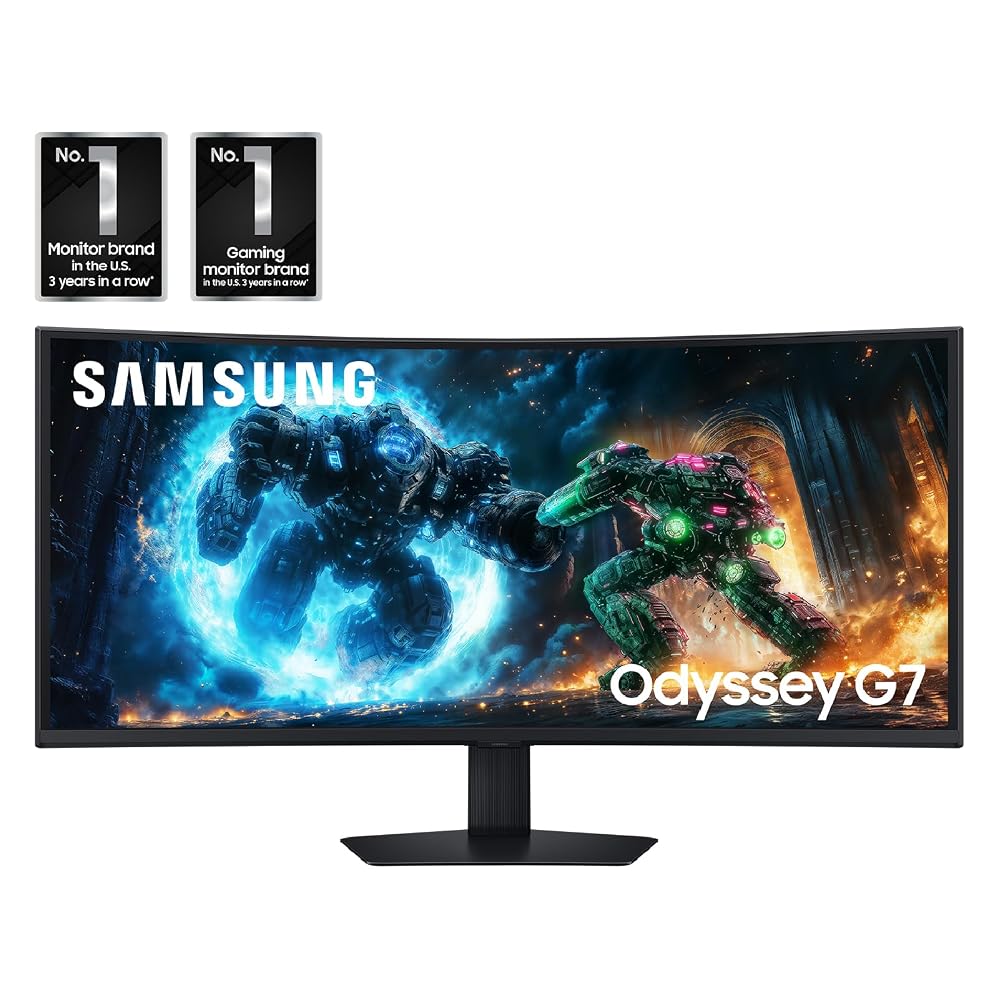
The Samsung Odyssey G7 G75F delivers a standout widescreen presentation that bridges the gap between competitive gaming responsiveness and generous desktop productivity. It gives you the equivalent visual workspace of two standard monitors fused into a single seamless panel, backed by rich color contrast and swift motion handling that prevents blurred visuals during frantic gameplay.
- Expansive 40-inch ultrawide canvas featuring an ergonomic 1000R curve that fills your peripheral vision naturally.
- Sharp WUHD resolution that delivers five thousand horizontal pixels for pinpoint visual clarity in games and office applications.
- Fluid motion performance driven by a 180Hz refresh rate and a rapid 1ms gray-to-gray response time.
- Versatile multitasking options including Picture-by-Picture split viewing and dynamic CoreSync rear ambient lighting.
Where to buy
at Amazon Prime
Price taken from the listing on 18 Sep 2026 and it can change at any time. We may earn a commission if you buy through this link.
Pros
- Expansive 40-inch 1000R curved ultrawide panel
- Sharp WUHD 5120x2160 resolution
- Fast 180Hz refresh rate with 1ms response time
- Deep 3000:1 contrast ratio with DisplayHDR 600
- Integrated Picture-by-Picture multitasking and CoreSync lighting
Cons
- Deep stand footprint requires significant desk depth
- Heavy 24.9-pound build requires sturdy desk support
- High 140-watt operating power consumption
- Listing does not specify included cables or ports
As Amazon Associates, we earn from qualifying purchases. This means we may receive a small commission at no extra cost to you if you click through and make a purchase.
Shopping for a dedicated gamer or setting up a high-performance personal workstation for the first time can quickly lead to information overload. Many newcomers and gift-buyers face the difficult choice between setting up two separate computer screens side by side or finding a single display that handles both intense entertainment and productivity. A dual-screen desk often creates an awkward plastic border right in the center of your view, requiring constant neck turning and complicated cable management. The Samsung Odyssey G7 G75F addresses this challenge by providing a massive, unbroken 40-inch curved workspace engineered to envelop your visual field and eliminate the seams of multi-monitor setups.
Our practical verdict on this display is that it represents an impressive, high-end visual powerhouse best suited for enthusiastic gamers and busy multi-taskers who have substantial desk space. By bringing together a super-wide aspect ratio, ultra-crisp definition, and rapid screen refreshes, it removes visual clutter while providing an intensely engaging viewing experience. However, because it demands plenty of physical room and capable computer hardware to take full advantage of its capabilities, first-time buyers should verify their desk dimensions and system readiness before making the investment.
Samsung Odyssey G7 G75F Features Explained
40-Inch 1000R Curved Ultrawide Display
The centerpiece of this monitor is its substantial 40-inch screen designed around an ultrawide 21:9 aspect ratio. Unlike conventional rectangular computer monitors that stick to a standard 16:9 shape, this wider format stretches out horizontally to give you significantly more visual real estate. For gift-shoppers who might be used to standard office monitors, this extra width means open windows can sit comfortably side by side without overlapping, making complex computing tasks feel effortless and organized.
To keep such a wide screen comfortable to look at, Samsung built this display with a 1000R curvature rating. In monitor design, a 1000R curve means the arc of the panel closely matches the natural curve of the human field of view. When you sit in front of this samsung odyssey g5 curved sibling, the left and right edges bend inward toward your eyes, keeping every corner of the screen at a uniform distance from your seat. This curvature reduces the amount of neck pivoting you have to do while drawing you directly into virtual gaming worlds.
WUHD 5120 x 2160 Ultra-High Definition Resolution
Resolution refers to the total number of individual colored dots, or pixels, that compose the images you see on screen. This monitor features a specialized resolution known as WUHD 2160p, with maximum display parameters of 5120 x 2160 pixels and a native listing resolution of 5210×2160. Because a 40-inch display covers so much physical surface area, a lower resolution would cause text and fine lines to look jagged or blurry. The density of the samsung g75f wuhd resolution keeps fine text razor-sharp and makes scenery in modern games appear lifelike.
For gift-givers and beginners, it is helpful to understand that driving this high pixel count requires a capable modern computer. Generating images at over five thousand horizontal pixels asks a computer graphics processor to render enormous amounts of graphical data every second. When paired with an appropriate gaming computer, the result is breathtaking realism, expansive game maps, and an abundance of workspace that makes tiny details readily visible.
180Hz Refresh Rate and 1ms Response Time
When looking at the Samsung Odyssey G7 G75F for gaming, speed is just as important as visual sharpness. Refresh rate measures how many times the screen draws a completely new image every second, represented in hertz. Standard office screens update at 60Hz, but this monitor features an odyssey g7 180hz refresh rate. That means motion on screen updates up to three times faster than standard office panels, resulting in silky camera pans and immediate visual tracking of moving objects.
Complementing that high update frequency is a near-instant 1ms gray-to-gray response time. Response time tracks how quickly individual pixels change from one color shade to another. A sluggish response time produces visible ghosting trails behind fast-moving characters, but a 1ms speed keeps transitions crisp. Additionally, Samsung includes AMD FreeSync Premium Pro technology, which communicates continuously with your computer graphics card to synchronize frame updates and prevent distracting horizontal screen tearing or visual stuttering.
VESA DisplayHDR 600 and High Contrast VA Panel
Contrast and lighting balance play a major role in overall image quality. The Samsung Odyssey G7 G75F relies on a vertical alignment, or VA, display panel that produces a static contrast ratio of 3000:1. In simple terms, this contrast ratio allows the monitor to produce deep, convincing dark tones while maintaining crisp highlights, avoiding the washed-out gray cast that sometimes plagues cheaper screen types.
The display also meets the official VESA DisplayHDR 600 performance standard and provides a baseline brightness rating of 350 candela per square meter with 0.99 color gamut coverage. High Dynamic Range, or HDR, enhances the luminance difference between the darkest shadows and the brightest highlights on screen. While premium self-lit alternatives like the samsung odyssey g7 oled achieve contrast through organic light-emitting diodes, the Samsung Odyssey G7 HDR 600 certification on this LED panel ensures vibrant bright sparks, realistic sunbeams, and clearly defined details even inside shadowy gaming environments.
Multitasking Features and CoreSync Ambient Lighting
Beyond traditional gaming, this monitor includes smart internal features designed to streamline everyday use. It includes Picture-by-Picture functionality, which lets you connect two separate video inputs at once and display them side by side on the single curved screen. If you also enjoy monitoring a video stream while playing a game, Picture-in-Picture allows you to place a smaller secondary video window in any corner of the display without hiding your primary program.
Ease of use is further enhanced by Auto Source Switch+, an intelligent feature that detects when you turn on a connected computer or console and automatically switches the active display signal to that device without forcing you to fiddle through menu buttons. To heighten entertainment immersion, the rear of the monitor features CoreLighting+ and CoreSync technology capable of projecting 16.7 million colors onto the wall behind your desk, matching the dominant colors shown on your monitor in real time.
Specs
Reviewing the official Samsung Odyssey G7 G75F specs helps you confirm whether this equipment aligns with your spatial requirements and technical expectations before ordering.
| Screen Size | 40 inches |
|---|---|
| Aspect Ratio | 21:9 Ultrawide |
| Screen Curvature | 1000R |
| Display Resolution | WUHD 2160p (5120 x 2160 maximum, 5210×2160 native) |
| Panel Technology | VA LED |
| Refresh Rate | 180 hertz |
| Response Time | 1ms (GtG) |
| Contrast Ratio | 3000:1 |
| Brightness & Gamut | 350 cd/m2, 0.99 Color Gamut |
| Dimensions & Weight | 11.96" D x 36.56" W x 23.58" H; 24.9 lbs |
| Power & Voltage | 140 watts, 240 volts |
As published by the manufacturer on the Amazon listing.
Buy it if
Best Use Cases
- Simulated racing and aerial flight games where the panoramic 21:9 curved field of view mimics the cockpit of a real vehicle.
- Action-oriented multiplayer gaming where the 180Hz refresh rate and 1ms response time ensure smooth, lag-free competitive tracking.
- Productivity desks where a single seamless ultra-wide panel replaces the clutter and borders of two side-by-side computer monitors.
- Multitasking setups that utilize Picture-by-Picture to simultaneously run a gaming system and a work laptop on one screen.
- Atmospheric evening gaming setups that benefit from the dynamic rear CoreSync ambient lighting reflecting against a bedroom wall.
Think twice if
Before You Buy
Before purchasing this monitor, your primary consideration should be physical desk dimensions. Meeting the Samsung Odyssey G7 desk space requirements is crucial because the monitor measures 36.56 inches across and stands 23.58 inches tall on its stand. More importantly, the curved stand occupies a depth of 11.96 inches from front to back. If you place this monitor on a shallow student desk, the front of the display will sit uncomfortably close to your face. Additionally, the unit weighs 24.9 pounds, meaning you must pair it with a sturdy desk surface that can safely hold substantial hardware.
Regarding compatibility and installation in your personal Samsung Odyssey G7 setup guide, you will need a capable desktop computer that can output high-resolution video signals at high refresh rates. Note that the listing does not specify the exact count or version numbers of the DisplayPort and HDMI ports on the rear of the monitor, nor does the listing specify which video cables are included in the package. Shoppers should be prepared to verify their computer outputs and may need to purchase certified high-bandwidth video cables separately if their computer requires specific connections. If you prefer alternative screen dimensions or flatter form factors, models such as the samsung odyssey g8 or flat-screen monitors like the samsung odyssey g50f offer different layouts worth keeping in mind.
Bottom Line
Deciding whether this display is the right choice ultimately comes down to your available physical space, your computing hardware, and your visual goals. If you are asking whether the Samsung Odyssey G7 G75F is worth it, the answer is a resounding yes for anyone seeking a dramatic, wrap-around visual upgrade that eliminates the need for multi-screen bezels. It blends the spacious visual canvas of an ultrawide productivity workstation with the lightning-fast 180Hz responsiveness demanded by competitive computer gaming.
On the other hand, gift-givers buying for someone with a small computer desk or an entry-level laptop may find this 40-inch display overly large and demanding. Its weight of nearly 25 pounds, footprint of nearly a foot of desk depth, and 140-watt power draw make it a substantial piece of desktop equipment. For those with the space to support it, it delivers an unforgettable panoramic computing experience that elevates both serious gaming and everyday work.
FAQ
Can this monitor show two different computers at the same time?
Yes, the display supports Picture-by-Picture functionality, which allows you to split the wide screen down the middle to display video feeds from two separate devices simultaneously. This makes it possible to view a work computer and a personal gaming system side by side on one single panel.
What does the 1000R curvature mean for casual computer use?
The 1000R rating indicates that the monitor curves at a radius of one thousand millimeters, which closely mimics the natural field of human peripheral vision. For everyday computing, this curve ensures that the outer edges of the expansive 40-inch screen remain equally distant from your eyes, reducing the neck strain often caused by looking back and forth across wide flat monitors.
Will this monitor work well with fast-paced action video games?
Yes, the display is specifically engineered for high-speed action, featuring a 180Hz refresh rate and a rapid 1ms gray-to-gray response time. Combined with AMD FreeSync Premium Pro technology to prevent screen tearing, motion remains fluid and clear during fast gameplay.
Does the listing specify which video cables come in the box?
No, the listing does not specify which video cables or packaging accessories are included in the box. Buyers should check their computer connections and be prepared to acquire the appropriate high-bandwidth display cables if necessary.
How much physical depth does this monitor need on a desk?
According to the product specifications, the monitor measures 11.96 inches deep from the back of the stand to the forward edges of the curved screen. To sit at a comfortable viewing distance, it is best placed on a desk with at least twenty-four to thirty inches of total depth.
Where to buy
at Amazon Prime
Price taken from the listing on 18 Sep 2026 and it can change at any time. We may earn a commission if you buy through this link.
More Monitors
See the section


Get our picks by email
New reviews and the prices we spotted, once a week.