Sony INZONE M9 Monitor: Simple Buyer’s Guide for PS5 & PC Gamers
Shopping for a dedicated gaming display can feel intimidating when you are confronted with an endless wall of technical specifications, acronyms, and marketing buzzwords. First-time buyers and gift-givers often struggle to know…
By Rebecca Paxton 10 min read



Our verdict
Scores are out of 10, based on listed specifications and buyer feedback — not from testing of our own
The Sony INZONE M9 II is an intuitive, high-performance display that balances high-resolution visual fidelity with ultra-smooth motion handling for both desktop and living-room gaming setups.
- Ultra-sharp 4K visual resolution paired with a 160Hz refresh rate delivers exceptional clarity and fluid movement across all game genres.
- Full array local dimming technology dramatically improves dark-scene depth and dynamic contrast compared to standard edge-lit screens.
- Direct PlayStation 5 integration automatically sets tone mapping and genre picture modes through modern HDMI 2.1 connectivity.
- Flexible ergonomic stand offers height adjustment, tilt, and a generous 180-degree swivel range to maintain comfortable viewing in any seating position.
Where to buy
at Amazon Prime
Price taken from the listing on 18 Sep 2026 and it can change at any time. We may earn a commission if you buy through this link.
Pros
- Vibrant 4K UHD visual detail
- Fluid 160Hz gaming refresh rate
- Full array local dimming contrast
- Automatic HDR calibration for PlayStation 5
- Comprehensive 3-year limited warranty
Cons
- High 100-watt power consumption
- Baseline 1000 to 1 contrast ratio
- Heavy build at nearly twenty pounds
As Amazon Associates, we earn from qualifying purchases. This means we may receive a small commission at no extra cost to you if you click through and make a purchase.
Shopping for a dedicated gaming display can feel intimidating when you are confronted with an endless wall of technical specifications, acronyms, and marketing buzzwords. First-time buyers and gift-givers often struggle to know whether a screen will work properly with both a modern desktop computer and a home video game console. Many standard office monitors lack the speed needed for fast action games, while dedicated gaming panels often sacrifice picture clarity or complicate setup. The Sony INZONE M9 II addresses this exact dilemma by pairing sharp visual presentation with effortless console and computer compatibility, delivering an all-in-one display solution that eliminates the frustration of complicated display adjustments.
Our verdict is that this 27-inch 4K screen provides an exceptional hybrid experience for gamers who want top-tier visual performance without the headache of manual calibration. By combining a 160Hz refresh rate with intelligent illumination zones and specialized console features, this Sony INZONE M9 gaming monitor presents a polished, premium visual experience straight out of the box. While buyers should take note of its 100-watt power consumption and realistic LCD baseline contrast levels, the overall build quality and balanced feature set make it an outstanding centerpiece for any modern gaming station.
Sony INZONE M9 II Features Explained
Sharp 4K Resolution and Ultra-Smooth 160Hz Refresh Rate
When exploring the Sony INZONE M9 4K 160Hz display capabilities, the first thing anyone notices is the sheer density of detail. Resolution refers to the total number of individual picture elements, or pixels, that compose the image on the screen. With a native resolution of 3840 by 2160 pixels, this screen packs four times as many visual details as a standard 1080p display into a compact 27-inch frame. Fine textures in open-world adventure games, readable tiny text in strategy titles, and distant landscape elements appear remarkably sharp. While everyday office screens like the msi pro mp273q e14 offer decent general clarity, stepping up to a true 4K resolution provides a major visual leap that lets you spot every hidden environmental flourish.
Resolution alone is only half the battle when playing interactive games; motion smoothness is equally critical. Refresh rate, measured in hertz, describes how many times every second the monitor redraws the visual image on screen. Standard office displays update 60 times per second, which can cause fast-moving games to appear jerky or stuttering. The 160Hz panel on this unit refreshes up to 160 times per second, resulting in liquid-smooth character movement, faster cursor tracking, and reduced visual fatigue during extended play sessions. Whether sweeping your camera across a panoramic fantasy landscape or reacting to fast-paced competitive action, the combination of high pixel count and high frame delivery ensures the picture stays crisp and fluid.
Full Array Local Dimming and DisplayHDR 600
One of the most defining aspects of this screen is how it manages lighting through its backlighting hardware. On ordinary consumer monitors, a strip of LED lights along the edge illuminates the entire screen uniformly, which often causes dark nighttime scenes in games to look washed out or gray. By contrast, the Sony INZONE M9 full array local dimming design places an organized grid of LED lights directly behind the LCD glass panel. These lighting zones can brighten or turn down independently depending on what is happening in the scene. When a dark dungeon has a single flickering torch, the lights directly behind the flame glow brightly while the LEDs behind the surrounding shadows dim down, creating genuine depth and dramatic visual contrast.
Working hand in hand with this physical lighting structure is the VESA certified Sony INZONE M9 DisplayHDR 600 specification. High Dynamic Range, or HDR, is an imaging standard that expands the gap between the darkest shadows and the brightest highlights on screen. With a baseline brightness of 400 cd and peak burst performance matching DisplayHDR 600 standards, sunbeams, explosions, and magical effects pop off the screen with realistic punch. Furthermore, with coverage of over 95 percent of the DCI-P3 color space and support for 1.07 billion colors (10-bit), colors look vibrant, accurate, and free from awkward color banding in skies and gradients.
Automated Console Integration for PlayStation 5
Setting up a third-party monitor with a gaming console has traditionally required navigating confusing menus to adjust brightness, contrast, and black levels. Choosing the Sony INZONE M9 for PS5 eliminates this headache through automated communication between the monitor and the console hardware. When connected to a PlayStation 5 or PlayStation 5 Pro via high-bandwidth HDMI 2.1, the system initiates Auto HDR Tone Mapping. During initial console recognition, the display automatically communicates its exact HDR capabilities, tuning highlight and shadow curves perfectly without requiring the player to slide test patterns back and forth.
Additionally, the monitor features Auto Genre Picture Mode, which automatically shifts visual tuning depending on what you are doing. If you are launching a video game, the screen automatically switches into Game Mode to minimize processing lag and maximize responsiveness. When you switch over to streaming a movie or watching video content on your console, the monitor seamlessly swaps into Standard Mode to emphasize richer picture processing and color accuracy. Combined with HDMI 2.1 Variable Refresh Rate (VRR) support, console games run smoothly without screen tearing or visual stutter.
Rapid 1ms Response Time and Advanced Motion Clarity
Fast-moving video games require display panels that can change color states almost instantaneously. Response time measures how quickly an individual liquid crystal pixel shifts from one gray shade to another, known as Gray-to-Gray or GtG. The 1ms GtG response time built into this display prevents noticeable ghosting, which is the distracting, blurry trail left behind rapidly moving objects on slower monitors. When racing around a track or tracking an opponent across an arena, outlines remain sharp and clearly defined.
To push visual clarity even further, this display incorporates specialized backlight scanning technology. Backlight scanning works by rapidly strobing the LED backlights between frame refreshes, effectively clearing out lingering images before the human eye can perceive motion blur. For PC enthusiasts, compatibility with NVIDIA G-SYNC ensures that the monitor synchronizes perfectly with your computer graphics card, ensuring tear-free frames even when heavy action causes game framerates to fluctuate.
Ergonomic Stand and Modern Connectivity
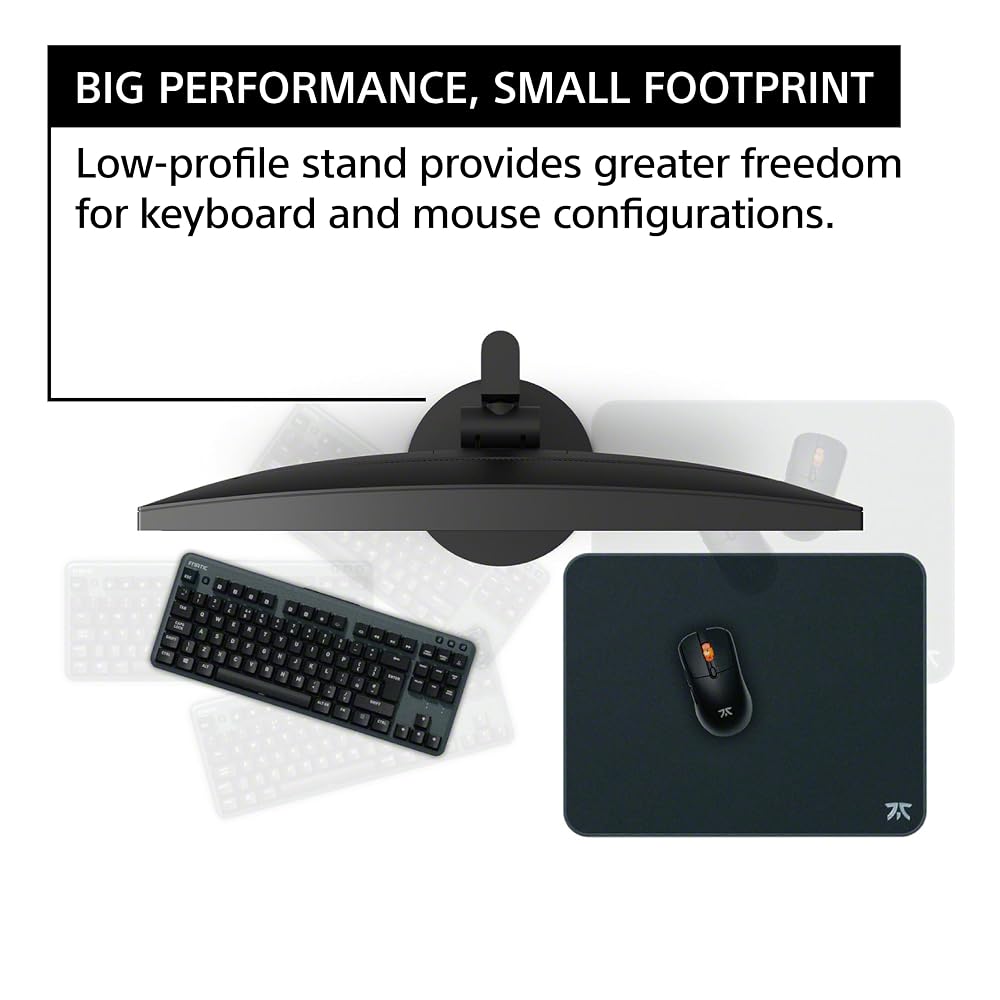
A gaming monitor must physically adapt to your desk space, and the low-profile stand on this model is intentionally engineered for flexibility. Unlike bulky tripod-style monitor feet that take up enormous amounts of desk surface, this stand features a compact footprint. This gives players ample room to angle their keyboard comfortably and glide their mouse across a large mousepad. The stand includes full height adjustment, tilt, and a wide swivel range of positive and negative 180 degrees, allowing you to position the screen at optimal eye level or easily turn it toward a friend sitting nearby.
Connecting your devices is equally versatile thanks to modern display inputs. The unit features cutting-edge DisplayPort 2.1 (UHBR10) alongside dual HDMI 2.1 ports, allowing you to keep a gaming PC and a modern console hooked up at the same time without swapping cables. If you prefer using an aftermarket monitor arm or wall bracket, the back panel supports standard 100mm by 100mm VESA mounting patterns. Built-in speakers provide convenient everyday sound right out of the box for system alerts and casual listening without requiring immediate external desktop accessories.
Specs
| Screen Size | 27 inches |
|---|---|
| Native Resolution | 4K UHD (3840 x 2160) |
| Refresh Rate | 160Hz |
| Panel Display Type | LCD with Full Array LED Local Dimming |
| Response Time | 1ms GtG |
| HDR Certification | VESA Certified DisplayHDR 600 |
| Color Gamut Coverage | DCI-P3 >95%, 1.07 Billion Colors (10-bit) |
| Baseline Brightness | 400 cd |
| Contrast Ratio | 1000:1 |
| Video Connectivity | DisplayPort 2.1 (UHBR10), HDMI 2.1 with VRR |
| Adjustable Stand | Height, Tilt, ±180° Swivel, 100x100mm VESA Mount |
| Power Consumption | 100 Watts |
As published by the manufacturer on the Amazon listing.
Buy it if
Best Use Cases
- Console gamers who want seamless automatic HDR calibration and 4K visual performance on the PlayStation 5.
- Computer enthusiasts building a modern setup who desire smooth 160Hz gaming with high-bandwidth DisplayPort 2.1 inputs.
- Fans of expansive role-playing games where localized dimming zones bring atmospheric fantasy environments and night scenes to life.
- Shared desk spaces where players frequently switch between a home work PC and a dedicated entertainment console.
Think twice if
Before You Buy
Before adding this monitor to your setup, it is essential to consider the hardware driving your games. Running games at native 4K resolution requires a powerful graphics card on PC, especially if you plan to hit the full 160Hz ceiling that the panel supports. While ultra-wide gaming monitors like the samsung odyssey g9 49 inch demand extensive desk width and specialized aspect ratio support, this 27-inch 16:9 screen offers universal game compatibility. However, the listing does not specify which video cables come packaged in the retail box, so buyers should verify whether an ultra-high-speed HDMI 2.1 cable or DisplayPort 2.1 cable is included before assembly day to avoid delays.
Audio and power requirements are another practical consideration for your desktop layout. The monitor features built-in speakers that are convenient for basic gaming and navigation, but players who want deep bass or cinematic audio immersion will likely want to add a pair of dedicated studio monitors like the presonus eris e5 or a gaming headset. Additionally, the monitor draws up to 100 watts of power and weighs 19.9 pounds with its stand attached, so ensure your desk power strip has adequate headroom and your desktop surface can securely handle a sturdy, twenty-pound display unit.
Bottom Line
The Sony INZONE M9 II delivers an outstanding balance of visual precision, fluid frame delivery, and console-friendly smarts. For players searching for a premium 27-inch screen that shines equally when connected to a cutting-edge graphics card or a modern home console, this display removes the technical barriers that often complicate advanced gaming gear. Its automatic tone mapping, rapid pixel response, and vivid color reproduction make every game look vibrant and crisp.
When considering whether the Sony INZONE M9 is worth it, the decision comes down to versatility and build quality. Backed by a reassuring 3-year limited warranty and equipped with future-ready DisplayPort 2.1 and HDMI 2.1 ports, it represents a durable investment for any player looking to maximize their visual fidelity. It easily earns its place as a centerpiece screen for dedicated PC and console players alike.
FAQ
Is the Sony INZONE M9 worth it for PlayStation 5 gaming?
Yes, this monitor is uniquely tailored for console owners thanks to exclusive features like Auto HDR Tone Mapping and Auto Genre Picture Mode. When connected through an HDMI 2.1 port, the screen automatically synchronizes its color settings and refresh rate to deliver optimized graphics without requiring you to manually navigate complicated calibration menus.
What are the key Sony INZONE M9 monitor specs to know before buying?
Reviewing the Sony INZONE M9 monitor specs reveals a 27-inch LCD panel with native 4K UHD resolution (3840 x 2160), a 160Hz refresh rate, a fast 1ms GtG response time, and full array local dimming. It also features DisplayHDR 600 certification, over 95 percent DCI-P3 color gamut coverage, 400 cd baseline brightness, DisplayPort 2.1, and dual HDMI 2.1 connections.
How does the Sony INZONE M9 II setup work on a desktop?
The Sony INZONE M9 II setup process is straightforward right out of the box thanks to its low-profile ergonomic stand, which snaps directly onto the monitor housing or can be replaced with any standard 100mm by 100mm VESA mount. Once placed on the desk, the stand provides smooth height adjustments, forward and backward tilt, and a full 180-degree swivel range to achieve an ideal viewing angle.
How does the Sony INZONE M9 full array local dimming benefit picture quality?
Full array local dimming places a matrix of LED backlights directly behind the LCD screen, allowing individual zones to brighten or dim independently. This design enhances contrast significantly over standard edge-lit displays, keeping dark nighttime scenes deep and atmospheric while letting bright explosions and lighting effects pop with vibrant brilliance.
Is the Sony INZONE M9 for PC gaming a good choice for competitive players?
Using the Sony INZONE M9 for PC gaming provides both exceptional visual sharpness and competitive responsiveness. The combination of a 160Hz refresh rate, 1ms GtG response time, backlight scanning technology, and NVIDIA G-SYNC compatibility ensures minimal motion blur and tear-free gameplay during intense, fast-moving action.
Where to buy
at Amazon Prime
Price taken from the listing on 18 Sep 2026 and it can change at any time. We may earn a commission if you buy through this link.
More Monitors
See the section


Get our picks by email
New reviews and the prices we spotted, once a week.