Ubiquiti LiteBeam 5AC Gen 2: Simple Outdoor Wireless Bridge Guide
Running an internet connection out to a detached workshop, barn, guest cottage, or home office shed often presents a frustrating dilemma. Digging trenches across lawns, breaking through concrete driveways, and burying hundreds…
By Andrea Maddox 8 min read


Our verdict
Scores are out of 10, based on listed specifications and buyer feedback — not from testing of our own
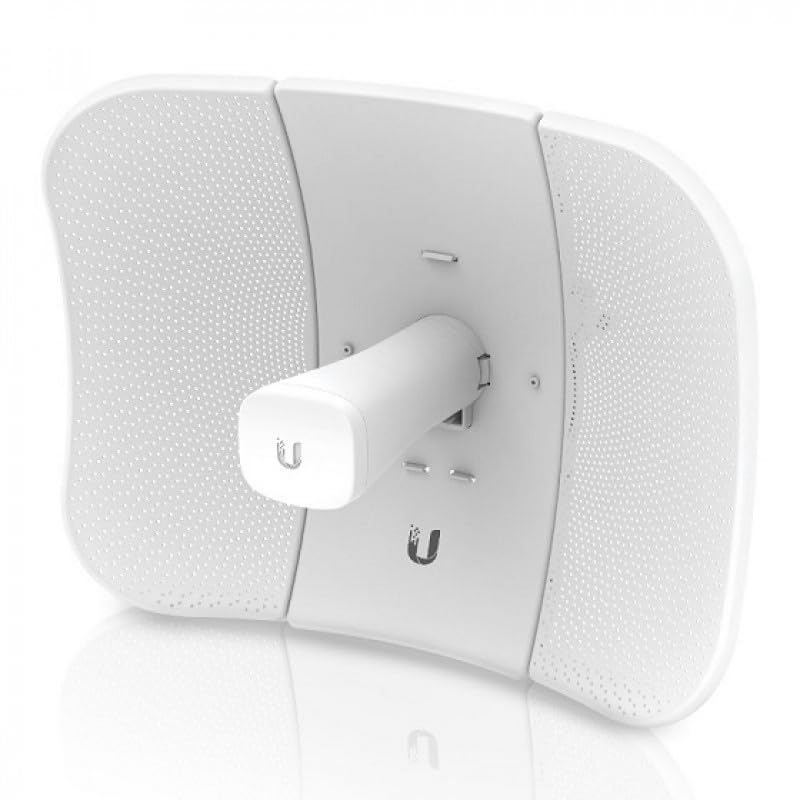
The Ubiquiti LiteBeam 5AC Gen 2 delivers commercial-grade outdoor networking in a form factor that first-time network builders can easily manage. It eliminates the need for expensive yard trenching while providing steady, high-bandwidth communication across outdoor spaces.
- High-gain directional radio dish designed to focus wireless energy tightly and resist outdoor radio interference.
- Integrated secondary management radio that allows quick smartphone alignment and setup without climbing a ladder with a laptop.
- Multi-pack bundling that makes linking several distinct buildings or establishing backup bridges straightforward right out of the shipping carton.
- Capable of carrying high-throughput network traffic up to 450 Mbps across long distances when installed with clear line of sight.
Where to buy
at Amazon Prime
Price taken from the listing on 18 Sep 2026 and it can change at any time. We may earn a commission if you buy through this link.
Pros
- Dedicated mobile management radio for fast phone setup
- High-speed throughput up to 450 Mbps
- Directional 23 dBi dish minimizes wireless noise
- Convenient 4-pack bundle for multi-building linking
- Lightweight aerodynamic outdoor design
Cons
- Requires clear line of sight without tree obstruction
- Requires separate indoor router for local Wi-Fi
- Mounting poles and exterior cables not specified
As Amazon Associates, we earn from qualifying purchases. This means we may receive a small commission at no extra cost to you if you click through and make a purchase.
Running an internet connection out to a detached workshop, barn, guest cottage, or home office shed often presents a frustrating dilemma. Digging trenches across lawns, breaking through concrete driveways, and burying hundreds of feet of delicate cabling can be physically exhausting and expensive. The Ubiquiti LiteBeam 5AC Gen 2 is designed to solve this exact headache by beaming a fast, reliable network connection through the open air. Instead of laying physical pipe, this dedicated outdoor station transmits network data across open spaces to deliver broadband access wherever you need it on your property.
For homeowners and property managers who want a dependable wireless link without hiring a team of network contractors, this hardware package offers an effective solution. By combining a directional radio dish with streamlined mobile management, it transforms an intimidating commercial technology into an accessible project for everyday property owners. Our verdict is that this multi-unit bundle provides an exceptional way to link multiple outbuildings reliably, provided you have a direct, unobstructed visual path between your mounting locations.
Ubiquiti LiteBeam 5AC Gen 2 Features Explained
Dedicated Management Radio for Simple Mobile Configuration
Historically, setting up an outdoor bridge required balancing on a ladder with an Ethernet cord plugged directly into a bulky laptop to aim the antenna. The LiteBeam AC mobile app configuration changes this process entirely by including a separate, secondary Wi-Fi radio built right into the device housing. This dedicated internal radio activates specifically for management tasks, allowing you to connect directly using your smartphone or tablet.
Through this wireless convenience, the ubiquiti litebeam 5ac gen2 setup process becomes much safer and simpler for a single person. You can stand securely near your mounting pole, open the mobile utility on your phone, and monitor signal strength readings in real time as you adjust the physical aim of the dish. Once your link is aligned and secured, the management radio handles basic configuration without interfering with your main outdoor network transmission.
Directional airMAX CPE Technology
Standard home Wi-Fi routers broadcast their signals in every direction at once, much like an unshaded lightbulb illuminating an entire room. While that works well inside a living room, it performs poorly across an open field because the wireless energy scatters and loses strength quickly. The litebeam 5ac gen2 airmax cpe uses a specialized dish reflector to gather and focus radio energy into a tight, narrow beam, functioning more like a focused spotlight.
This directional design serves two crucial functions for outdoor links. First, it pushes the signal across significant distances without bleeding signal away into empty space. Second, it provides excellent noise immunity by ignoring stray wireless chatter coming from neighbors, nearby towers, or other home electronics outside its direct listening path. If you are comparing older networking hardware like the ubiquiti ns m5, the newer AC-series platform offers modern protocol handling designed specifically to prevent traffic collisions over long-range outdoor paths.
High-Capacity 5GHz 2×2 MIMO Radio Performance
Underneath the weather-resistant feed horn, this unit features a 2×2 MIMO 5GHz radio capable of delivering data rates up to 450 Mbps. MIMO stands for Multiple-Input Multiple-Output, a technology that uses two distinct spatial streams over the same frequency to double the amount of data traveling back and forth. For anyone looking at the ubiquiti litebeam 5ac gen2 specs, this throughput means your remote office or workshop will not feel like it is running on a compromised secondary connection.
At 450 Mbps, the wireless bridge can effortlessly handle demanding everyday tasks simultaneously. You can stream high-definition security feeds, participate in two-way video calls, stream high-resolution content, and quickly upload heavy media project files captured with high-end cameras like the fuji film xs20 to off-site cloud backup servers without bottlenecking the main household network.
Compact and Lightweight Modular Design
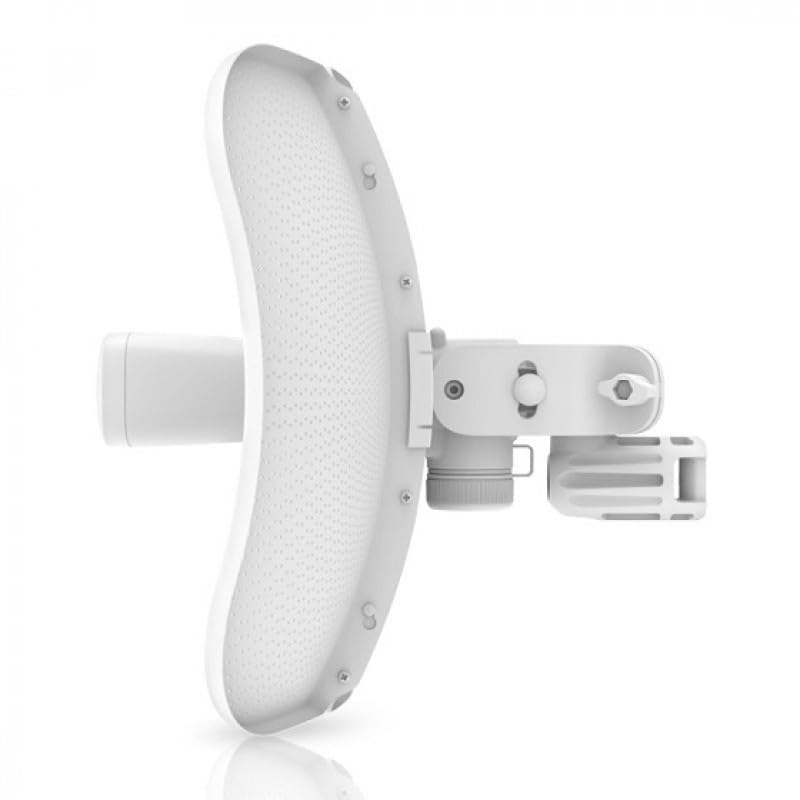
Mounting heavy equipment to exterior walls, rooftops, or fence posts can cause structural strain and make precise aiming difficult. The LiteBeam series uses an ultra-lightweight geometric reflector that snaps together easily without requiring specialized mechanical tools. The entire assembly is engineered to minimize wind resistance while maintaining rigidity during stormy outdoor conditions.
Because the physical frame is light and compact, handling the unit while standing on an elevated surface is far less daunting for non-professionals. The ball-joint mounting bracket allows three-axis flexibility, letting you pan left, tilt up or down, and rotate the dish smoothly to dial in the cleanest possible connection between your buildings.
Specs
| Brand | Ubiquiti Networks |
|---|---|
| Manufacturer | UBNT Systems |
| Part Number | 20 |
| UPC | 680392659620 |
| Operating Frequency | 5 GHz |
| Antenna Gain | 23 dBi (Listing also references 26 dBi LR) |
| Maximum Data Throughput | 450 Mbps |
| Radio Configuration | 2×2 MIMO |
| Antenna Impedance | 50 ohm |
| Package Quantity | 4 Units (4-Pack) |
| Color | White |
As published by the manufacturer on the Amazon listing.
Buy it if
Best Use Cases
- Extending high-speed broadband from a main house directly to a detached garage, barn, or backyard creative studio without trenching cables.
- Building a reliable ubiquiti wireless bridge for outbuildings to support remote security systems, gate openers, and outdoor camera arrays.
- Connecting separate commercial storage units, farm outbuildings, or workshops across wide open acreage.
- Supplying steady internet to a guest cottage so visitors can stream media and work remotely on an isolated local network.
Think twice if
Before You Buy
Before purchasing this hardware, it is critical to understand that a ubiquiti litebeam point to point bridge requires a completely clear, direct line of sight between the transmitting and receiving units. Unlike indoor home routers that can pass signals through drywall and furniture, high-frequency 5GHz directional signals cannot reliably penetrate dense tree canopies, metal roofs, or neighboring structures. If tall pine trees, hills, or storage sheds block the visual path between your mounting points, the signal will degrade significantly or fail to connect entirely.
Shoppers must also recognize that these units are dedicated bridge endpoints, not standard Wi-Fi access points for your smartphones or laptops. The dish catches the wireless signal and brings it down through an Ethernet cable, meaning you will need to plug that cable into a standard indoor Wi-Fi router or access point inside the destination building to generate a normal indoor wireless network. Additionally, this specific Amazon listing provides a combo 4-pack of dishes, which is ideal if you plan to link multiple remote structures or keep spares on hand. However, the listing does not specify whether mounting poles or exterior-grade shielded Ethernet cables are included in the box, so you should plan to source your exterior mounting hardware and wiring separately.
Bottom Line
For rural property owners, hobbyists with separate workshops, and homeowners tired of spotty connectivity outside the main house, the Ubiquiti LiteBeam 5AC Gen 2 offers a practical and powerful way to conquer physical distance. It takes commercial long-range wireless bridging technology and makes it approachable, especially with the built-in smartphone management radio that removes the frustration from antenna alignment.
So, is ubiquiti litebeam 5ac gen2 worth it for normal property owners? If you have clear line of sight between your structures and want to avoid the massive labor and expense of digging trenches through your landscaping, this package delivers outstanding value, stability, and speed.
FAQ
Can I connect my phone or laptop directly to the dish for everyday internet access?
No, the main high-power 5GHz radio is designed strictly to communicate with another compatible bridge device, not personal consumer gadgets. While the dish does feature a secondary management Wi-Fi signal, that radio is used exclusively for device setup and antenna alignment through the mobile application. To use internet inside your outbuilding, you connect an Ethernet cable from the dish into a standard indoor wireless router or network switch.
How far does the LiteBeam 5AC Gen 2 reach?
When deployed outdoors with completely clear line of sight, the litebeam 5ac gen2 range is capable of spanning multiple miles across open territory. Because it uses a focused 23 dBi directional antenna, it easily handles standard property distances between detached garages or neighboring farm fields as long as no trees or physical structures block the path.
Is the LiteBeam 5AC Gen 2 suitable for ordinary home use?
Yes, deploying the litebeam 5ac gen2 for home use is very popular for properties with detached garages, separate home offices, or guest tiny-homes. Although the technology originates from commercial wireless service provider networks, the setup interface has been simplified enough that any patient homeowner comfortable running an outdoor cable can successfully link their buildings.
Why does this listing include four separate units?
A wireless bridge requires a minimum of two units to function: one configured as the transmitter at the main building and one configured as the receiver at the remote building. This 4-pack listing provides enough equipment to connect multiple outbuildings back to a central location, build two completely independent point-to-point links, or maintain ready-to-use spares for larger rural properties.
Does bad weather like rain or snow affect the wireless link?
The system is built for outdoor environments, and normal rainfall or seasonal temperature shifts will not disrupt a well-aligned connection over typical residential distances. However, severe torrential storms or heavy snow accumulation directly on the feed horn can temporarily reduce signal margin, which is why precise physical alignment during initial setup is important.
Can I use this bridge to stream footage from remote security cameras?
Yes, the bridge provides up to 450 Mbps of bandwidth, which is more than enough capacity to handle multiple high-definition surveillance feeds simultaneously. Whether you are transmitting data from remote IP cameras, sensors, or panoramic monitoring equipment like the insta360 x5 bundle across your property, the wireless link functions just like a direct physical network cable.
Where to buy
at Amazon Prime
Price taken from the listing on 18 Sep 2026 and it can change at any time. We may earn a commission if you buy through this link.
More Other
See the section


Get our picks by email
New reviews and the prices we spotted, once a week.