Western Digital Red Plus 8TB: A Beginner-Friendly Storage Review
Finding the right internal hard drive for home backups can feel intimidating when you are confronted with technical jargon, multi-drive arrays, and networking acronyms. Many beginners start their storage journey with standard…
By Reid Wallace 7 min read


Our verdict
Scores are out of 10, based on listed specifications and buyer feedback — not from testing of our own
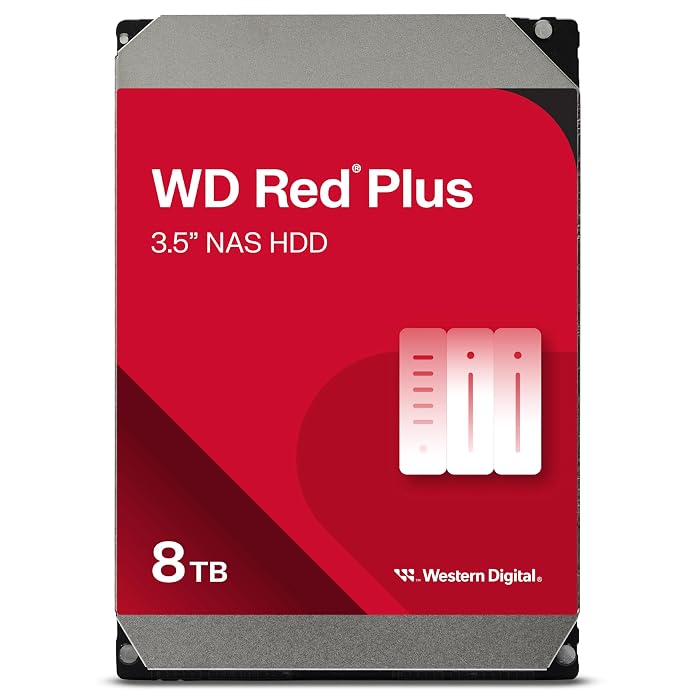
The drive provides an exceptional entry point for beginners setting up their first home network storage enclosure or centralized desktop archive, combining proven recording architecture with 24/7 continuous operation support.
- Conventional Magnetic Recording ensures consistent data writing speeds and seamless RAID rebuilds.
- Engineered to support continuous 24/7 multi-drive environments in enclosures holding up to 8 bays.
- Substantial 180 TB per year workload rating handles demanding home backups and file sharing.
- Integrated NASware firmware optimizes drive health and system compatibility.
Where to buy
at Amazon
Price taken from the listing on 18 Sep 2026 and it can change at any time. We may earn a commission if you buy through this link.
Pros
- Conventional Magnetic Recording prevents array write bottlenecks
- Spacious 8000 GB capacity for media archives
- Rated for continuous 24/7 multi-drive operation
- Supports multi-drive network enclosures up to 8 bays
- High 180 TB per year workload endurance rating
Cons
- Moderate 5640 RPM speed compared to enterprise drives
- Large 3.5-inch form factor incompatible with laptops
- Listing does not specify included SATA data cables
As Amazon Associates, we earn from qualifying purchases. This means we may receive a small commission at no extra cost to you if you click through and make a purchase.
Finding the right internal hard drive for home backups can feel intimidating when you are confronted with technical jargon, multi-drive arrays, and networking acronyms. Many beginners start their storage journey with standard desktop drives, only to realize that continuous operation requires hardware engineered specifically for 24/7 reliability. The WD Red Plus 8TB is designed to solve this exact challenge by providing a high-capacity, dependable storage drive tailored for personal network-attached storage enclosures and desktop backup systems.
For first-time network storage buyers, this drive strikes an ideal balance between generous capacity and purpose-built network storage engineering. It bypasses the common pitfalls of standard desktop drives by utilizing conventional recording methods and customized firmware that safeguards your media libraries, family photos, and critical documents across multi-drive configurations.
WD Red Plus 8TB Features Explained
Conventional Magnetic Recording Architecture
When shopping for storage, understanding the difference between recording technologies is vital. This wd red plus cmr drive uses Conventional Magnetic Recording, an established technology where data tracks are aligned side-by-side without overlapping. In contrast to Shingled Magnetic Recording, which writes overlapping data tracks and can cause severe write performance drops during heavy multi-drive operations, CMR maintains consistent write speeds throughout intensive tasks.
This design choice becomes particularly crucial when evaluating a wd red plus vs regular hard drive. While everyday consumer models like a standard 2tb hdd western digital blue work wonderfully for standard desktop computing, they often employ different write mechanisms and power management curves. The CMR foundation on this 8TB unit ensures that whether you are performing an initial multi-terabyte backup or rebuilding a degraded storage pool, transfer performance remains stable and predictable.
Built-In NASware Firmware
One of the standout features of this drive is Western Digital’s proprietary NASware firmware technology. Standard desktop computer hard drives are tuned for single-drive environments where the operating system expects occasional sleep modes and handles drive timeouts differently. NASware fine-tunes the internal drive parameters to prevent disks from dropping offline unexpectedly when communicating with storage controllers inside multi-bay setups.
This intelligent firmware also manages thermal parameters, vibration tolerance, and error recovery controls across multi-disk systems. If you are researching a broader family of wd red nas hard drives, you will appreciate that this firmware is built into the drive’s controller to actively balance power consumption and data integrity across enclosures housing up to 8 bays.
180 TB per Year Workload Rating and Continuous Operation
Desktop hard drives are typically rated for eight hours of daily use, but a home server or centralized backup system runs constantly. The Western Digital Red Plus 8TB reliability rating is anchored by an annualized workload rating of up to 180 TB per year. The listing defines this workload rate as the annualized amount of user data transferred to or from the hard drive, giving you clear insight into its real-world endurance.
Combined with its certification for continuous 24/7 environments, this workload threshold comfortably exceeds the typical reading and writing demands of family photo syncs, media streaming, and automated computer backups. While enterprise-grade lines such as western digital gold cater to massive data centers with even higher write cycles, this drive offers the sweet spot for small and medium business environments and demanding home networks.
Acoustic Profile and 5640 RPM Spindle Speed
Rotational speed plays a direct role in drive acoustics, operating temperature, and vibration. This 8TB model operates at 5640 rpm, which allows it to stay cooler and run more quietly than aggressive 7200 RPM enterprise units. When placing a multi-drive enclosure in a living room, home office, or quiet hallway, the wd red plus 8tb noise level remains unobtrusive, avoiding distracting hums or excessive resonance.
Despite rotating at 5640 RPM, the drive achieves a maximum internal data transfer rate of 215 megabytes per second over its SATA 6.0 Gb/s interface. This provides ample speed to saturate standard gigabit home networks during large file transfers while consuming less electricity and generating minimal heat inside compact multi-bay enclosures.
Generous 8000 GB Storage Capacity
Modern media collections, uncompressed 4K home video, and operating system image backups consume space rapidly. With a wd red plus 8tb storage capacity of 8000 GB, a single disk provides immense headroom for beginner storage builders. As noted in the listing specifications, 1GB equals one billion bytes and 1TB equals one trillion bytes, meaning actual usable capacity will vary slightly depending on your operating system format.
This 8TB sizing is particularly cost-effective and practical because it reduces the total number of drive bays you need to populate immediately. A first-time builder can install one or two of these drives today, leaving additional bays open in a network chassis for future capacity expansion without needing to replace all existing disks down the road.
Specs
Reviewing the official western digital red plus 8tb specs helps you verify physical dimensions and system compatibility before ordering.
| Brand | Western Digital |
|---|---|
| Model Number | WD80EFPX |
| Digital Storage Capacity | 8000 GB (8 TB) |
| Hard Disk Form Factor | 3.5 inches |
| Hard Disk Interface | SATA 6.0 Gb/s (Serial ATA-600) |
| Rotational Speed | 5640 RPM |
| Workload Rate | Up to 180 TB/year |
| Maximum Data Transfer Rate | 215 MB/s |
| Bay Support | Up to 8 bays |
| Item Weight | 1.6 pounds |
As published by the manufacturer on the Amazon listing.
Buy it if
Best Use Cases
- Building a dedicated WD Red Plus 8TB for home NAS setup to stream movies and share media across household devices.
- Backing up critical desktop workstations and home office laptops through an automated schedule.
- Establishing a multi-drive RAID storage pool in a small business network enclosure supporting up to 8 bays.
- Archiving high-resolution digital photography portfolios and raw video projects on a high-capacity drive.
- Creating an offline cold storage archive in a desktop docking station for disaster recovery protection.
Think twice if
Before You Buy
When planning your wd red plus 8tb setup beginner project, ensure that your enclosure or desktop computer chassis supports the standard 3.5-inch hard drive form factor. This mechanical drive requires standard SATA data and SATA power connectivity, which means it will not fit inside slim laptop bays without external desktop enclosures or docking adapters. If you intend to install this drive into an external enclosure, verify that your multi-bay chassis supports 8TB drive capacities on its hardware compatibility list.
It is also important to pay attention to what the packaging contains. The product arrives as a bare internal hard drive unit; the listing does not specify included SATA interface cables, drive mounting screws, power adapters, or installation brackets. You will need to use the drive sleds and screws supplied with your computer case or network storage enclosure. Additionally, the listing specifies a 3-year limited warranty, but directs buyers to check Western Digital’s official website for regional details.
Bottom Line
If you have been wondering whether the investment in a dedicated NAS drive makes sense for your personal setup, the answer is clear. So, is wd red plus 8tb worth it for entry-level and growing home data collections? Without question, its dedicated NASware firmware, stable CMR architecture, and 180 TB per year workload rating make it far more dependable for 24/7 continuous operation than an ordinary desktop drive.
By opting for an 8000 GB capacity disk engineered specifically to manage multi-bay heat and vibration, beginners avoid early disk failure headaches and sluggish array rebuild times. It stands as an exceptional balance of acoustic quietness, consistent transfer speeds, and trustworthy reliability for anyone building an enduring digital archive.
FAQ
What makes a WD Red Plus CMR drive different from an SMR drive?
A CMR drive writes data tracks in non-overlapping parallel lines, while SMR drives overlap data tracks like shingles on a roof. Because tracks do not overlap on CMR drives, rewriting data does not force neighboring tracks to be rewritten, which prevents extreme slowdowns during multi-drive rebuilding operations.
Can I use this drive inside an ordinary desktop computer?
Yes, the listing explicitly lists desktop devices as compatible hardware. As long as your desktop PC tower has a standard 3.5-inch internal drive bay, an available SATA data port on the motherboard, and a SATA power connector from the power supply, you can use this drive for internal storage.
How many drive bays can this hard drive model support?
Western Digital specifies that this model is built and tested for multi-drive network-attached storage systems containing up to 8 bays, making it suitable for single-bay backups up to large multi-bay storage arrays.
What is the workload rate rating for this hard drive?
The drive supports an annualized workload rate of up to 180 TB per year. Western Digital defines this workload rate as the amount of user data transferred to or from the hard drive annualized based on power-on hours.
Does this hard drive come with installation cables or mounting brackets?
No, the listing specifies a unit count of one individual internal hard drive and does not specify included SATA data cables, power splitters, or mounting screws. These accessories are typically provided by your computer chassis or multi-bay enclosure manufacturer.
Where to buy
at Amazon
Price taken from the listing on 18 Sep 2026 and it can change at any time. We may earn a commission if you buy through this link.
More PC Components & Storage
See the section


Get our picks by email
New reviews and the prices we spotted, once a week.