Acer Aspire Go 15: A Friendly Laptop Guide for Beginners
Shopping for a reliable home computer or finding a thoughtful tech present for a family member often feels overwhelming when confronted with confusing technical jargon. Many shoppers simply want an uncomplicated machine…
By Jasmine Norris 9 min read



Our verdict
Scores are out of 10, based on listed specifications and buyer feedback — not from testing of our own
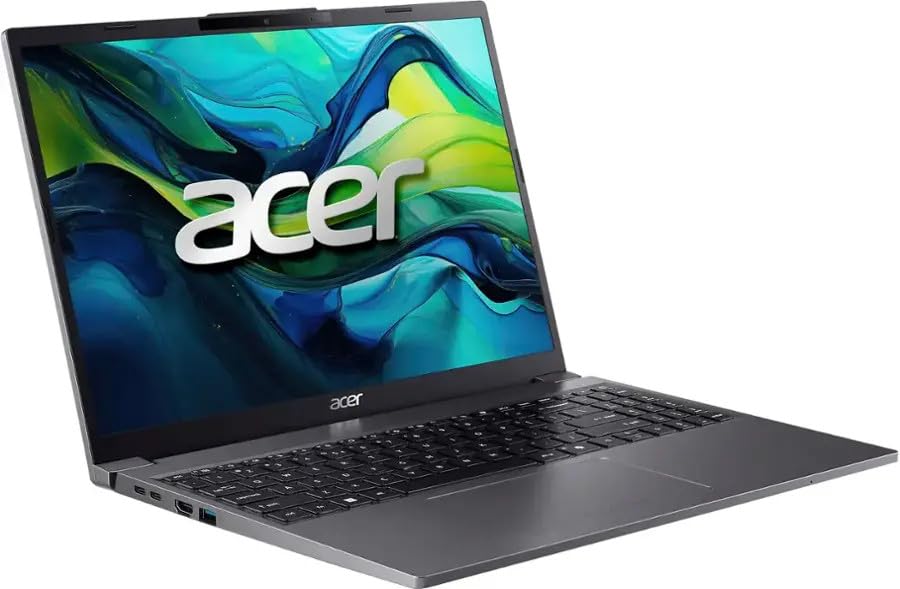
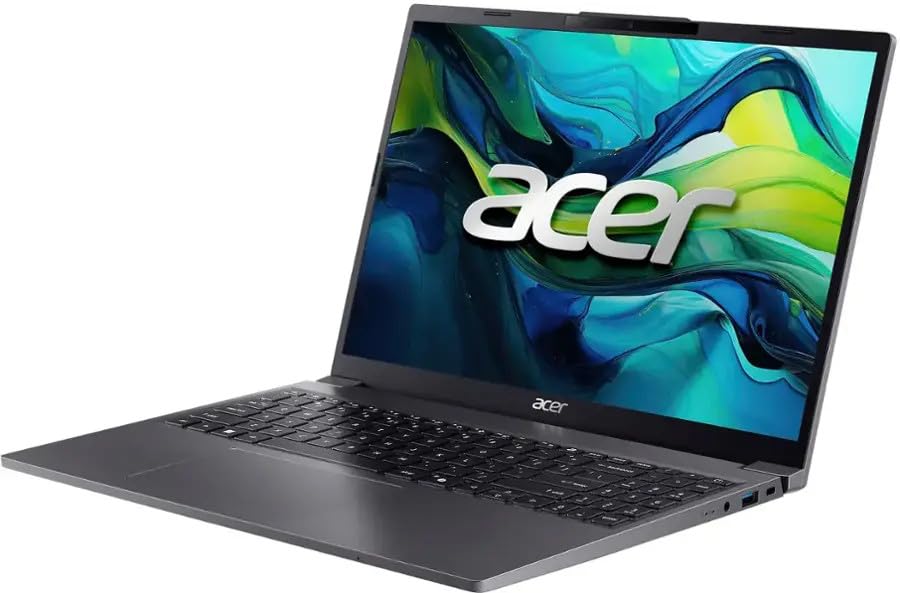
The Acer Aspire Go 15 stands out as an accommodating, practical portable computer that gives newcomers and casual users all the essentials needed for daily productivity without demanding technical know-how.
- Roomy 15.3-inch anti-glare screen with modern 1920 by 1200 resolution that shows more vertical content than older widescreen models.
- Speedy 10-core Intel Core i5 processor and 16GB of system memory that smoothly manage several active applications at once.
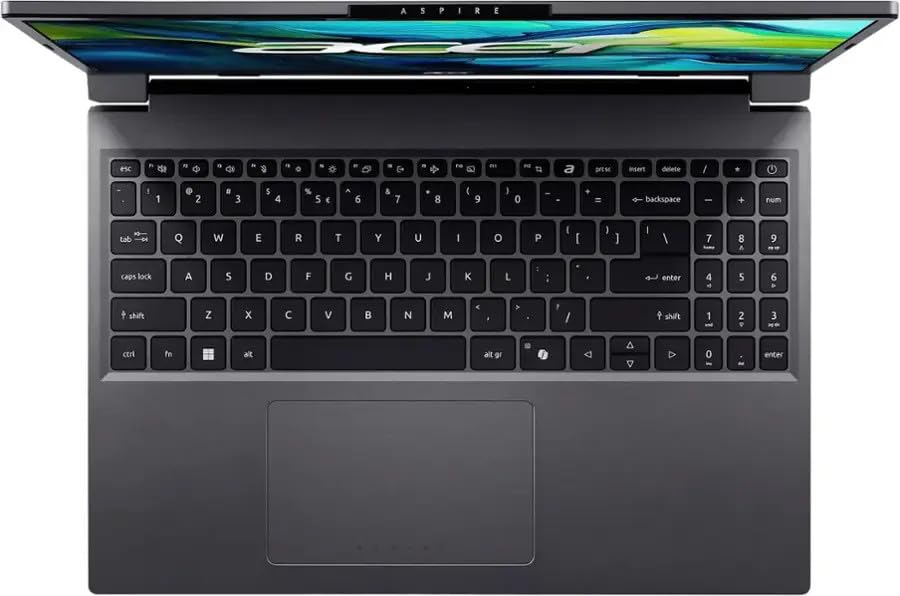
- Spacious full-size keyboard with an integrated numeric keypad, making homework assignments, accounting, and budgeting effortless.
- Sensible 3.7-pound build that remains conveniently portable around the house or between classes.
Where to buy
at Amazon
Price taken from the listing on 18 Sep 2026 and it can change at any time. We may earn a commission if you buy through this link.
Pros
- Spacious 15.3-inch anti-glare display
- Generous 16GB modern DDR5 memory
- Fast 512GB solid-state storage
- Clear 1080p Full HD webcam
- Full-size keyboard with numeric keypad
- Versatile connectivity including dual USB-C
Cons
- Modest 250 nits indoor screen brightness
- Battery runtime hours not manufacturer specified
- Integrated graphics unsuitable for heavy gaming
As Amazon Associates, we earn from qualifying purchases. This means we may receive a small commission at no extra cost to you if you click through and make a purchase.
Shopping for a reliable home computer or finding a thoughtful tech present for a family member often feels overwhelming when confronted with confusing technical jargon. Many shoppers simply want an uncomplicated machine that starts quickly, keeps up with everyday browsing, and offers a clear, comfortable display for reading documents, writing emails, and watching movies. The Acer Aspire Go 15 provides a welcoming solution to this problem by combining user-friendly features with modern processing components, eliminating the guesswork for first-time owners and gift-givers alike.
Our verdict reveals a balanced and capable everyday notebook built for households, home offices, and learners who want ample workspace without unnecessary operational hurdles. Outfitted with a generous screen, generous system memory, and swift solid-state storage right out of the box, it solves common frustrations like endless loading wheels, cramped screen space, and sluggish multi-tab web browsing.
Acer Aspire Go 15 Features Explained
15.3-Inch Display Quality and Visual Clarity
The screen is often the most critical part of any portable computer because it directly impacts your everyday comfort. Evaluating the Acer Aspire Go 15 display quality reveals a generous 15.3-inch viewing area featuring an In-Plane Switching panel. This technology ensures that colors and text remain sharp and legible even when you look at the screen slightly from the side, which is perfect when sharing a video clip or photo album with someone sitting beside you. The screen features a 1920 by 1200 resolution, giving you a taller aspect ratio than standard high-definition displays so you do not have to scroll as frequently while reading web pages or editing documents.
Acer coats the screen in an anti-glare finish and equips it with 250 nits of brightness along with 45 percent NTSC color coverage. Paired with integrated Intel Iris Xe Graphics, the display renders streaming movies, spreadsheets, and personal pictures with crisp edges and natural tones. While the 250-nit brightness level is best suited for indoor living rooms, classrooms, and offices rather than direct outdoor sunlight, the matte anti-reflective treatment reduces harsh overhead light reflections to keep your eyes feeling relaxed throughout long study or work sessions.
10-Core Intel Core i5 Processing Muscle
Under the hood, this computer runs on an Intel Core i5-1334U processor, an engine featuring 10 separate computing cores and 12 processing threads. In plain language, cores act like lanes on a highway: having 10 cores means your system can handle many digital instructions at the same time without stalling. This processor includes two high-speed Performance Cores for heavier assignments like basic media editing and eight Efficient Cores that handle routine background duties while conserving electricity. With Intel Turbo Boost Technology pushing clock speeds up to 4.6 GHz and a 12 MB Smart Cache, launching software feels instantaneous.
In this Acer Aspire Go 15 i5 review context, the computing power proves more than capable of keeping everyday home tasks fluid. You can stream high-definition family media, keep numerous browser tabs open, and run desktop office software simultaneously without experiencing stutters. Shoppers who prefer a compact convertible format might explore our acer aspire 3 spin 14 coverage, but this traditional 15-inch model provides substantially higher processing capability for families needing reliable long-term horsepower.
Speedy 16GB Memory and Roomy 512GB Storage
Computer memory, known as RAM, acts as a temporary mental scratchpad where the computer holds open apps and browser windows. This model comes loaded with 16GB of rapid LPDDR5/DDR5 system memory clocked at 4800MHz. For beginners, having 16GB means you will rarely have to worry about closing one program just to open another. You can jump back and forth between word processors, video calls, music players, and recipe websites without annoying pauses or tab refreshes, making the Acer Aspire Go 15 for everyday use an exceptionally smooth partner.
For permanent file archiving, the computer provides a high-speed 512GB PCIe NVMe solid-state drive. Unlike old-fashioned spinning mechanical hard drives that took minutes to boot up, an NVMe SSD transfers files at rapid digital speeds, allowing Windows 11 to start in mere seconds. The 512GB capacity provides plenty of space to preserve thousands of family photos, course materials, spreadsheets, and essential software without immediately needing external storage drives.
Full-Size Keyboard and Versatile Port Selection
Typing comfort is vital for students writing papers and adults managing home finances. This model features a full-size keyboard that includes an integrated physical numeric keypad on the right side. Having dedicated number keys simplifies entering tax figures, calculating school math problems, and typing spreadsheet data. The chassis measures 13.6 inches long by 9.6 inches wide with a slim 0.78-inch thickness, giving the keyboard a spacious layout that avoids feeling cramped under adult hands.
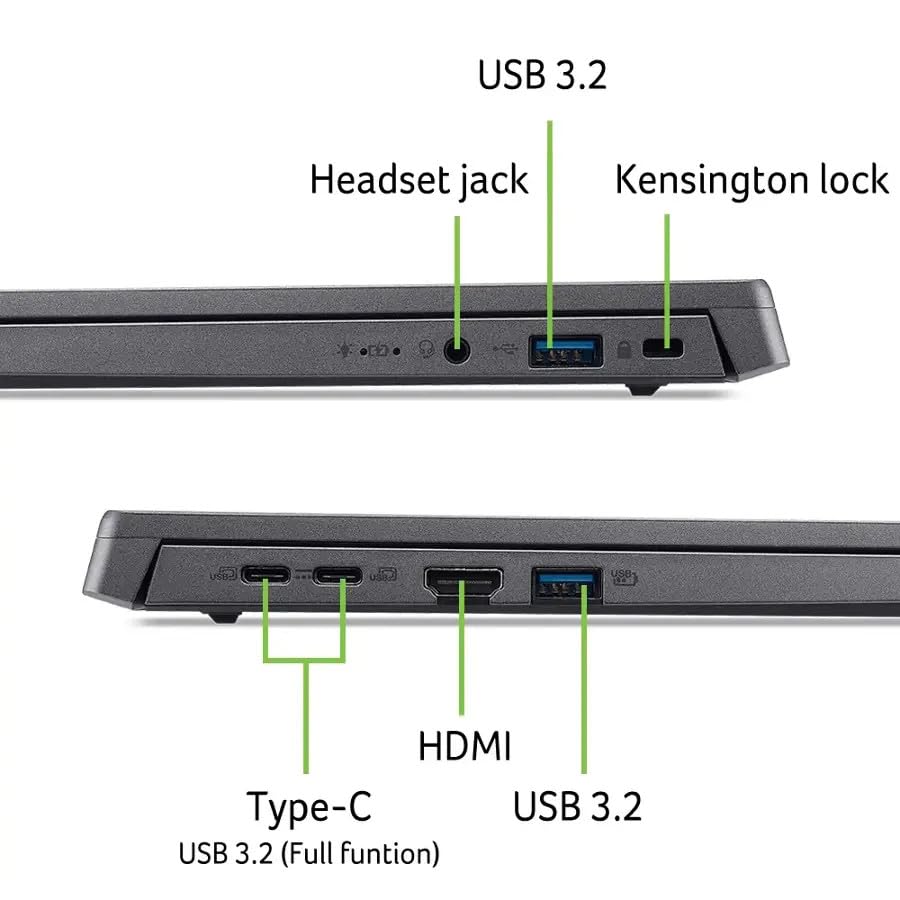
Wired connectivity is equally well thought out, ensuring compatibility with common household accessories without requiring confusing adapter dongles. It includes two modern USB-C 3.2 Gen 1 ports running at 5Gbps, two standard USB 3.2 Gen 1 ports for older flash drives or desktop mice, an HDMI 2.1 port for linking to a television or external monitor, a dedicated USB-C power connection, and a headphone and microphone combo jack for private listening.
Webcam, Speakers, and Wireless Standards
Staying in touch with distant relatives or attending online virtual classes requires clear video and dependable audio. This laptop features a built-in 1080p Full HD camera that produces clearer facial detail than standard low-resolution laptop cameras, ensuring you look crisp during video conferences. Dual 2-watt stereo speakers provide clear dialogue for instructional videos and web chats, supported by built-in HD Audio processing.
To keep you linked to the internet, Acer incorporates Intel MediaTek Wi-Fi 6 with a 2×2 antenna setup alongside Bluetooth 5.1 wireless connectivity. Wi-Fi 6 communicates efficiently with modern home wireless routers, maintaining stable internet speeds even when multiple family members stream media on the same network. Bluetooth 5.1 lets you quickly pair wireless mice, cordless headphones, and Bluetooth printers without cluttering your workspace with cables.
Specs
Reviewing the official Acer Aspire Go 15 specs gives you a clear overview of the physical dimensions, computing parts, and hardware components included in this configuration.
| Screen Size and Panel | 15.3-inch IPS LED-backlit display |
|---|---|
| Screen Resolution | 1920 x 1200 pixels (Anti-glare, 250 nits, 45% NTSC) |
| Processor (CPU) | Intel Core i5-1334U (10 cores, 12 threads, up to 4.6 GHz) |
| Graphics (GPU) | Intel Iris Xe Graphics (Integrated, shared memory) |
| System Memory (RAM) | 16GB DDR5 / LPDDR5 SDRAM (4800MHz) |
| Internal Storage | 512GB PCIe NVMe M.2 Solid State Drive |
| Operating System | Windows 11 Home |
| Wireless Connectivity | Wi-Fi 6 (2×2) and Bluetooth 5.1 |
| Webcam and Audio | 1080p FHD camera, dual 2W speakers, HD Audio |
| Battery Hardware | 53 Whr 3-cell lithium-ion battery |
| Dimensions and Weight | 13.6" L x 9.6" W x 0.78" Th; 3.7 pounds; Steel Gray |
As published by the manufacturer on the Amazon listing.
Buy it if
Best Use Cases
- Managing everyday household correspondence, paying monthly bills, and balancing family accounts using the full numeric keypad.
- Researching school reports, composing term essays, and participating in remote classroom lectures with the sharp 1080p camera.
- Serving as a hassle-free starter computer for teenagers or older adults desiring a clean, familiar Windows interface.
- Streaming high-definition educational videos and leisure entertainment on an anti-glare screen that reduces indoor eye fatigue.
- Multitasking across various open browser windows, music streaming apps, and communication tools without slowdowns.
Think twice if
Before You Buy
Before making your final choice, it is beneficial to understand what is included in the package and where practical hardware limitations exist. The laptop arrives with Windows 11 Home pre-installed, offering straightforward out-of-the-box navigation with built-in accessibility tools. When planning your Acer Aspire Go 15 setup guide steps, you will simply connect the included power supply to the dedicated USB-C power jack, turn the machine on, and follow the on-screen prompts to join your home Wi-Fi network. Note that the listing does not include peripheral accessories such as a dedicated carrying case, protective sleeve, or standalone wireless mouse, so you will need to acquire those separately if desired.
Regarding power consumption, the computer is equipped with a 53 Whr 3-cell lithium-ion battery. The listing does not specify exact runtime hours, as real-world Acer Aspire Go 15 battery life fluctuates depending on screen brightness, open software, and connected accessories. The 250 nits display brightness and 45 percent NTSC color profile are ideal for indoor general computing, but those seeking professional photo color work or outdoor sunlight visibility might explore larger productivity options such as the acer aspire go 16. Furthermore, graphics processing relies on integrated Intel Iris Xe shared memory, meaning this machine is crafted for everyday productivity rather than demanding modern 3D gaming.
Bottom Line
Deciding if the Acer Aspire Go 15 is worth it comes down to matching your daily needs with its thoughtful feature balance. For first-time computer shoppers, family households, and academic learners, this configuration provides remarkable value by including generous 16GB system memory and a 10-core Intel Core i5 processor right out of the box. Rather than skimping on memory or saddling owners with sluggish performance, it ensures dependable responsiveness across regular computing routines.
While shoppers looking for premium color-critical creative displays or intense gaming hardware will want specialized machinery like those discussed in our acer aspire 16 overview, this Steel Gray notebook excels at making essential digital tasks easy and reliable. It represents a sensible, well-equipped investment that gives novices and students the confidence to work, learn, and connect without technological frustration.
FAQ
Is the Acer Aspire Go 15 a good choice for someone buying their first laptop?
Yes, choosing an Acer Aspire Go 15 first laptop is an excellent move for beginners because it comes configured with Windows 11 Home and plenty of internal memory. The straightforward keyboard layout, spacious 15.3-inch screen, and clear setup prompts allow new computer users to navigate basic tasks like sending emails and browsing the web without technical confusion.
Is the Acer Aspire Go 15 recommended for students?
Selecting the Acer Aspire Go 15 for students is a practical decision because the machine features a built-in 1080p webcam for remote lectures, a full numeric keypad for coursework, and 16GB of memory to handle research with dozens of open browser tabs simultaneously. At 3.7 pounds, it remains easy to slide into a standard school backpack.
What should I expect regarding the Acer Aspire Go 15 battery life?
The laptop houses a 53 Whr 3-cell lithium-ion battery designed to support routine indoor computing. While the listing does not specify exact operational hours due to differing user habits, the balance of energy-efficient processor cores and moderate screen brightness helps conserve power during typical school and household work sessions.
Can I connect an external monitor or television to this laptop?
Yes, you can easily connect an external display using the built-in full-size HDMI 2.1 video output port. Additionally, the machine features two USB-C 3.2 Gen 1 ports that provide versatile connectivity for modern peripheral equipment, external backup drives, and compatible digital accessories.
Does this laptop have enough storage for family pictures and school projects?
The system features a rapid 512GB PCIe NVMe solid-state drive, which provides ample space for thousands of family photos, personal music libraries, school reports, and essential software applications. Because it uses solid-state technology rather than mechanical disks, opening files and starting up the operating system happens almost instantly.
Where to buy
at Amazon
Price taken from the listing on 18 Sep 2026 and it can change at any time. We may earn a commission if you buy through this link.
More Computers & Laptops
See the section


Get our picks by email
New reviews and the prices we spotted, once a week.