CalDigit TS4 Dock Review: The Complete Beginner’s Guide
Setting up a modern workspace often introduces an unexpected challenge: modern laptops are sleeker and lighter than ever, yet they routinely arrive with only two or three small ports. When you need…
By Tara Sanderson 10 min read




Our verdict
Star rating left by 1,741 Amazon buyers — not a score from testing of our own
The CalDigit TS4 is an expansive 18-port desktop docking station built around Thunderbolt 4 technology, designed to provide comprehensive connectivity, dual-display capability, and robust computer charging across a wide range of modern systems.
- Eighteen dedicated ports allow you to connect all your daily desk peripherals through a single host cable.
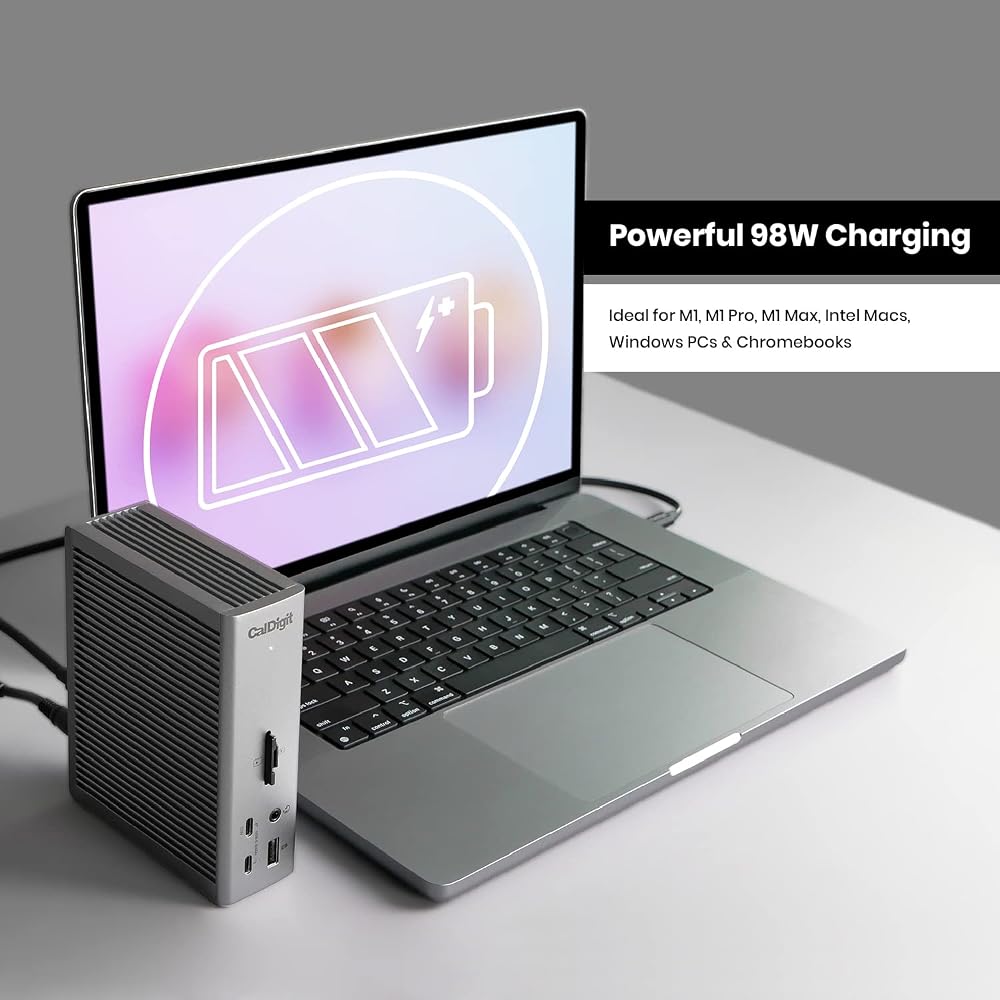
- Up to 98 watts of computer charging power keeps power-hungry laptops energized without their stock wall chargers.
- Massive 40Gbps Thunderbolt 4 bandwidth supports up to a single 8K display or dual 6K monitors on supported systems.
- Built-in 2.5 Gigabit Ethernet delivers networking speeds up to two and a half times faster than standard gigabit connections.
Where to buy
at Amazon
Price taken from the listing on 18 Sep 2026 and it can change at any time. We may earn a commission if you buy through this link.
Pros
- Eighteen high-performance expansion ports
- Up to 98W host laptop charging
- Dual 6K display support on compatible systems
- Fast 2.5 Gigabit Ethernet port
- Included 0.8-meter certified Thunderbolt 4 cable
Cons
- Base Apple M-series chips limited to single monitor
- Requires large 230W external power supply
- No built-in HDMI port included
As Amazon Associates, we earn from qualifying purchases. This means we may receive a small commission at no extra cost to you if you click through and make a purchase.
Setting up a modern workspace often introduces an unexpected challenge: modern laptops are sleeker and lighter than ever, yet they routinely arrive with only two or three small ports. When you need to plug in an external monitor, a keyboard, a mouse, a backup drive, an internet cable, and your charger, your desk quickly dissolves into an unsightly web of dongles and adapters. The CalDigit TS4 is engineered to eliminate this everyday hassle by centralizing all your peripheral connections into a single, high-performance desktop hub. Whether you are assembling a clean home office or upgrading a creative studio, this unit bridges the gap between ultra-portable computers and full-scale workstation productivity.
Our assessment reveals that this docking station stands out as an exceptional, premium solution for anyone seeking reliable single-cable convenience. By combining generous power delivery with eighteen physical ports and high-bandwidth data handling, it provides the kind of seamless expansion that lets you plug in one cord and instantly access your entire desk setup. While it represents a substantial hardware investment compared to basic travel dongles, its rock-solid stability and forward-looking capabilities make it one of the most capable desktop companions currently on the market.
CalDigit TS4 Features Explained
Massive 18-Port Array for Total Desk Organization
Understanding the caldigit ts4 ports explained begins with realizing just how many separate adapters this single station replaces. Across its front and rear panels, the dock houses eighteen distinct interfaces. The front face gives you quick access to frequently swapped items, including an SD 4.0 UHS-II card slot, a microSD 4.0 UHS-II card slot, a combination audio jack, a dedicated USB-A port, and two USB-C ports. The rear panel accommodates your permanent desk fixtures, offering four additional USB-A ports, a third USB-C port, two downstream Thunderbolt 4 ports, a dedicated host Thunderbolt 4 connection, a DisplayPort 1.4 video output, rear audio ports, and a wired Ethernet jack.
When weighing a dedicated station like the caldigit ts4 vs simple hub, the sheer physical capacity and permanent layout make a substantial difference. Simple travel hubs draw power directly from your laptop and often hang awkwardly off the side of your machine with short, strained cords. In contrast, this full-sized station rests steadily on your desk in either a vertical or horizontal orientation, keeping thick monitor cables and network cords neatly tucked out of sight behind the aluminum chassis. This creates a remarkably organized, distraction-free work environment where plugging in your computer requires just one simple connection.
Next-Generation Thunderbolt 4 Speed and 10Gbps USB Channels
A core reason this dock excels in demanding environments is its 40Gbps Thunderbolt 4 foundation. While standard USB ports share limited data channels that can slow down when multiple drives are working at once, Thunderbolt 4 provides a massive data highway. The dock includes three total Thunderbolt 4 ports: one connects directly to your computer to handle incoming and outgoing data, while two downstream ports allow you to attach high-speed external storage drives, specialized creative gear, or even daisy-chain additional Thunderbolt devices without losing performance.
Furthermore, all eight standard USB ports on the unit—consisting of five USB-A ports and three USB-C ports—deliver full 10Gbps transfer rates. Many entry-level hubs restrict their standard USB-A jacks to slower legacy speeds, which can cause severe delays when moving large photo libraries or video archives. By equipping every single USB socket with 10Gbps throughput, the hardware ensures that your portable flash drives, external solid-state drives, and desktop peripherals run at their maximum possible performance simultaneously. While the supplied 0.8-meter cord handles full 40Gbps transfers, those looking ahead to next-generation cabling accessories might also explore our review of the caldigit thunderbolt 5 cable.
Dependable 98W Host Power Delivery
A frequent problem for remote workers using compact travel hubs is inadequate power supply. Many basic hubs only pass through a fraction of the electricity your laptop needs, resulting in slow battery drainage during intensive tasks like video rendering or large file exports. The caldigit ts4 98w charging system solves this completely by pushing up to 98 watts of continuous power back to your host laptop through the main connection cord. This provides ample headroom to charge larger-screen portable machines rapidly while simultaneously powering every connected accessory.
To support this high level of power delivery without compromising stability, the system relies on an included 230-watt desktop power brick. Because the dock has its own dedicated external power supply, it does not siphon energy from your laptop battery to run its card readers, network interface, or USB drives. Instead, it operates as an independent power station that keeps your laptop fully charged, your external drives spinning reliably, and your mobile devices charging even when your main computer is unplugged or powered down.
Flexible Single 8K and Dual 6K Monitor Configurations
Visual workspace is essential for modern multitasking, and setting up a caldigit ts4 dual display setup offers immense flexibility depending on your operating system and computer hardware. On compatible Windows computers, the dock can drive a single monitor at up to 8K resolution at 30Hz, or two separate 4K displays running at a smooth 60Hz. This makes it a great fit for users who need expansive desktop real estate for spreadsheets, programming windows, or financial dashboards.
For macOS users, the dock supports a single external screen at up to 6K resolution at 60Hz. If your Mac is powered by an Apple M1 Pro, M2 Pro, M3 Pro, M4 Pro, M Max, or M Ultra processor, you can drive two independent 6K monitors at 60Hz simultaneously. Monitors can be connected directly using the built-in DisplayPort 1.4 port, or by utilizing the downstream Thunderbolt 4 ports with native USB-C or Thunderbolt display connections. Users comparing high-port-count multi-monitor docks might also consider how the ugreen revodok maxidok 17-in-1 thunderbolt™ 5 docking station handles peripheral bandwidth and external video lines.
High-Speed 2.5 Gigabit Ethernet and Integrated Media Card Slots
While wireless internet is convenient, physical network cables remain the gold standard for reliable video conferencing, competitive online gaming, and large network backups. The TS4 features an upgraded 2.5 Gigabit Ethernet port, offering speeds two and a half times faster than standard 1Gbps ports. When paired with a compatible router, local network switch, or network-attached storage device, this port significantly cuts down file transfer times across your home or office network while remaining fully backwards compatible with older 1Gbps connections.
Creative hobbyists and media professionals will also appreciate the inclusion of both full-sized SD and microSD card slots directly on the front panel. Both slots operate on the high-speed UHS-II standard at up to 312MB/s, meaning you can ingest high-resolution photos and 4K footage from cameras, drones, or action cams without digging through desk drawers for a standalone card reader. The ability to use both card slots simultaneously further streamlines everyday digital workflows.
Specs
| Model Number | TS4-US 500971 |
|---|---|
| Total Physical Ports | 18 Ports |
| Host Interface | Thunderbolt 4 (40Gb/s), backward compatible with USB4, Thunderbolt 3, USB-C |
| Host Power Delivery | Up to 98W |
| Power Supply Wattage | 230W (120V Input) |
| USB Ports | 3x USB-C (10Gb/s), 5x USB-A (10Gb/s) |
| Video Outputs | 1x DisplayPort 1.4, 2x Downstream Thunderbolt 4 |
| Ethernet | 2.5GbE LAN (RJ-45) |
| Card Readers | SD 4.0 UHS-II, microSD 4.0 UHS-II |
| Dimensions and Weight | 4.46" L x 1.65" W x 5.55" H; 1.4 pounds |
As published by the manufacturer on the Amazon listing.
Buy it if
Best Use Cases
- A caldigit ts4 for work from home professional can permanently attach dual external displays, wired internet, a webcam, and desktop speakers while docking their work laptop with one cord.
- Photographers and video editors can rapidly ingest memory cards via the front-facing UHS-II slots while streaming heavy project assets to high-speed external Thunderbolt drives.
- Multitasking power users who utilize numerous USB accessories can eliminate loose hubs and run all eight USB-A and USB-C devices at full 10Gbps transfer rates.
- Minimalist desk builders can conceal bulky power bricks and display cabling behind the dock, maintaining a completely clutter-free desktop aesthetic.
Think twice if
Before You Buy
Understanding caldigit ts4 compatibility is essential before completing your purchase. The dock functions smoothly across Thunderbolt 4, Thunderbolt 3, USB4, and standard USB-C host machines, spanning Windows 11 PCs, Chrome OS computers, and modern tablets like iPadOS devices and USB-C iPhones. If you are shopping for a caldigit ts4 for macbook setup, pay close attention to the specific Apple processor inside your computer. While Apple machines equipped with M1 Pro through M4 Pro, Max, or Ultra processors support dual external displays through the dock, base-level M1, M2, M3, and M4 chips only support a single external monitor through a single docking connection due to operating system hardware constraints. When connected to older USB-C ports lacking full video and data specifications, overall functionality will automatically scale down to match the host port limits.
It is also worth noting what arrives in the packaging versus what you must supply yourself. The retail box includes the TS4 dock, a certified 0.8-meter Thunderbolt 4 connection cable, rubber foot strips for horizontal placement, and the external 230-watt power supply unit. However, the listing does not include native HDMI ports or bundled video conversion adapters. If your external monitors rely exclusively on HDMI cables, you will need to supply your own active DisplayPort-to-HDMI adapter or a USB-C-to-HDMI cable. Shoppers seeking enterprise office docking solutions can also research alternatives like the dell pro thunderbolt 4 dock – wd25tb4 to compare varying port layouts and manufacturer features.
Bottom Line
When asking whether is caldigit ts4 worth it, the answer comes down to how much you value desktop simplicity, hardware reliability, and comprehensive peripheral support. For casual users who simply need to plug in a wireless mouse dongle and a standard thumb drive, an eighteen-port station may offer more capacity than daily routines require. But for anyone managing a multi-device setup, demanding external storage, dual monitors, or high-speed wired networking, the unit provides unmatched performance that handles everything effortlessly over a single connection.
By pairing 98 watts of host charging with an extensive collection of 10Gbps USB ports, dual UHS-II media card slots, and an upgraded 2.5GbE network jack, this workstation hub eliminates cord clutter and future-proofs your desk. For first-time docking station buyers and thoughtful gift-givers alike, the TS4 represents a top-tier peripheral expansion that transforms any compatible laptop into a tidy, highly capable desktop workstation.
FAQ
What is the difference between a Thunderbolt 4 dock and a basic USB-C hub?
In this thunderbolt 4 dock beginner guide context, the primary distinction lies in bandwidth and independent power. A basic USB-C hub typically shares a limited 5Gbps or 10Gbps data channel across all its ports and draws power directly from your laptop battery. A Thunderbolt 4 dock operates on a massive 40Gbps bandwidth pipeline, relies on its own high-output 230W power brick, and supports high-resolution dual displays alongside ultra-fast external storage without degrading transfer performance.
Can the CalDigit TS4 run dual external monitors on an Apple MacBook?
Dual external monitor support on a Mac depends directly on the processor model inside your machine. MacBook models featuring M1 Pro, M2 Pro, M3 Pro, M4 Pro, M Max, or M Ultra processors natively support dual external monitors up to 6K resolution at 60Hz through this dock. However, base-tier M1, M2, M3, and M4 MacBook Air and MacBook Pro models natively support only one external monitor over a single dock connection.
How much charging power does the CalDigit TS4 supply to a connected laptop?
The TS4 provides up to 98 watts of Power Delivery to your host computer through the primary Thunderbolt 4 connection cable. This provides sufficient wattage to charge thin ultrabooks, standard business laptops, and larger performance notebooks quickly without requiring you to plug in your computer’s original manufacturer power adapter.
Does the CalDigit TS4 work with Windows laptops and Chromebooks?
Yes, the dock is universally compatible with Windows 11 laptops, Chrome OS computers, and macOS systems that feature Thunderbolt 4, Thunderbolt 3, USB4, or fully featured USB-C ports. On compatible Windows 11 machines, users can drive either a single 8K display at 30Hz or dual 4K monitors running at 60Hz.
What accessories are included inside the CalDigit TS4 package?
The package contains the CalDigit TS4 docking station, an external 230-watt power supply unit with a power cord, rubber stabilizing feet, and a certified 0.8-meter Thunderbolt 4 host cable. The listing does not specify included HDMI adapters or external display cables, so monitor cords must be acquired separately based on your screen inputs.
What buyers say
Quoted from reviews published on the Amazon listing. We have not edited the wording.
One of the Best docks you can buy!
I’m what is known as a Power User. First let me tell you what I’ve hooked this up to. I recently bought an HP Windows 11 - 17” Laptop. It has 64 Gig of Ram and a 4 TB SSD drive. It comes with 2 USB C Thunderbolt 4 ports (40 Gig). One of them is used for…
THE best dock for your Macbook Pro
I've gone through a number of docks for my 14" M1 Pro MacBook pro in the 18 months I've had my Mac. The Caldigit TS4 is BY FAR the best dock (and most expensive) that I've used. For me, it has the perfect combination of ports given the number of peripherals that I need to connect. Of course…
As a PC User.. Good so far...
After 2 months of using with my Windows laptops (home and work) this dock has been pretty easy. Occasionally something will happen with the display or sound etc. But most problems are resolved by disconnecting and reconnecting to the port.
Where to buy
at Amazon
Price taken from the listing on 18 Sep 2026 and it can change at any time. We may earn a commission if you buy through this link.
More Accessories & Peripherals
See the section



Get our picks by email
New reviews and the prices we spotted, once a week.