UGREEN Revodok Maxidok 17-in-1 Dock Review: A Beginner’s Guide
Setting up a productive modern desk often turns into an overwhelming mess of dangling adapters, messy cords, and frustrating port limitations. As modern notebooks become thinner and lighter, manufacturers routinely eliminate standard…
By Tara Sanderson 9 min read


Our verdict
Star rating left by Amazon buyers — not a score from testing of our own
The UGREEN Revodok Maxidok 17-in-1 is a premium, future-ready desktop hub designed to streamline demanding setups with massive throughput and effortless multi-screen support. With next-generation transfer rates reaching up to 120Gbps, internal solid-state drive expandability, and enough dedicated power to fast-charge power-hungry laptops, it eliminates desktop clutter while effortlessly managing heavy daily productivity tasks.
- Extreme 120Gbps Thunderbolt 5 bandwidth capable of driving dual 8K displays or triple independent Windows monitors.
- Integrated NVMe PCIe Gen4x4 M.2 SSD bay supporting up to 8TB of high-speed internal desktop storage.
- Massive 240W total system power delivery providing up to 140W of rapid host laptop charging.
- Seventeen total ports including 2.5GbE Ethernet, fast SD/TF 4.0 slots, and three independent 3.5mm audio jacks.
Where to buy
at Amazon Prime
Price taken from the listing on 18 Sep 2026 and it can change at any time. We may earn a commission if you buy through this link.
Pros
- Blazing 120Gbps Thunderbolt 5 transfer bandwidth
- Internal M.2 NVMe slot supports up to 8TB
- Generous 140W fast host laptop charging
- Seventeen total ports with 2.5GbE networking
- Drives dual 8K displays at 60Hz
Cons
- DisplayPort lacks DP++ needing active HDMI adapter
- Internal M.2 SSD drive not included
- Requires macOS 15 or later on Mac
As Amazon Associates, we earn from qualifying purchases. This means we may receive a small commission at no extra cost to you if you click through and make a purchase.
Setting up a productive modern desk often turns into an overwhelming mess of dangling adapters, messy cords, and frustrating port limitations. As modern notebooks become thinner and lighter, manufacturers routinely eliminate standard connection ports, leaving remote workers, creative pros, and home office users struggling to hook up their external screens, backup drives, card readers, and wired web connections. The UGREEN Revodok Maxidok 17-in-1 solves this exact problem by acting as a high-performance central command center for your entire workspace. Using the newest Thunderbolt 5 technology, this heavy-duty hub routes all your display feeds, power delivery, and peripheral data through a single high-bandwidth connection straight into your laptop.
In this detailed ugreen thunderbolt 5 dock review, our verdict is clear: this desktop station is an exceptional powerhouse for anyone who needs uncompromised speed, clean cable management, and extensive hardware support. By pairing high-speed display capabilities with a built-in internal drive slot and robust power delivery, it turns any compatible computer into a tidy, workstation-grade powerhouse.
UGREEN Revodok Maxidok 17-in-1 Features Explained
Next-Generation Thunderbolt 5 Bandwidth and Speed
The defining highlight of this docking station is its Intel-certified Thunderbolt 5 connectivity, which delivers up to 120Gbps of bidirectional bandwidth. For everyday users and beginners, bandwidth simply refers to the volume of data that can travel between your laptop and your desktop accessories at the exact same moment. Older hardware hubs, such as the hp thunderbolt dock g4, rely on older standards that offer a fraction of this throughput. With 120Gbps available, you no longer have to worry about data lag when running high-resolution displays, external audio interfaces, and high-speed data drives at the exact same time.
The dock provides two downstream Thunderbolt 5 ports that allow you to plug in top-tier accessories or daisy-chain additional hardware without choking your workflow. Whether you are transferring massive batches of raw digital camera images, editing uncompressed video files, or backing up system archives, the connection handles heavy continuous data streams with silky-smooth responsiveness.
Integrated NVMe PCIe Gen4x4 M.2 SSD Storage Slot
Unlike standard desktop adapters that only pass signals between external cables, this device functions as a true thunderbolt 5 docking station with nvme slot built right into the body. Concealed underneath an easy-access panel in the aluminum chassis is an internal M.2 bay supporting PCIe Gen4x4 solid-state drives. It accommodates standard M.2 drive sizes from 2230 up to 2280, with capacity support reaching all the way to 8TB. This means you can install a solid-state drive straight into the dock, essentially turning the hub into an ultra-fast desktop external drive.
For creative professionals, photographers, and video editors, having this bay built into the dock eliminates the need for loose external drive enclosures and extra USB cables dangling across your desk. The bay is engineered to fit drives equipped with heatsinks measuring up to 12mm in height and 24mm in width, ensuring that your storage stays cool and maintains sustained high read and write speeds even during intense rendering workloads.
Comprehensive 17-Port Desktop Array
The ugreen 17 in 1 docking station is designed to handle every piece of gear in your home office without needing secondary dongles. On the front and rear panels, you will find three 10Gbps USB-A ports for legacy accessories like keyboards and mice, alongside three 10Gbps USB-C ports, two of which intelligently share 60W of fast device-charging power. If you are comparing this layout to earlier hubs like the ugreen revodok max 213, this updated array provides noticeably faster USB port throughput across all channels.
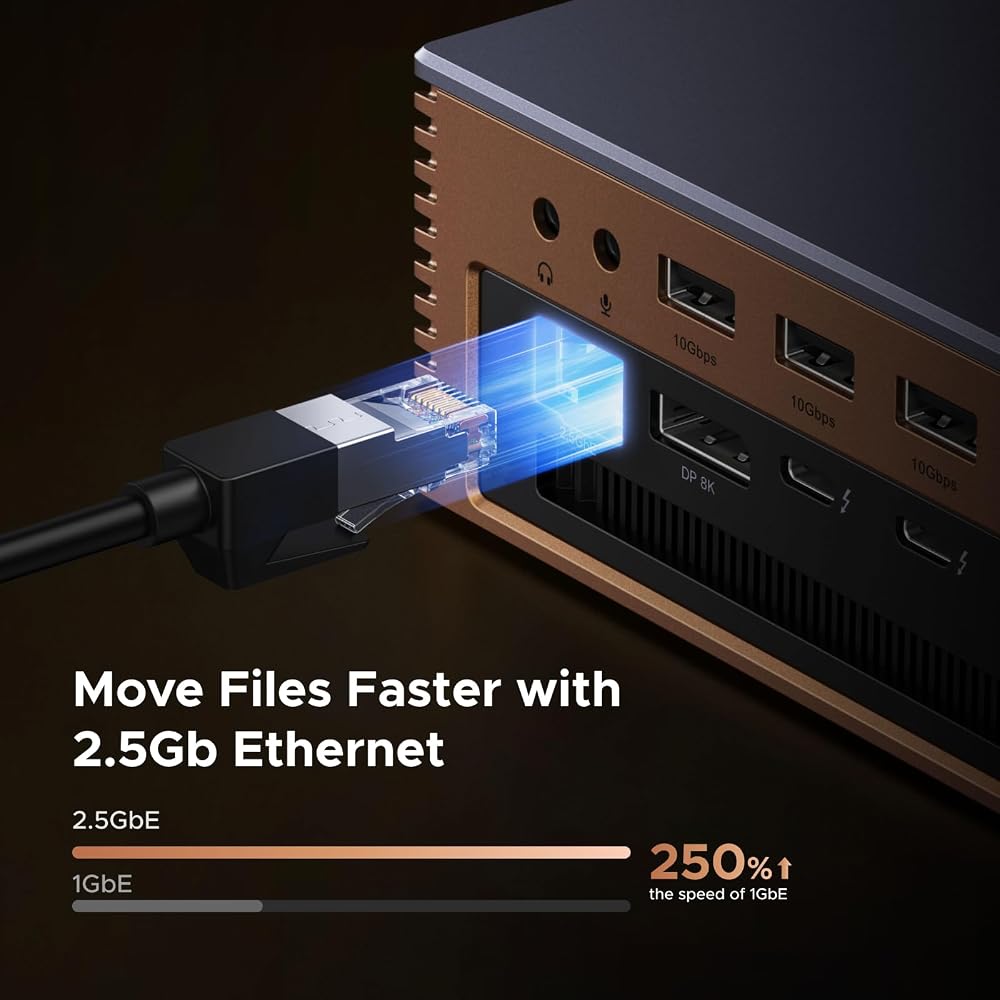
Photographers and content creators will appreciate the built-in SD 4.0 and TF 4.0 memory card slots, which allow quick photo and footage imports directly from digital cameras. For networking, the dock includes a 2.5GbE Ethernet port that provides significantly lower latency and faster data transfer rates than standard Gigabit jacks. You also get three independent 3.5mm audio ports, giving you dedicated, hassle-free plug points for headphones, external desktop speakers, and audio input gear.
Versatile Multi-Monitor Display Output
Expanding your visual workspace is simple thanks to the dock’s advanced display architecture. When evaluating ugreen revodok maxidok multi monitor performance, Windows systems can drive up to three independent external monitors at once using the dual downstream Thunderbolt 5 ports and the integrated DisplayPort connection. On compatible Windows PCs, the dock supports single or dual 8K displays running at a fluid 60Hz refresh rate, delivering sharp visuals for drafting, coding, or detailed graphic design.
Apple laptop owners can take advantage of the ugreen revodok maxidok dual display capabilities to run two external displays simultaneously on supported Apple silicon hardware. It is important to note that the dock’s DisplayPort connection does not support DP++ (DisplayPort Dual-Mode). Because of this design, if you want to hook up a monitor that uses an HDMI cable, you must use an active DisplayPort-to-HDMI adapter rather than a cheap passive cord.
Massive 240W Power Supply and AI Smart Cooling
Powering a full desk of peripherals while charging a demanding workstation laptop takes serious electrical muscle. This dock comes equipped with an external 240W total system power supply. It directs up to 140W of dedicated charging power upstream into your laptop, which is more than enough wattage to keep heavy-duty notebooks charged under intense computing tasks. An additional 60W of power delivery is distributed across the front-facing ports to charge mobile phones, tablets, or power banks quickly.
To keep the unit running safely under heavy electrical and data loads, the bronze aluminum unibody acts as a natural heat sink, similar to what you find on high-end options like the anker tb5 docking station. Inside, an ultra-thin 60mm AI smart cooling fan automatically regulates internal airflow around the motherboard and the M.2 SSD bay. The listing notes that fan rotation during everyday operation is completely normal, ensuring your components maintain safe thermal levels during marathon computing sessions.
Specs
| Brand & Model | UGREEN Revodok Maxidok 17-in-1 (Model U716 / Part 85590F) |
|---|---|
| Total Port Count | 17 individual connectivity ports |
| Host Interface | Intel-certified Thunderbolt 5 (Up to 120Gbps) |
| Internal Storage | M.2 NVMe PCIe Gen4x4 slot (Supports 2230–2280 SSDs up to 8TB) |
| Display Outputs | 2x Thunderbolt 5 downstream, 1x DisplayPort (No DP++) |
| Maximum Resolutions | Single or Dual 8K@60Hz; Triple independent displays on Windows |
| Total System Power | 240W total; up to 140W host charging; 60W shared USB PD-out |
| Wired Networking | 2.5GbE RJ45 Ethernet port |
| Audio & Media | 3x 3.5mm audio jacks; SD/TF 4.0 card reader slots |
| Operating System | Windows 10 or later; macOS 15 or later |
As published by the manufacturer on the Amazon listing.
Buy it if
Best Use Cases
- Creative professionals editing high-bitrate video who need fast internal NVMe storage paired with multi-monitor workspaces.
- Remote office workers looking to clean up tangled desktop cords by connecting displays, webcams, power, and accessories through a single laptop cable.
- Software developers and data analysts requiring multiple sharp external screens and dependable wired 2.5GbE network speeds.
- High-performance laptop users who need up to 140W of rapid host charging to sustain heavy computing loads without battery drain.
Think twice if
Before You Buy
Before purchasing this hub, checking your computer hardware and operating system compatibility is essential. If you plan to deploy the ugreen revodok maxidok for macbook setups, the manufacturer specifies that your machine must be running macOS 15 or later. Supported Mac models include MacBook systems equipped with M4 Standard, Pro, or Max chips, as well as M1, M2, and M3 Pro or Max processors, and the M4 Pro Mac mini. For Windows users, you will need a machine running Windows 10 or newer with a dedicated Thunderbolt 4 or Thunderbolt 5 port. Users upgrading from legacy enterprise hubs like the dell wd22tb4 docking station should confirm their laptop port supports these bandwidth specifications to enjoy the full performance benefits.
You should also take note of what hardware is not bundled in the box. While the unit features a built-in M.2 storage bay, an actual solid-state drive is not included, meaning you must purchase your own PCIe Gen4x4 NVMe drive separately. Ensure any drive heatsink you pick fits within the 12mm height and 24mm width restrictions. Furthermore, remember that the DisplayPort output does not support DP++, so connecting an HDMI screen requires an active adapter. The listing does not specify whether extra monitor cables come in the box, so make sure you have appropriate video cables ready for your screens.
Bottom Line
The UGREEN Revodok Maxidok 17-in-1 stands out as an impressive, future-proof solution for anyone seeking to cure desktop clutter and elevate their computing experience. Combining 120Gbps Thunderbolt 5 speeds, an internal 8TB-capable NVMe drive bay, 140W laptop charging, and 17 dedicated connectivity ports, this hub turns a single laptop connection into a fully outfitted workstation.
While prospective buyers need to keep the active HDMI adapter requirement and operating system prerequisites in mind, the sheer performance, clean aluminum design, and stability it offers are top-notch. If you want a dependable, high-speed desk hub that will easily handle your multi-monitor and storage needs for years to come, this dock is well worth the investment.
FAQ
Is UGREEN Revodok Maxidok worth it for a standard desk setup?
Deciding whether is ugreen revodok maxidok worth it comes down to how many peripherals and monitors you use. If you only need to connect a wireless mouse and a single basic display, this unit may offer more power than you truly need. However, for power users, creative pros, and remote workers who want high-speed external storage, dual 8K display support, and 140W laptop charging through one cable, it provides incredible convenience and performance.
How do I follow the UGREEN Maxidok setup guide for the first time?
Following a standard ugreen maxidok setup guide is very simple. First, plug the included 240W power brick into a wall outlet and connect it to the dock. If you bought an M.2 SSD, open the bottom bay and install it before powering on. Next, plug your monitors, Ethernet cable, and USB peripherals into their respective ports on the dock. Finally, connect the included Thunderbolt 5 cable from the hub into your laptop; your computer will immediately start charging while recognizing your screens, network, and connected accessories.
What are the primary UGREEN Revodok Maxidok specs to know?
The key ugreen revodok maxidok specs include 17 total ports, Intel-certified Thunderbolt 5 speeds up to 120Gbps, and a 240W total power supply that delivers up to 140W of host laptop charging. Other critical specifications include an internal M.2 NVMe PCIe Gen4x4 bay supporting up to 8TB drives, three 10Gbps USB-A ports, three 10Gbps USB-C ports, dual Thunderbolt 5 downstream ports, 2.5GbE Ethernet, and support for up to triple independent displays on Windows or dual displays on Mac.
Can I connect an HDMI monitor directly to the DisplayPort on this dock?
You can connect an HDMI monitor, but you cannot use a standard passive DisplayPort-to-HDMI cable. The DisplayPort on this docking station does not support DP++ (DisplayPort Dual-Mode). To send video to an HDMI screen, you must use an active DisplayPort-to-HDMI adapter or use an adapter connected to one of the downstream Thunderbolt 5 ports.
Does the internal M.2 SSD bay support older SATA drives?
No, the internal bay is designed exclusively for M.2 NVMe PCIe Gen4x4 solid-state drives. It accommodates standard form factors including 2230, 2242, 2260, and 2280 sizes up to 8TB in capacity. SATA-based M.2 drives are not supported, so ensure you choose a PCIe NVMe drive when expanding your storage.
Where to buy
at Amazon Prime
Price taken from the listing on 18 Sep 2026 and it can change at any time. We may earn a commission if you buy through this link.
More Accessories & Peripherals
See the section



Get our picks by email
New reviews and the prices we spotted, once a week.