Dell WD22TB4 Docking Station: What First-Time Buyers Need to Know
Setting up a home office or modern workstation often introduces a frustrating tangle of power bricks, monitor cables, and USB adapters. Modern portable laptops are thinner and lighter than ever, but they…
By Tara Sanderson 10 min read




Our verdict
Scores are out of 10, based on listed specifications and buyer feedback — not from testing of our own
The Dell WD22TB4 is a high-performance desktop dock that excels at keeping modern workstations organized, fully charged, and connected through a single cable connection. It delivers exceptional transfer speeds, substantial power delivery for business laptops, and flexible video outputs for multiple displays.
- High-speed 40Gbps Thunderbolt 4 architecture handles video, data, and power simultaneously.
- Generous laptop power delivery provides up to 130W to supported Dell machines and 90W to other USB-C systems.
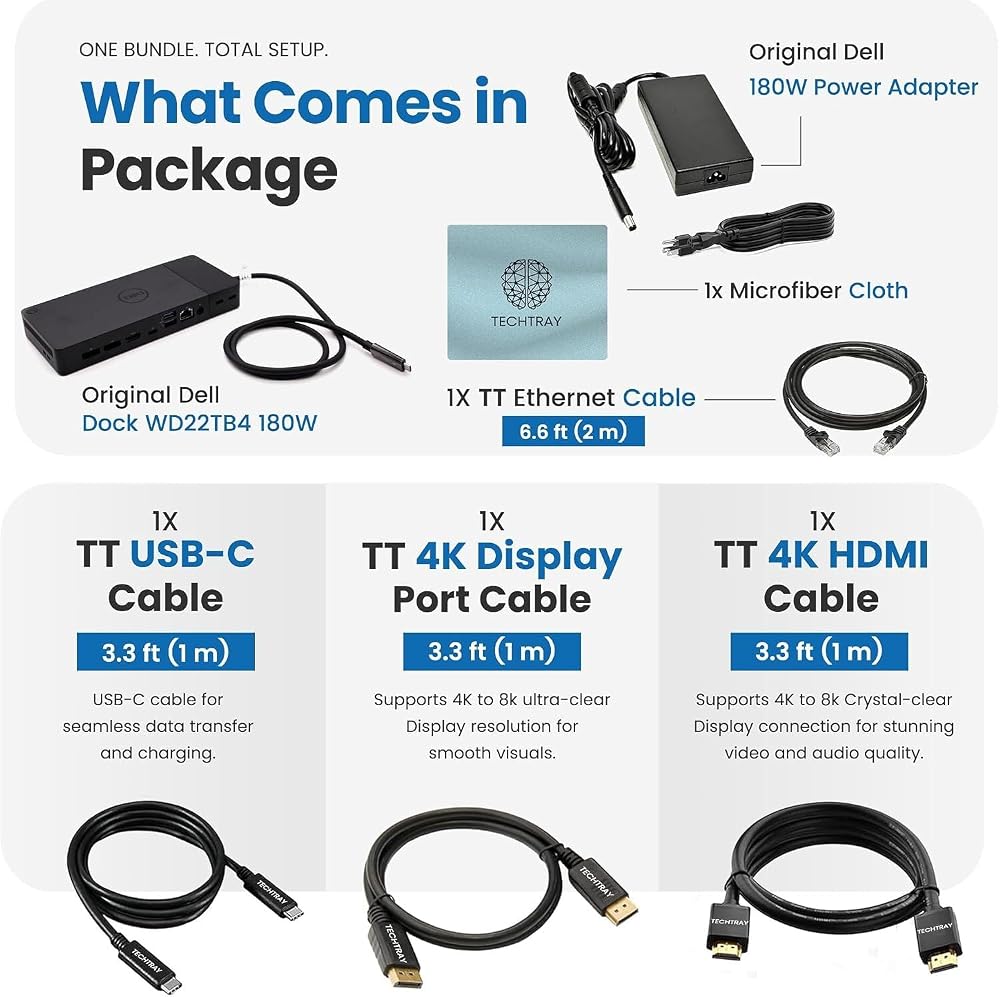
- Comprehensive bundle includes the dock, a 180W power adapter, HDMI, DisplayPort, Ethernet, and USB-C cables.
- Multi-screen output drives dual or triple displays on compatible Windows Thunderbolt computers.
Where to buy
at Amazon
Price taken from the listing on 18 Sep 2026 and it can change at any time. We may earn a commission if you buy through this link.
Pros
- Up to 130W charging for Dell laptops
- Fast 40Gbps Thunderbolt 4 data transfer
- Includes HDMI, DisplayPort, and Ethernet cables
- Supports dual and triple external monitors
- Backed by a 3-year warranty
Cons
- Non-Dell laptops capped at 90W charging
- Requires OEM charger for 180W+ gaming laptops
- Dual external screens on standard Macs need DisplayLink
As Amazon Associates, we earn from qualifying purchases. This means we may receive a small commission at no extra cost to you if you click through and make a purchase.
Setting up a home office or modern workstation often introduces a frustrating tangle of power bricks, monitor cables, and USB adapters. Modern portable laptops are thinner and lighter than ever, but they frequently sacrifice full-sized ports to achieve those sleek profiles. If you find yourself plugging and unplugging three or four separate cables every time you sit down at your desk or leave for a meeting, a central hub is the ultimate workspace upgrade. The Dell WD22TB4 docking station is engineered to solve this desk clutter problem by consolidating your entire setup into a single high-speed cable. Built for professionals, remote workers, and students who want a seamless desktop experience, this device bridges the gap between ultra-portable laptops and full-scale desktop productivity.
In this beginner-focused review, our short verdict is that this dock stands out as a dependable, future-ready powerhouse for compatible workstations. By pairing modern 40Gbps Thunderbolt 4 connectivity with a robust 180W power supply, it delivers ample charging current alongside smooth multi-monitor output. While shoppers with base-model Apple laptops or ultra-demanding gaming rigs need to understand a few hardware limitations before buying, this package removes setup friction by including essential video and network cables right in the box.
Dell WD22TB4 Features Explained
High-Speed Thunderbolt 4 Connectivity
Understanding the technology inside the dell wd22tb4 thunderbolt 4 dock begins with the cable connection itself. Thunderbolt 4 provides up to 40Gbps of bidirectional bandwidth, which is four times faster than standard USB 3.2 Gen 2 ports found on basic hubs. For beginners, bandwidth simply refers to the volume of data that can travel between your computer and your desk accessories at the same instant. Because the pipeline is so broad, you can transfer massive files to external storage drives while driving high-resolution monitors without experiencing input lag, display stutter, or dropped network packets.
This connection also provides backward compatibility with Thunderbolt 3, USB4, and standard USB-C laptops that support DisplayPort Alternate Mode. However, how much performance you unlock depends on your host computer. When plugged into a genuine Thunderbolt 4 or Thunderbolt 3 port, the dock utilizes its full 40Gbps capacity to manage complex multi-monitor arrays. When attached to a basic USB-C port that relies only on DisplayPort Alt Mode, data and display capabilities drop down to match the limits of that slower connection.
Power Delivery and Charging Capabilities
Managing power is one of the most critical functions of any desktop hub, and the dell wd22tb4 power delivery system is built around an included 180W AC power adapter. The dock pulls electricity from your standard wall outlet and splits it between its internal circuitry, connected USB accessories, and your laptop battery. When connected to a compatible Dell commercial or consumer laptop, the dock provides up to 130W of direct pass-through power. This high wattage allows larger Dell productivity machines to charge rapidly while running demanding business applications.
If you connect a non-Dell laptop from brands like Lenovo, HP, or Apple, the dock safely steps down its output to deliver up to 90W via standard USB Power Delivery protocols. This 90W threshold is more than enough to keep most modern 13-inch, 14-inch, and standard 15-inch ultraportable laptops fully powered throughout the workday. However, heavy-duty machines like the alienware 16 aurora gaming laptop or mobile workstations that demand 180W or more during heavy processing loads cannot rely solely on the dock for power. For those performance machines, the listing specifies that you must keep the original manufacturer power adapter connected directly to the laptop during intensive tasks.
Multi-Display Support and Video Outputs
For multitaskers seeking more visual workspace, choosing the dell wd22tb4 for dual monitors or even triple displays is a practical upgrade. The back panel includes two DisplayPort 1.4 outputs, one HDMI 2.0 port, and a USB-C port equipped with DisplayPort 1.4 Alt Mode. On Windows computers equipped with Thunderbolt 4 or Thunderbolt 3 ports, the dock can push dual or triple 4K monitors at smooth refresh rates, creating an expansive digital desktop for spreadsheets, video editing, and research documents.
Display behavior shifts significantly when using non-Thunderbolt machines or Apple hardware. If your Windows computer connects via a standard USB-C port with DisplayPort Alt Mode rather than Thunderbolt, the available video bandwidth is lower, which may limit you to fewer external screens or lower display resolutions. For macOS users, the listing notes that base Apple computers can directly drive only one external 4K monitor at 60Hz through standard hardware connections. If you want dual external displays on standard Mac chips, you may need third-party DisplayLink software solutions, though Apple M1 Pro and M1 Max computers natively support two external displays.
Port Selection and Peripheral Management
Having all necessary dell wd22tb4 ports explained helps first-time users understand how their daily accessories plug into the unit. The front of the dock offers convenient access for devices you plug in and unplug frequently. It features one USB 3.2 Gen 2 Type-C port for fast external solid-state drives and one USB 3.2 Gen 1 Type-A port featuring PowerShare technology. PowerShare allows you to charge small accessories, such as your smartphone or wireless earbuds, even when your connected laptop is in sleep mode or disconnected.
The rear panel acts as the permanent backbone for your workspace peripherals. Along with the two DisplayPort 1.4 jacks and one HDMI 2.0 video output, the rear features an additional USB 3.2 Gen 2 Type-C port with DisplayPort Alt Mode, two USB 3.2 Gen 1 Type-A ports for keyboards, mice, or printers, and a dedicated Gigabit Ethernet port for fast, wired office networks. On top of the chassis, a dedicated sleep, wake-up, and power button lets you turn on compatible laptops without opening their lids. Users transitioning from older office docks like the dell wd19s docking station or the legacy dell wd15 docking station will appreciate the cleaner layout, higher data bandwidth, and integrated power control.
Bundled TechTray Cable Package
Many docking stations sold online ship with only a power brick, forcing buyers to spend extra time and money hunting down individual display cables before they can use their hardware. This specific package, distributed by TechTray, eliminates that frustration by arriving as a complete six-piece bundle. Out of the box, you receive the Dell WD22TB4 docking station alongside the official 180W power adapter, making initial setup fast and straightforward for beginners.
To ensure you can immediately connect external monitors and high-speed office networks, the package also bundles a TechTray USB Type-C host cable, a TechTray 4K HDMI cable, a TechTray 4K DisplayPort cable, and a high-speed TechTray Ethernet cable. The manufacturer also throws in a microfiber cleaning cloth to keep your screen surfaces free from dust and fingerprints. Having tested, compatible video cables included directly in the packaging removes the guesswork of verifying whether your existing cords support 4K resolution standards.
Specs
| Model Number | WD22TB4-DOCK NEW |
|---|---|
| Brand & Manufacturer | TechTray |
| Host Connection Interface | Thunderbolt 4, Thunderbolt 3, USB4, USB Type-C DP Alt Mode |
| Maximum Bandwidth | 40Gbps |
| Power Adapter Included | Dell 180W AC Power Adapter (120V / 230V AC, 50/60 Hz) |
| Laptop Power Delivery | Up to 130W for Dell systems; Up to 90W for non-Dell systems |
| Video Output Ports | 2x DisplayPort 1.4, 1x HDMI 2.0, 1x USB-C DisplayPort 1.4 Alt Mode |
| Total USB Ports | 5 USB Ports (USB 3.2 Gen 2 Type-C and USB 3.2 Gen 1 Type-A) |
| Network Connectivity | Gigabit RJ45 Ethernet Port |
| Operating System Compatibility | Windows 10, Windows 11, Ubuntu OS, Chrome OS, macOS |
| Included Warranty | 3-Year Warranty |
As published by the manufacturer on the Amazon listing.
Buy it if
Best Use Cases
- Streamlining a work-from-home desk setup by connecting dual 4K monitors, an external keyboard, and wired Ethernet through a single laptop cable.
- Powering and docking compatible Dell business laptops with up to 130W of fast pass-through charging during demanding corporate workdays.
- Transferring large media projects and data archives between external solid-state drives and computers using full 40Gbps Thunderbolt 4 speeds.
- Equipping hybrid workers who share hot-desking stations with a universal connection for modern Windows, Ubuntu, Chrome OS, and Mac laptops.
Think twice if
Before You Buy
Before finalizing your purchase, careful review of dell wd22tb4 compatibility is necessary to prevent workspace bottlenecks. This docking station requires a computer with a Thunderbolt 4, Thunderbolt 3, USB4, or USB-C port that explicitly supports DisplayPort Alternate Mode. If your laptop’s USB-C port is designed strictly for charging or basic data transfers without video signaling, the dock will not output video to your external screens. Furthermore, buyers investigating dell wd22tb4 macbook support should recognize that macOS handles external video streams differently than Windows. While an Apple M1 Pro or M1 Max machine natively drives two external monitors, base M1, M2, or M3 MacBooks natively support only one extended external 4K screen at 60Hz through this hardware, requiring software like DisplayLink for additional extended displays. Those seeking alternative high-bandwidth desktop hubs designed around different workstation philosophies might also consider the anker prime dl7400 as another multi-device option.
It is equally important to know what the listing does not include or specify. Although the package includes the dock, the 180W power supply, and four TechTray accessory cables (USB-C, HDMI, DisplayPort, Ethernet), the listing does not specify whether a dedicated 3.5mm analog audio headset jack is present on the chassis. Users relying on wired headphones or analog desktop speakers should plan to route audio through their monitors, an external USB audio adapter, or the laptop’s built-in headphone jack. Additionally, while the listing details the dock’s 180W adapter and comprehensive 3-year warranty, it does not specify the physical dimensions or weight of the dock unit itself. High-performance gaming rigs requiring 180W or greater also cannot charge exclusively through the dock under full load, so keeping your factory power brick handy remains mandatory.
Bottom Line
If you are asking whether the dell docking station wd22tb4 is right for your home or office, the answer depends largely on your laptop model and display goals. For professionals using Dell commercial notebooks or modern Windows Thunderbolt laptops, this docking station delivers an exceptional one-cord workspace experience. It effortlessly supplies up to 130W of charging, delivers 40Gbps data speeds, and supports dual or triple monitors without breaking a sweat.
Deciding if the is dell wd22tb4 worth it comes down to convenience and reliability. Between the generous 3-year warranty protection, the included 180W power supply, and the complete set of TechTray display and network cables, this bundle spares you the headache of buying accessories separately. As long as you verify your laptop port specifications beforehand, the Dell WD22TB4 offers a durable, clutter-free foundation that makes sitting down to work completely seamless.
FAQ
Does the Dell WD22TB4 work with Apple MacBook laptops?
Yes, the Dell WD22TB4 supports macOS machines equipped with Thunderbolt 3 or Thunderbolt 4 ports. However, base Apple silicon chips natively support only one external 4K monitor at 60Hz directly through the dock. If you want to run dual external monitors from a base MacBook, the listing notes that you may need third-party DisplayLink software, whereas MacBook models powered by M1 Pro and M1 Max chips can drive two external displays natively.
How much power does the Dell WD22TB4 deliver to connected laptops?
The docking station provides up to 130W of pass-through power delivery to compatible Dell laptops when powered by the included 180W AC adapter. For non-Dell computers from brands such as Apple, HP, or Lenovo, the dock delivers up to 90W of standard USB Power Delivery. High-end gaming laptops that require 180W or more must keep their original manufacturer power charger plugged in during heavy processing workloads.
Can the Dell WD22TB4 run dual or triple monitors?
Yes, on compatible host computers. Laptops with Thunderbolt 4 or Thunderbolt 3 have the high data bandwidth required to drive dual or triple external displays across its two DisplayPort 1.4 ports, single HDMI 2.0 port, and USB-C DisplayPort Alt Mode connection. If your computer connects using a basic USB-C port with DisplayPort Alt Mode instead of Thunderbolt, your display setup may be limited to fewer screens or lower screen resolutions.
What cables come in the box with this Dell WD22TB4 package?
This TechTray bundle comes with six total items. In the box, you receive the Dell WD22TB4 docking station, a Dell 180W power adapter, a TechTray USB Type-C host cable, a TechTray 4K HDMI cable, a TechTray 4K DisplayPort cable, a TechTray Ethernet cable, and a microfiber cleaning cloth. This complete assortment ensures you have the necessary cables to connect video and network connections right away.
What operating systems are compatible with this dock?
The listing specifies that the Dell WD22TB4 is officially compatible with Windows 10, Windows 11, Ubuntu OS, Chrome OS, and macOS on systems equipped with Thunderbolt 3 or Thunderbolt 4. Compatibility requires that your computer features Thunderbolt 4, Thunderbolt 3, USB4, or a USB-C port supporting DisplayPort Alternate Mode.
Does the dock power accessories when the laptop is asleep?
Yes, the dock features a front-facing USB 3.2 Gen 1 Type-A port equipped with PowerShare technology. This feature supplies continuous power to connected mobile accessories like smartphones, smartwatches, or wireless headphones even when the host laptop is sleeping or completely unplugged from the dock.
Where to buy
at Amazon
Price taken from the listing on 18 Sep 2026 and it can change at any time. We may earn a commission if you buy through this link.
More Accessories & Peripherals
See the section


Get our picks by email
New reviews and the prices we spotted, once a week.