Samsung T7 Touch Guide: Is Fingerprint Storage Right for You?
Backing up irreplaceable family photos, tax records, and important work files can feel overwhelming if you worry about losing a tiny drive or exposing personal information. Traditional external hard drives are fragile,…
By Reid Wallace 8 min read


Our verdict
Scores are out of 10, based on listed specifications and buyer feedback — not from testing of our own
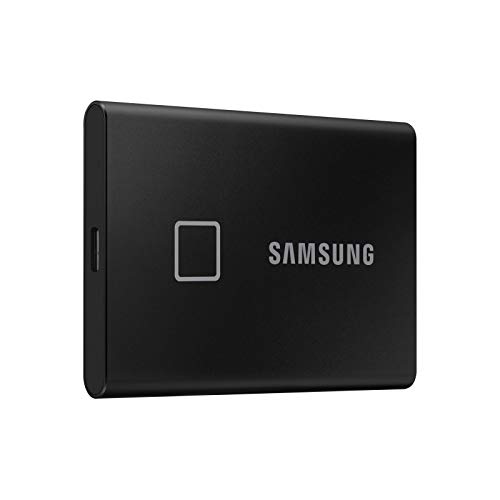
The Samsung T7 Touch is an outstanding external drive for home users, students, and professionals who prioritize convenience and personal privacy. With read speeds up to 1050 MB/s and built-in fingerprint protection, it strips away the complications of data security.
- Integrated biometric fingerprint sensor backed by AES 256-bit hardware encryption
- Speedy data transfers reaching up to 1050 MB/s read and 1000 MB/s write
- Solid shock-resistant aluminum casing engineered to survive drops from up to two meters
- Comprehensive connectivity package featuring both USB Type-C to C and Type-C to A cables
Where to buy
at Amazon Prime
Price taken from the listing on 18 Sep 2026 and it can change at any time. We may earn a commission if you buy through this link.
Pros
- One-touch biometric fingerprint unlock
- Fast read speeds up to 1050 MB/s
- Hardware-level AES 256-bit encryption
- Drop-resistant aluminum housing up to two meters
- Includes both USB-C to C and USB-C to A cables
Cons
- Initial fingerprint setup requires companion software
- No water or dust resistance rating specified
- Does not include a protective carrying pouch
As Amazon Associates, we earn from qualifying purchases. This means we may receive a small commission at no extra cost to you if you click through and make a purchase.
Backing up irreplaceable family photos, tax records, and important work files can feel overwhelming if you worry about losing a tiny drive or exposing personal information. Traditional external hard drives are fragile, slow, and often force you to remember complex passwords that become a headache to manage across different computers. The Samsung T7 Touch eliminates this friction by adding a physical fingerprint scanner right onto the drive itself. If you want a dependable way to safeguard digital records without needing an IT background, this compact unit is engineered to keep your files secure and accessible anywhere.
In this comprehensive samsung portable ssd t7 touch review, our verdict is clear: it represents one of the friendliest portable solid-state solutions on the market. By blending rapid file transfer speeds with intuitive biometric unlocking, the samsung t7 touch for beginners turns routine data protection into an effortless, one-touch habit.
Samsung T7 Touch Features Explained
Biometric Fingerprint Scanner and Hardware Encryption
Digital privacy is often complicated, but the samsung t7 touch fingerprint security design makes protection straightforward. Instead of entering lengthy strings of numbers and symbols every time you plug into a laptop, you simply place your registered finger on the square scanner located on the front panel. The hardware instantly validates your print and unlocks your file directory in less than a second. A subtle LED indicator squares the sensor, giving visual feedback so you know whether the drive is locked, unlocking, or transferring files.
Behind the physical sensor sits AES 256-bit hardware encryption. This is an advanced security standard that scrambles your data at the chip level. If someone physically takes your drive or you accidentally misplace it while traveling, your personal documents and private media remain completely unreadable without your fingerprint or backup password. Unlike basic software locks that can bog down your computer processor, this hardware-based approach manages encryption internally without draining your computer performance.
Speed and Everyday Performance
Older external storage drives rely on spinning magnetic platters that move slowly and can stutter when transferring large video files or extensive picture libraries. The Samsung T7 Touch uses solid-state flash memory paired with a USB 3.2 interface to deliver read speeds up to 1050 MB/s and write speeds up to 1000 MB/s. According to manufacturer benchmarks, this makes the drive up to nine times faster than typical external hard drives, transforming multi-gigabyte transfers from a lengthy waiting game into a matter of seconds.
Whether you are copying high-resolution holiday albums, shifting 4K video clips, or creating a complete system image, the rapid data throughput ensures smooth operation. If you need plenty of room for creative work or expansive personal archives, selecting the samsung t7 touch 2tb model ensures you will not constantly bump against capacity ceilings. For shoppers comparing standard form factors without biometric hardware, checking a detailed samsung t7 ssd 2tb overview highlights how everyday solid-state speeds compare across the broader line.
Durability and Shock Resistance
Accidental slips happen, whether a drive gets knocked off a kitchen table or dropped while sliding it into a backpack pocket. The samsung t7 touch durability stands out thanks to an all-metal exterior. Samsung crafted the housing from shock-resistant aluminum supported by a reinforced inner frame, allowing the unit to withstand drops of up to two meters without losing functionality. Because solid-state drives contain no moving internal parts, sudden bumps do not risk jarring a delicate read/write head.
While this sleek aluminum exterior provides robust impact defense against standard daily accidents, it differs from heavy-duty rubberized outdoor models. Those who work in harsh environments or near open water may want to compare it against rugged alternatives like the samsung t7 shield 1tb ssd, but for office, home, and school environments, the standard T7 Touch aluminum shell provides an ideal balance of durability and slim elegance.
Cross-Platform Compatibility and Included Cables
Finding an accessory that works seamlessly across different operating systems can be challenging. The samsung t7 touch for mac and pc bridges this divide effortlessly. The manufacturer supplies two separate connection leads right in the packaging: a USB Type-C to Type-C cable and a USB Type-C to Type-A cable. This eliminates the need to purchase separate adapters, whether you are plugging into a brand-new laptop with modern oval ports or an older desktop tower utilizing traditional rectangular USB slots.
Beyond standard computer setups, the drive supports Android mobile phones, tablets, smart televisions, and home gaming setups such as the Sony PlayStation 5. Completing the initial samsung t7 touch setup is simple: plug the unit into your computer, open the included management software, and register your desired fingerprints along with a master recovery password. Once configured, you can tap to unlock the drive across compatible hosts without reinstalling software on every individual machine.
Capacity and Compact Form Factor
Despite packing a massive 2 TB digital storage capacity, the Samsung T7 Touch maintains a miniature footprint. Measuring within a pocket-friendly form factor, it takes up practically no room in a purse, briefcase, or jacket pocket. For users who maintain vast file collections, a 2 TB capacity holds thousands of high-definition movies, hundreds of thousands of digital photos, or massive software libraries with ease.
Users who require monumental archival capacity for multi-camera production studios sometimes evaluate massive options such as the crucial x10 8tb portable ssd, while internal desktop builders often choose high-speed motherboard drives like the samsung ssd 9100 pro 1tb. However, for everyday portable plug-and-play convenience, the compact 2 TB envelope of the T7 Touch hits a sweet spot for balance, speed, and size.
Specs
| Brand and Model | Samsung MU-PC2T0K/WW |
|---|---|
| Storage Capacity | 2 TB |
| Interface & Connectivity | USB 3.2 (Hardware Connectivity: USB 3.1 Type C) |
| Maximum Read Speed | 1050 MB/s |
| Maximum Media/Write Speed | 1000 MB/s |
| Security Standard | AES 256-bit Hardware Encryption with Fingerprint & Password |
| Impact Resistance | Withstands drops up to 2 meters |
| Supported Platforms | Windows PC, Mac, Android mobile & tablet, Smart TV, Game Consoles |
| Compatible Game Consoles | Sony PlayStation 5 |
| Included Cables | USB Type-C to C and USB Type-C to A |
As published by the manufacturer on the Amazon listing.
Buy it if
Best Use Cases
- Safeguarding sensitive personal paperwork, banking archives, and tax documents with instant fingerprint access.
- Backing up expansive photo collections and family home videos to a drop-resistant aluminum drive.
- Carrying academic research, coursework, and presentations securely between university campus computer labs.
- Expanding available game storage on a Sony PlayStation 5 or PC gaming setup with fast load times.
- Working on creative photo editing catalogs directly from the drive using high-speed USB 3.2 connectivity.
Think twice if
Before You Buy
Before purchasing, it is important to understand the software requirements for biometric management. While the drive operates as standard portable storage out of the box, activating the fingerprint security requires running the official Samsung Portable SSD software on a compatible Windows PC, Mac, or Android device. Once your fingerprints are registered into the drive onboard memory, you can unlock your files with a simple touch on almost any powered host. However, you cannot register new fingerprints directly through a smart television or gaming console interface without a computer.
You should also take note of what is and is not included with the product packaging. The retail box includes the black 2TB drive along with two dedicated cables: a USB Type-C to C cord and a USB Type-C to A cord. However, the listing does not specify water resistance or an IP dust rating, meaning you must protect the drive against rain, spills, or moisture exposure. Additionally, the listing does not specify a dedicated carrying pouch, lanyard, or protective travel case, so mobile travelers may want to source a sleeve separately.
Bottom Line
So, is samsung portable ssd t7 touch worth it for the average buyer? If you value seamless file protection and want to avoid the hassle of memorizing extra passwords, the answer is a resounding yes. It pairs dependable hardware encryption with an intuitive physical sensor, giving you top-tier privacy without unnecessary friction.
With its durable shock-resistant aluminum casing, versatile dual-cable packaging, and swift 1050 MB/s speeds, this unit represents an outstanding long-term investment. Whether you are shopping for a reliable family backup drive or choosing a thoughtful gift for a student, the Samsung T7 Touch delivers effortless data peace of mind.
FAQ
How many fingerprints can be registered on the Samsung T7 Touch?
The listing does not specify the exact maximum number of individual fingerprints supported by the onboard security system. However, the initial configuration through the Samsung Portable SSD application allows you to enroll your prints and set a master recovery password to ensure you always have access.
Can I use the drive without activating the fingerprint sensor?
Yes. Setting up biometric protection is entirely optional. If you prefer to use the Samsung T7 Touch as an open, standard external storage device for transferring movies, music, or console game installations, you can leave security disabled and use it immediately without unlocking.
What happens if the drive fails to recognize my fingerprint?
If your finger is damp or positioned incorrectly and the biometric sensor does not recognize your print, you do not lose your files. You can unlock the drive using the master password you created during the initial setup via the companion desktop or mobile software.
Does the Samsung T7 Touch require a wall power adapter?
No external power cord or bulky wall brick is necessary. The drive draws all required operating power directly through the connected USB-C or USB-A cable from your host computer, phone, tablet, or gaming console.
Is the drive compatible with both modern and older computers?
Yes. Because the manufacturer includes both a USB Type-C to C cable and a USB Type-C to A cable in the package, you can connect the drive to modern laptops featuring USB-C ports as well as older desktop systems utilizing traditional rectangular USB-A slots.
Where to buy
at Amazon Prime
Price taken from the listing on 18 Sep 2026 and it can change at any time. We may earn a commission if you buy through this link.
More PC Components & Storage
See the section



Get our picks by email
New reviews and the prices we spotted, once a week.