Dell U3225QE Monitor Explained: A Guide for Everyday Work
Setting up a comfortable and efficient modern desk often feels overwhelming, especially when trying to balance sharp visual detail with a clean, cable-free layout. Many professionals, remote employees, and students spend entire…
By Rebecca Paxton 9 min read


Our verdict
Scores are out of 10, based on listed specifications and buyer feedback — not from testing of our own
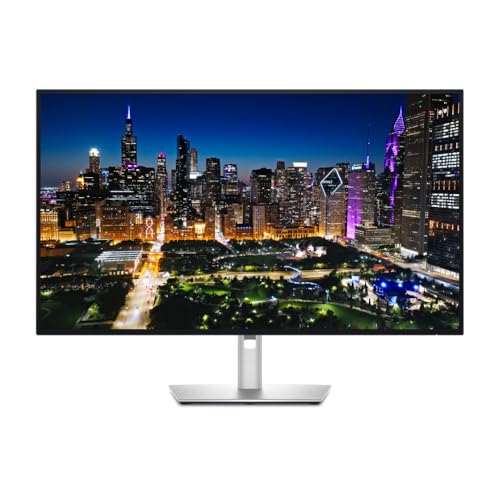
The Dell U3225QE combines top-tier visual performance with practical workspace convenience, making it one of the most capable displays available for office productivity, creative projects, and multitasking.
- Enhanced panel technology delivers deep 3000:1 contrast and rich dark tones for crisp document reading and media editing.
- The integrated docking hub provides single-cable laptop charging and device connectivity to keep your desk neat.
- A smooth 120Hz refresh rate noticeably reduces visual jitter and eye strain when scrolling through websites and spreadsheets.
- Certified eye comfort features and an integrated light sensor automatically adjust brightness to match your room lighting.
Where to buy
at Amazon
Price taken from the listing on 18 Sep 2026 and it can change at any time. We may earn a commission if you buy through this link.
Pros
- Deep 3000:1 contrast with IPS Black
- Integrated Thunderbolt hub for single-cable docking
- Smooth 120Hz refresh rate reduces eye strain
- Sharp 4K UHD resolution across 31.5 inches
Cons
- Substantial desk footprint requiring ample space
- Relatively heavy unit at 20.6 pounds
- Listing does not specify included connection cables
As Amazon Associates, we earn from qualifying purchases. This means we may receive a small commission at no extra cost to you if you click through and make a purchase.
Setting up a comfortable and efficient modern desk often feels overwhelming, especially when trying to balance sharp visual detail with a clean, cable-free layout. Many professionals, remote employees, and students spend entire workdays squinting at cramped laptop screens, struggling with washed-out text, and untangling a web of power bricks and display cords. The Dell U3225QE is designed to resolve these daily workspace headaches by serving as an expansive, all-in-one visual command center. With its generous 31.5-inch screen, sharp Ultra High Definition presentation, and built-in connection station, it offers an approachable yet advanced solution for anyone seeking to upgrade an everyday workspace or find a thoughtful, high-end gift for a dedicated home office worker.
Taking a comprehensive look at the overall package reveals that this display sets a new benchmark for everyday productivity and digital comfort. By pairing an upgraded display panel capable of deep contrast with a seamless docking hub, it minimizes clutter while making text, spreadsheets, and creative media look vivid and clear. If you want to know whether this screen delivers real value for daily tasks, the short verdict is simple: it is an exceptional display that makes everyday computer work significantly smoother and far more comfortable on the eyes.
Dell U3225QE Features Explained
Enhanced IPS Black Visual Clarity
At the center of this display is its innovative panel design. Traditional office screens often struggle to show genuine dark shades, turning deep grays into a milky haze that makes reading small fonts or editing photos frustrating. By utilizing dell u3225qe ips black technology, this unit achieves an impressive 3000:1 contrast ratio, offering 47 percent deeper blacks than conventional in-plane switching panels. This contrast upgrade ensures that dark backgrounds look deep and saturated, which significantly sharpens text edges and makes colorful graphics stand out with lifelike accuracy.
Color presentation is equally strong, with the screen offering 99 percent coverage of wide color standards including DCI-P3 and Display P3. Whether you are reviewing marketing presentations, retouching family photographs, or switching between personal and professional tasks, colors look natural and balanced right out of the box. Unlike curved ultra-wide alternatives such as the dell s3425dw monitor, this display maintains a classic 16:9 widescreen format, providing wide 178-degree viewing angles and a low-reflectance matte finish that prevents annoying reflections from overhead room lights.
Smooth Motion with a 120Hz Refresh Rate
Most standard computer displays operate at a 60Hz refresh rate, meaning the picture updates 60 times per second. While 60Hz is functional for basic typing, it often introduces noticeable visual stutter when you quickly drag windows, skim through long PDF documents, or scroll through dense spreadsheets. With the dell u3225qe 120hz refresh rate, the screen refreshes twice as fast as basic office monitors. This produces silky motion that feels instantaneous and significantly more fluid during daily navigation.
While fast refresh speeds are commonly associated with dedicated competitive gaming screens like the dell s2522hg 240hz, having a higher refresh rate on an office monitor provides substantial ergonomic benefits. Faster frame updates reduce screen flicker and make tracking text much easier on the eyes during fast scrolling. For desk workers who read thousands of lines of text or data every day, this extra fluidity dramatically reduces the subtle micro-strain that causes afternoon visual fatigue.
Expansive 4K UHD Screen Real Estate
Screen space directly influences how quickly and comfortably you can finish daily tasks. Operating as a spacious dell u3225qe 4k monitor, this unit packs a native resolution of 3840 by 2160 pixels across its 31.5-inch diagonal surface. With a fine pixel pitch of 0.18 millimeters, individual pixels are practically invisible at normal seating distances. This fine pixel density makes fine serif fonts look as sharp as printed paper, eliminating the jagged edges typical of lower-resolution office displays.
The 31.5-inch size hits an ideal sweet spot for multitasking without demanding a complicated multi-monitor arrangement. While smaller 4K models like the dell s2725qc monitor offer sharp visuals, their smaller physical area often requires aggressive software scaling that reduces usable screen space. On this 32-inch class panel, you have sufficient physical space to snap a web browser, a spreadsheet, and an email window side by side, allowing you to cross-reference documents easily without constantly toggling through taskbar tabs.
Integrated Thunderbolt Hub and Connectivity
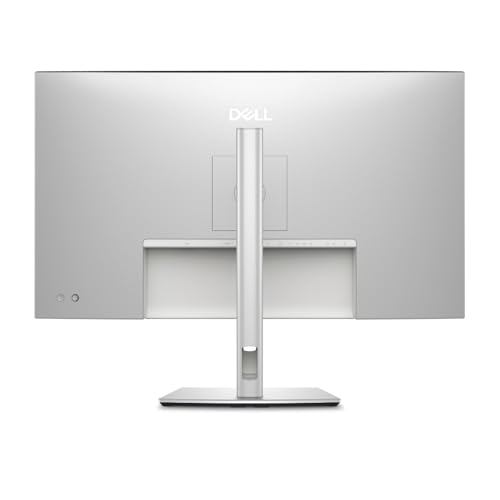
Managing multiple computer chargers, display cables, and peripheral adapters often turns a tidy desk into a tangled mess. The dell u3225qe thunderbolt hub solves this problem by embedding a versatile hardware dock directly into the monitor frame. Instead of plugging power supplies, external drives, keyboards, and network cables into your laptop every morning, you connect your peripheral devices directly to the monitor and run a single cable to your computer.
This single-cable connection transmits crisp 4K video, receives device data, and delivers power to charge compatible portable computers simultaneously. When the workday ends, you simply disconnect one plug and pack your laptop into your bag. Despite powering an expansive panel and charging connected devices, the monitor maintains an efficient operational profile with a rated power consumption of just 30.5 watts, keeping your workspace energy-conscious and organized.
Advanced Eye Comfort and Ambient Light Sensing
Staring at a bright screen in changing room conditions is a major cause of computer-related headaches and dry eyes. Dell incorporates an improved version of ComfortView Plus, which actively reduces potentially harmful blue light emissions without tinting the entire screen with an unnatural yellow cast.
Additionally, the monitor incorporates an intelligent ambient light sensor built into the bezel. This sensor monitors the brightness of your home office throughout the day, automatically raising the screen brightness up toward its rated 600 cd peak during sunny mornings and lowering it as evening falls. Combined with the anti-glare matte coating, this dynamic illumination prevents sudden glare and eliminates the need to fiddle with on-screen menu buttons as daylight fades.
Specs
Reviewing the dell u3225qe specs helps illustrate how the hardware balance supports both creative tasks and long office shifts:
| Screen Size | 31.5 inches (Diagonal) |
|---|---|
| Native Resolution | 4K UHD (3840 x 2160 pixels) |
| Display Panel Technology | IPS Black LCD |
| Refresh Rate | 120 Hertz |
| Static Contrast Ratio | 3000:1 |
| Maximum Brightness | 600 cd |
| Color Gamut Coverage | 99% DCI-P3 and Display P3 |
| Viewing Angles | 178 degrees horizontal and vertical |
| Screen Finish | Low reflectance matte coating |
| Pixel Pitch | 0.18 mm |
| Dimensions (D x W x H) | 8.46 x 28.08 x 24.37 inches |
| Item Weight | 20.6 pounds |
| Power Consumption | 30.5 watts |
As published by the manufacturer on the Amazon listing.
Buy it if
Best Use Cases
- Managing multi-window spreadsheets, financial models, and research documents side by side without needing dual screens.
- Color-critical photo editing and graphic design workflows requiring deep 3000:1 contrast and 99 percent wide color accuracy.
- Streamlining home office workstations by replacing standalone docking stations with single-cable laptop connectivity.
- Long study or remote work sessions where certified blue light reduction and an ambient light sensor help prevent visual fatigue.
- Reading dense articles, coding repositories, and legal briefs with smooth 120Hz scrolling and paper-like text clarity.
Think twice if
Before You Buy
Before purchasing this monitor, it is essential to verify that your current desk setup can accommodate its physical dimensions. Measuring 28.08 inches wide, 8.46 inches deep, and weighing 20.6 pounds with its stand, this 31.5-inch screen commands a noticeable presence. Buyers with narrow desks or shallow writing tables should ensure they have adequate depth so the display can sit at a comfortable viewing distance. In terms of sound, desk builders looking for external desktop speakers often add modular options like the dell ax510 sound bar, as the listing does not specify integrated stereo speakers inside the display chassis.
Shoppers should also pay attention to how device compatibility is handled in the product description. The listing highlights the integrated Thunderbolt hub for single-cable connectivity, but the listing does not specify the exact assortment or lengths of cables included in the retail box. Furthermore, the listing does not specify the precise downstream port counts for secondary USB accessories or whether an alternative VESA wall-mounting bracket is bundled. If you plan to connect older desktop computers that lack modern video outputs, you may need to confirm your computer hardware supports 4K output at 120Hz before completing your installation.
Bottom Line
Evaluating whether the Dell U3225QE is worth it comes down to how much you value daily visual comfort and workspace organization. When used as a primary workstation screen, the combination of 3000:1 IPS Black contrast, high 4K resolution, and fluid 120Hz scrolling delivers an immediate boost to everyday usability. It takes the strain out of prolonged computer sessions, turning blurry text into crisp lines and eliminating the sluggish screen stutter common on entry-level displays.
For remote workers, creative enthusiasts, and gift-givers seeking an all-in-one upgrade, choosing the dell u3225qe for office work is a sound decision. Its integrated connectivity hub simplifies your physical workspace, while its advanced eye comfort certifications protect your vision during demanding work weeks. As long as your desk has sufficient room for a 32-inch footprint, this monitor provides a durable, premium foundation for daily productivity.
FAQ
Is the Dell U3225QE worth it for ordinary office work?
Yes, the monitor offers tangible benefits for standard office work. The 4K resolution across a 31.5-inch panel provides vast space to arrange several documents simultaneously, while the 3000:1 contrast ratio makes small text sharper and easier to read. Combined with smooth 120Hz scrolling and single-cable docking, it streamlines daily work routines significantly.
How does IPS Black technology improve image quality?
Standard IPS panels generally achieve a contrast ratio around 1000:1, which can cause dark areas to appear faded or gray. Enhanced IPS Black technology doubles down on light blocking, achieving an impressive 3000:1 contrast ratio. This delivers 47 percent deeper blacks, ensuring higher contrast between text and backgrounds for clear, vibrant imagery.
What are the benefits of a 120Hz refresh rate on a non-gaming monitor?
While 120Hz is widely known for fast gaming, it provides notable ergonomic perks for office applications. Moving mouse cursors, dragging windows, and scrolling down lengthy web pages or spreadsheets appears significantly smoother. This extra fluidity eliminates motion jitter, which directly reduces eye strain during long hours at your desk.
Can the integrated Thunderbolt hub replace a laptop dock?
Yes, the integrated hub is specifically designed to function as an all-in-one docking station. It allows you to connect compatible laptops via a single cable to transmit high-resolution video, transfer peripheral data, and provide charging power, eliminating the need to buy and wire a separate desktop dock.
What should you consider before following a Dell U3225QE setup guide?
Before following any dell u3225qe setup guide, verify that your computer hardware supports 4K resolution at 120Hz over its video connection. You will also want to measure your desk surface to ensure it can support an 8.46-inch stand depth and have sufficient clearance for the monitor’s 28.08-inch width.
Does the matte display help reduce office glare?
Yes, the screen features a low-reflectance matte finish engineered to diffuse reflections from desk lamps and nearby windows. Coupled with a strong 600 cd brightness rating and an automatic ambient light sensor, the display remains clear and legible in brightly lit office environments.
Where to buy
at Amazon
Price taken from the listing on 18 Sep 2026 and it can change at any time. We may earn a commission if you buy through this link.
More Monitors
See the section


Get our picks by email
New reviews and the prices we spotted, once a week.